
Odoo Cloud Storage Solutions | SFTP File Sync, Document Manager & Folder Synchronization
by TechUltra Solutions Private Limited https://www.techultrasolutions.com$ 98.00


Odoo Cloud Storage Solutions | SFTP Server | SFTP Synchronization
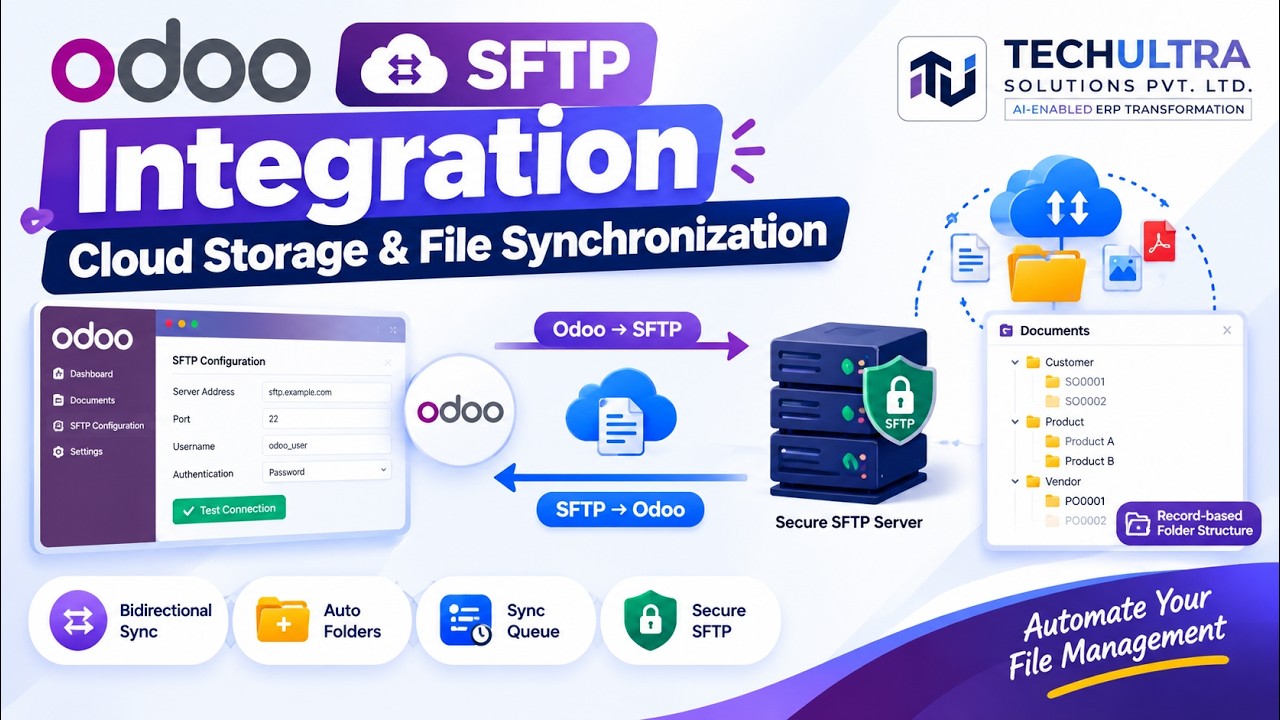
Cloud Storage Solutions provides a complete document-management layer for Odoo.
It organizes attachments in a searchable file-manager interface, creates structured
folders from Odoo records, and synchronizes documents with configured cloud clients.
The core module includes folder hierarchies, automatic folder rules, attachment
management, access control, synchronization queues, retry handling and detailed logs.
It can be used as an Odoo SFTP Server or extended with a storage connector.
The tus_sftp connector adds Paramiko-based SFTP support. Configure the SFTP host, port, user, password and base path to synchronize Odoo files and folders with a remote server. Odoo-side changes are sent to SFTP and supported remote changes can be pulled back into Odoo.
Backward pull limitations: Incremental checks require SSH shell access
and a compatible find command; otherwise Odoo scans every tracked folder,
which can take longer on large archives. Downloaded files are loaded into worker memory,
so configure the Download Size Limit for large files. Remote folder moves or renames can
break their Odoo links; use Force Full Scan after reorganizing the remote tree.
Remote paths identify files: replacing a file's contents at the same path is not pulled
into an already linked Odoo attachment, while renaming or moving a remote file is treated
as a removal and a new file. Backward sync also runs within Odoo's cron time budget, so
large scans may need multiple runs.

Odoo Cloud Storage Solutions | SFTP Server | SFTP Synchronization
Product Overview
▶ Watch Module Demo
Watch Odoo attachments, automatic folders and SFTP synchronization work together.
Features

Organize and browse Odoo attachments through a centralized folder-based interface.

Create folder structures from Odoo models, domains, parent rules and naming expressions.

Synchronize Odoo changes to storage and reconcile supported remote changes back into Odoo.

Connect an SFTP host, port, user, password and base path for remote file operations.

Run dedicated times forward and backward SFTP synchronization jobs.

Trigger an immediate reverse synchronization from a confirmed SFTP client.

Use Odoo record permissions and additional user or group restrictions for folders.

Ask the next backward sync to re-examine every folder after the remote tree was changed outside Odoo.

Refuse to read remote files larger than the configured MB limit to protect the Odoo worker memory. 0 means no limit.

Review detailed sync logs from each cloud client to diagnose connection issues and failed queue tasks.
 Configuration
 Support
 FAQs
User Configuration - File Manager
Enable the File Manager access for selected users so they can browse, upload and manage Odoo attachments from the centralized Cloud Storage menu. This keeps document access focused on the users who need it.

Restricted User Menu
Users without administrative rights see only the File Manager functionality assigned to them. Configuration menus remain hidden, helping protect cloud clients, folder rules and synchronization settings from unauthorized changes.

User Configuration - Administration
Assign administration access to trusted users who are responsible for configuring cloud clients, folder rules, folders, sync queues and synchronization logs.

Cloud Configuration Menu
Administrators get a dedicated Configuration area containing Cloud Clients, Folder Rules, Sync Logs and other technical tools. This provides one organized place to control the complete document synchronization workflow.

Cloud Client Configuration
Create a cloud client by entering its connection details and the default storage path. Each client can then be used by folder rules to route Odoo attachments to the required external location.

Cloud Client Confirm
Confirm the configured client before using it for synchronization. Validation helps ensure that the connection is available and that the client is ready to receive or provide Odoo files.

Sale Order Folder Rule
Define a folder rule for Sale Orders to automatically create the required document location from the selected Odoo record. New orders and their attachments can therefore follow a consistent storage structure without manual folder creation.

Sale Order - File Attach
Attach files directly to a Sale Order and keep them linked with the order's automatically managed folder. Documents remain available from the business record while also following the configured cloud storage workflow.

Sync Queue - Sale Order File
File operations are placed in the synchronization queue instead of interrupting the user's business workflow. The queue provides a clear view of pending work and helps process Sale Order files reliably. Odoo's scheduled actions then run automatically: the folder preparation job checks for required folders every 15 minutes, while the sync queue job prepares and processes pending operations every 15 minutes. Once the scheduled action runs, the queued attachments and folder changes are synchronized with the configured cloud storage.

Sale Order Files - System SFTP Server
Browse Sale Order documents from the central SFTP Server and access files without opening each business record. The folder view keeps documents easy to locate and manage.

Sale Order Files Structure
The generated structure groups files under the related Sale Order, making the relationship between Odoo records, folders and stored attachments immediately visible.

Sync Queue - After File Sync
After the scheduled synchronization action processes the queue, the operation is marked as completed and no longer appears as pending. This gives users a quick confirmation that the file, folder and attachment changes have been synchronized successfully.

Parent Configuration - Sale Order
Parent rules allow a Sale Order folder to be created below the folder of its related parent record. This builds a meaningful hierarchy automatically and avoids a flat, difficult-to-manage document list.

Parent Contact
Contact records can act as parent records for their related documents. The contact folder becomes the starting point for a structured hierarchy of customer files and transactional documents.

Parent Contact - Sale Order
Sale Order attachments are organized below the related Contact, preserving the business relationship between the customer and its orders in both Odoo and the SFTP Server.

Parent Contact - Sync Queue
When contact-related documents are changed, the resulting operations are tracked in the synchronization queue. If multiple contacts have the same name, the contact name is shown together with its unique record ID, making every operation easy to identify. For example, contacts such as Rushi Other and Rushi Other 11 can be distinguished clearly before the queued work is processed.

Parent Contact Sale Order - Sync Queue
The queue also handles files from nested Contact and Sale Order folders, keeping synchronization status visible even when the document structure contains multiple levels.

Odoo - Contact Hierarchical Structure
Odoo records can be connected through a parent-child relationship, such as Contact followed by its Sale Orders. The module uses this relationship to produce the same logical hierarchy for documents.

Contact Hierarchical Structure - System SFTP Server
The SFTP Server mirrors the Odoo hierarchy, so users can navigate from the parent Contact folder to its Sale Order folders and locate related attachments with fewer clicks.

Add File from system SFTP Server
Upload a new document directly from the SFTP Server and place it in the selected folder. The new attachment remains connected to the corresponding Odoo folder and record context.

Sync Data Button
Use the Sync Data action to start the available synchronization process from Odoo. Normally, the scheduled actions prepare folders and process the synchronization queue automatically every 15 minutes. This button gives administrators a direct way to trigger the synchronization workflow immediately when current folder and attachment changes need to be pushed without waiting for the next scheduled run.

Added File Synced in Odoo
Files added through the external storage workflow can be reflected back in Odoo and shown with the correct folder and record relationship, keeping both sides aligned.

Folder Menu
Open the Folders area to review the folders generated by rules and the folders linked to Odoo records. This gives administrators a complete view of the document structure.

All Folders Structure
View the complete folder tree in one place, including parent Contact folders, Sale Order subfolders and their attachments. A consistent structure makes large document collections easier to search, maintain and synchronize.

- We provide 90 days bug-free support related to our module.
- We provide 5 hours of free configuration support. Additional configuration or customization is billable.
- The support team is available from Monday to Friday 10:00 AM to 07:00 PM (IST).
- To create a ticket, send an email to support@techultra.in.
cloud_base provides the SFTP Server, folders, rules, queue and logs. tus_sftp adds the SFTP connection and file synchronization implementation.
No. Forward and backward SFTP synchronization run timely. A manual Pull from SFTP Now action is also available.
Configure the host, port, user, password and base path. Port 22 is used by default.
Tasks are processed through the synchronization queue. Failed operations can be retried according to configured limits, while logs show the failure reason.
The first backward sync performs a full scan of tracked folders to discover remote files. Later runs can check only changed entries when the SFTP host supports the required SSH shell and find command.
Use Force Full Scan after moving or renaming folders directly on the SFTP server, or when you want Odoo to re-check the complete tracked folder tree. Large scans may continue over multiple scheduled runs.
Remote paths identify files. A rename or move is handled as a removed file and a new file. Replacing contents at the same path is not pulled into an already linked Odoo attachment.
Yes. Set Download Size Limit (MB) on the SFTP client to refuse downloads above that size. A value of 0 means no size limit; large downloads use worker memory.


| Availability |
Odoo Online
Odoo.sh
On Premise
|
| Odoo Apps Dependencies |
Discuss (mail)
|
| Lines of code | 15714 |
| Technical Name |
tus_odoo_sftp_integration |
| License | OPL-1 |
| Website | https://www.techultrasolutions.com |
Odoo Proprietary License v1.0

This software and associated files (the "Software") may only be used (executed,
modified, executed after modifications) if you have purchased a valid license
from the authors, typically via Odoo Apps, or if you have received a written
agreement from the authors of the Software (see the COPYRIGHT file).

You may develop Odoo modules that use the Software as a library (typically
by depending on it, importing it and using its resources), but without copying
any source code or material from the Software. You may distribute those
modules under the license of your choice, provided that this license is
compatible with the terms of the Odoo Proprietary License (For example:
LGPL, MIT, or proprietary licenses similar to this one).

It is forbidden to publish, distribute, sublicense, or sell copies of the Software
or modified copies of the Software.

The above copyright notice and this permission notice must be included in all
copies or substantial portions of the Software.

THE SOFTWARE IS PROVIDED "AS IS", WITHOUT WARRANTY OF ANY KIND, EXPRESS OR
IMPLIED, INCLUDING BUT NOT LIMITED TO THE WARRANTIES OF MERCHANTABILITY,
FITNESS FOR A PARTICULAR PURPOSE AND NONINFRINGEMENT.
IN NO EVENT SHALL THE AUTHORS OR COPYRIGHT HOLDERS BE LIABLE FOR ANY CLAIM,
DAMAGES OR OTHER LIABILITY, WHETHER IN AN ACTION OF CONTRACT, TORT OR OTHERWISE,
ARISING FROM, OUT OF OR IN CONNECTION WITH THE SOFTWARE OR THE USE OR OTHER
DEALINGS IN THE SOFTWARE.
Please log in to comment on this module