

Web Widget One2Many Product Picker
by Tecnativa https://github.com/OCA/web , Odoo Community Association (OCA) https://github.com/OCA/webWeb Widget One2Many Product Picker





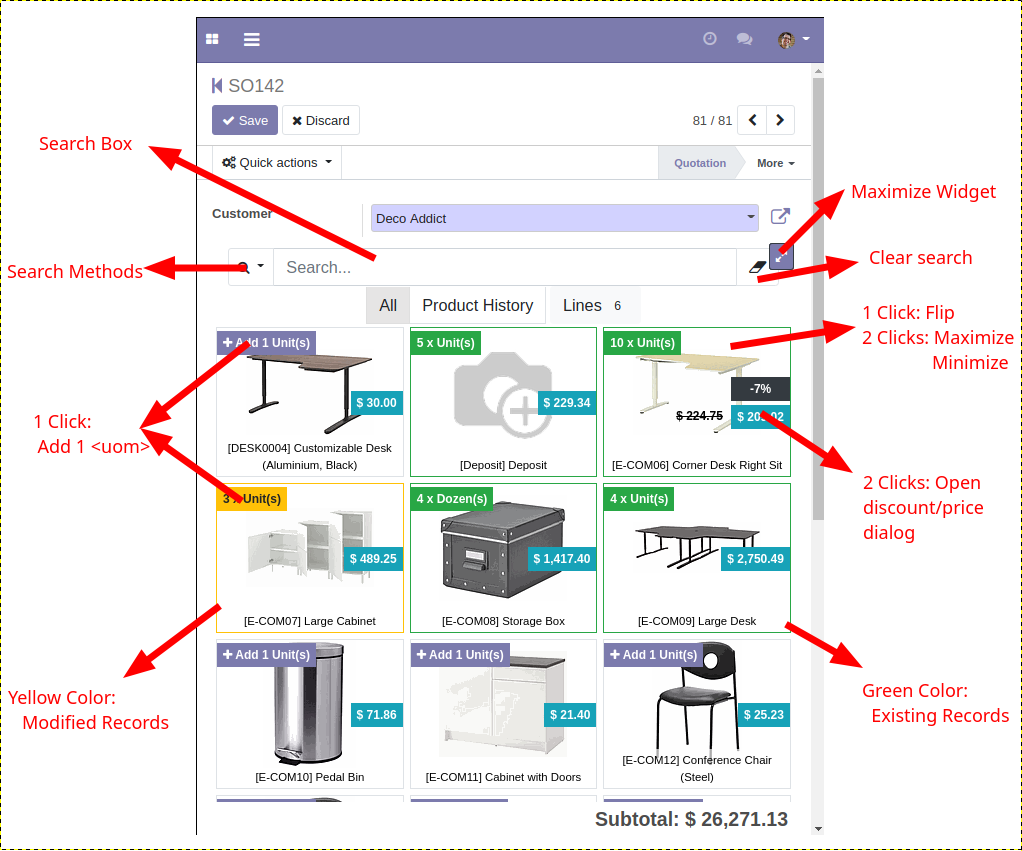
Adds the ‘one2many_product_picker’ friendly mobile widget to create one2many lines linked with product.product records.
Table of contents
Installation
It’s advisable to install ‘web_widget_numeric_step’ to have a better usability on touch screens.
Configuration
Create or edit a new view and use the new widget called ‘one2many_product_picker’. You need to define the view fields. The view must be of form type.
Widget options:
groups > Array of dictionaries -> Declare the groups
name -> The group name
string -> The text displayed
domain -> Forced domain to use
order -> The order
- name -> The field name to order
- asc -> Flag to use ‘asc’ order
records_per_page > Integer -> Used to control the load more behaviour (16 by default)
active -> Boolean -> Select the default group to use (‘false’ by default = ‘All’ group)
currency_field > Model field used to format monetary values (‘currency_id’ by default)
field_map > Dictionary:
- product -> The field that represent the product (product_id by default)
- name -> The field that represent a name (‘name’ by default)
- product_uom -> The field that represent a product_uom (‘product_uom’ by default)
- product_uom_qty -> The field that represent a product_uom_qty (‘product_uom_qty’ by default)
- price_unit -> The field that represent a price_unit (‘price_unit’ by default)
- discount -> The field that represent a discount (‘discount’ by default)
search > Array of dictionaries (defines to use name_search by default)
name -> The name to display
domain -> The domain to use
- $search -> Replaces it with the current value of the searchbox
- $number_search -> Replaces all the leaf with the current value of the searchbox as a number
name_search_value -> Enables the use of ‘name_search’ instead of ‘search_read’ and defines the value to search (‘$search’ by default)
operator -> Operator used in ‘name_search’ (‘ilike’ by default)
edit_discount > Enable/Disable discount edits (False by default)
edit_price > Enable/Disable price edits (True by default)
show_discount > Enable/Disable display discount (False by default)
show_subtotal > Enable/Disable show subtotal (True by default)
auto_save > Enable/Disable auto save (False by default)
auto_save_delay > The time (in milliseconds) to wait after the last interaction before launching the autosave (1500 by default)
all_domain > The domain used in ‘All’ section ([] by default)
If using auto save feature, you should keep in mind that the “Save” and “Discard” buttons will lose part of its functionality as the document will be saved every time you modify/create a record with the widget.
ignore_warning > Enable/Disable display onchange warnings (False by default)
instant_search > Enable/Disable instant search mode (False by default)
trigger_refresh_fields > Fields in the main record that dispatch a widget refresh ([“partner_id”, “currency_id”] by default)
auto_focus > Keep the focus on the search box after performing a search (True by default)
All widget options are optional. Notice that you can call ‘_’ method to use translations. This only can be used with this widget.
Example:
options="{'search': [{'name': _('Starts With'), 'domain': [('name', '=like', '$search%')]}], 'groups': [{'name': 'cheap', 'string': _('Cheap'), 'domain': [('list_price', '<', 10.0)], 'field_map': { 'product': 'my_product_id' }}]}"
Default context:
The widget sends a defaults context with the ‘search_read’ request:
active_search_group_name > Contains the name of the active search group
- ‘all’ > Is the hard-coded name for the ‘All’ group
- ‘main_lines’ > Is the hard-coded name for the ‘Lines’ group
active_search_involved_fields > Contains an array of dictionaries with the fields used with the searchbox content
- ‘type’ > Can be ‘text’ or ‘number’
- ‘field’ > The field name
- ‘oper’ > The operator used
Examples:
This is an example that uses the ‘sale.order.line’ fields:
<field
    name="order_line"
    attrs="{'readonly': [('state', 'in', ('done','cancel'))]}"
    nolabel="1"
    mode="form"
    widget="one2many_product_picker"
    options="{'search': [{'name': 'Test', 'domain': [['name', 'ilike', '$search']]}] ,'edit_discount': True, 'show_discount': True, 'groups': [{'name': 'desk', 'string': _('Desks'), 'domain': [('name', 'ilike', '%desk%')], 'order': [{'name': 'id', 'asc': true}]}, {'name': 'chair', 'string': _('Chairs'), 'domain': [('name', 'ilike', '%chair%')]}]}"
>
    <form>
        <field name="state" invisible="1" />
        <field name="display_type" invisible="1" />
        <field name="currency_id" invisible="1" />
        <field name="discount" widget="numeric_step" options="{'max': 100}" invisible="1"/>
        <field name="price_unit" widget="numeric_step" invisible="1"/>
        <field name="name" invisible="1" />
        <field name="product_id" invisible="1" />
        <field name="order_id" invisible="1"/>
        <field name="product_uom_qty" class="mb-1" widget="numeric_step" context="{
            'partner_id': parent.partner_id,
            'quantity': product_uom_qty,
            'pricelist': parent.pricelist_id,
            'uom': product_uom,
            'company_id': parent.company_id
        }" />
        <field name="product_uom" force_save="1" attrs="{
            'readonly': [('state', 'in', ('sale','done', 'cancel'))],
            'required': [('display_type', '=', False)],
        }" context="{'company_id': parent.company_id}" class="mb-2" options="{'no_open': True, 'no_create': True, 'no_edit': True}" />
    </form>
</field>
** In this example we don’t use ‘field_map’ option because the default match with the sale.order.line field names.
Other example for ‘purchase.order.line’ fields:
<field
    name="order_line"
    attrs="{'readonly': [('state', 'in', ('done','cancel'))]}"
    nolabel="1"
    widget="one2many_product_picker"
    mode="form"
    options="{'search': [{'name': _('Name'), 'domain': [['name', 'ilike', '$search']]}, {'name': _('Price'), 'domain': [['list_price', '=', $number_search]]}], 'field_map': {'product_uom_qty': 'product_qty'}, 'groups': [{'name': _('Desk'), 'domain': [['name', 'ilike', 'desk']], 'order': {'name': 'id', 'asc': true}}, {'name': _('Chairs'), 'domain': [['name', 'ilike', 'chair']]}]}"
>
    <form>
        <field name="name" invisible="1" />
        <field name="product_id" invisible="1" />
        <field name="price_unit" invisible="1"  />
        <field name="currency_id" invisible="1" />
        <field name="order_id" invisible="1" />
        <field name="date_planned" class="mb-1" />
        <field name="product_qty" class="mb-1" widget="numeric_step" required="1" />
        <field name="product_uom" class="mb-2" options="{'no_open': True, 'no_create': True, 'no_edit': True}" />
    </form>
</field>
Boostrap Modifications:
The product picker view container have a custom media queries space adding a new screen size called ‘xxl’ (>= 1440px) and modifies the columns to have 24 instead of 12. This means that you can use “col-xxl-” inside the product picker view container.
Usage
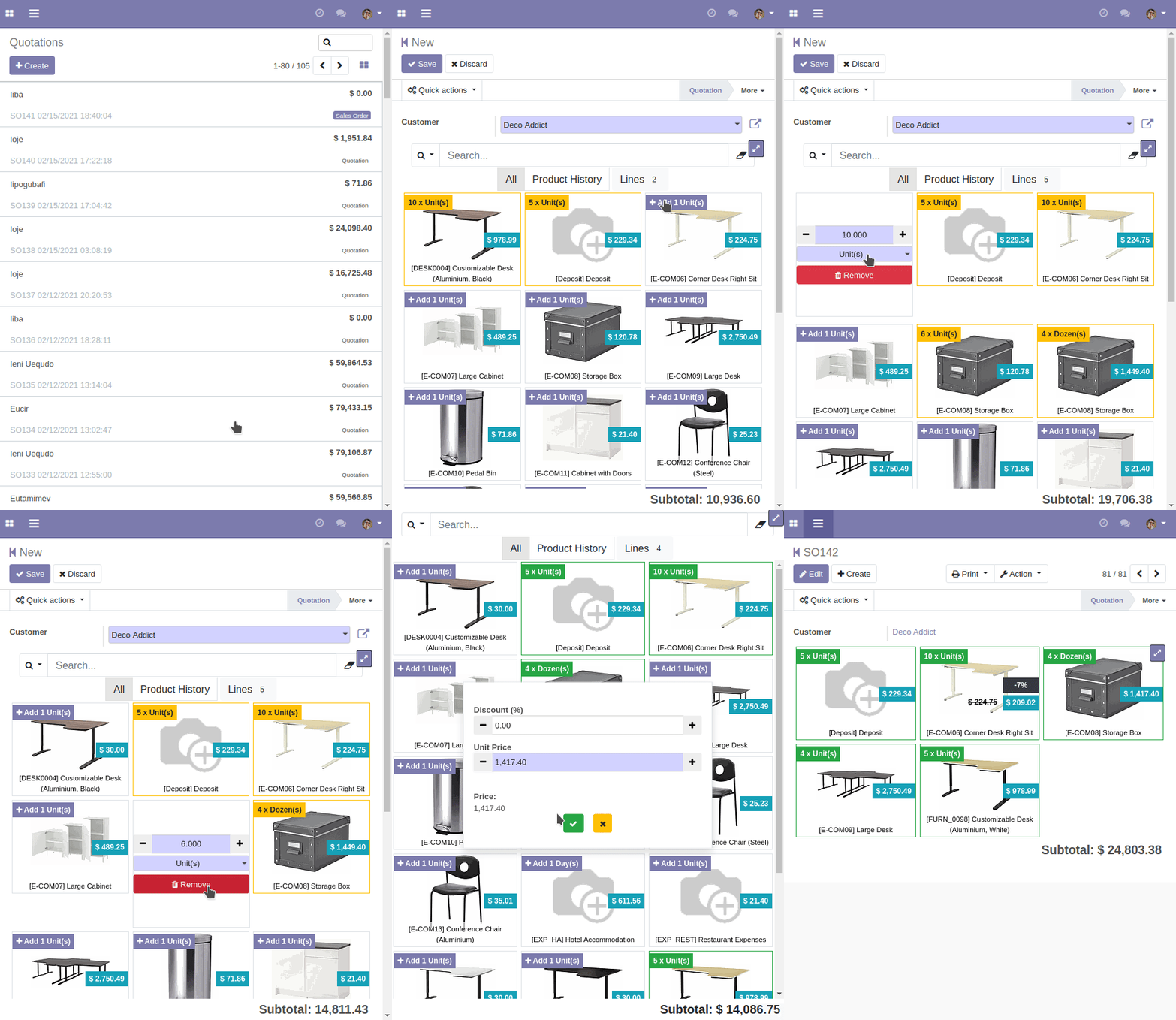
When you change the value of a field and switch to edit another record, the changes will be applied to the previous record without having to click on accept changes.
Known issues / Roadmap
- Translations in the xml ‘options’ attribute of the field that use the widget can’t be exported automatically to be translated
- The product card animations can be improved. Currently the card is recreated, so we lost some elements to apply correct effects
- sale.order onchanges that affects to “order_line” subfields will be ommitted to increase the performance
Bug Tracker
Bugs are tracked on GitHub Issues. In case of trouble, please check there if your issue has already been reported. If you spotted it first, help us to smash it by providing a detailed and welcomed feedback.
Do not contact contributors directly about support or help with technical issues.
Credits
Authors
- Tecnativa
Contributors
Tecnativa:
- Alexandre D. Díaz
- Pedro M. Baeza
- David Vidal
Giovanni Serra <giovanni@gslab.it>
Maintainers
This module is maintained by the OCA.

OCA, or the Odoo Community Association, is a nonprofit organization whose mission is to support the collaborative development of Odoo features and promote its widespread use.
This module is part of the OCA/web project on GitHub.
You are welcome to contribute. To learn how please visit https://odoo-community.org/page/Contribute.
| Availability |
Odoo Online
Odoo.sh
On Premise
|
| Odoo Apps Dependencies |
Discuss (mail)
|
| Lines of code | 4459 |
| Technical Name |
web_widget_one2many_product_picker |
| License | AGPL-3 |
| Website | https://github.com/OCA/web |
Please log in to comment on this module