

Track record changesets
by Onestein https://github.com/OCA/server-tools , Camptocamp https://github.com/OCA/server-tools , Odoo Community Association (OCA) https://github.com/OCA/server-toolsTrack record changesets





This module extends the functionality of records. It allows to create changesets that must be validated when a record is modified instead of direct modifications. Rules allow to configure which field must be validated.
What is a changeset
A changeset is a list of changes made on a record.
Some of the changes may be ‘Pending’, some ‘Accepted’ or ‘Rejected’ according to the changeset rules. The ‘Pending’ changes require an interaction by the approver user: only when that change is approved, its value is written on the record.
Important
This is an alpha version, the data model and design can change at any time without warning. Only for development or testing purpose, do not use in production. More details on development status
Table of contents
Access Rights
The changesets rules must be edited by users with the group Changesets Configuration. The changesets can be applied or canceled only by users with the group Changesets Validations
Changesets Rules
The changesets rules can be configured in Configuration > Record Changesets > Fields Rules.
Configuration of rules
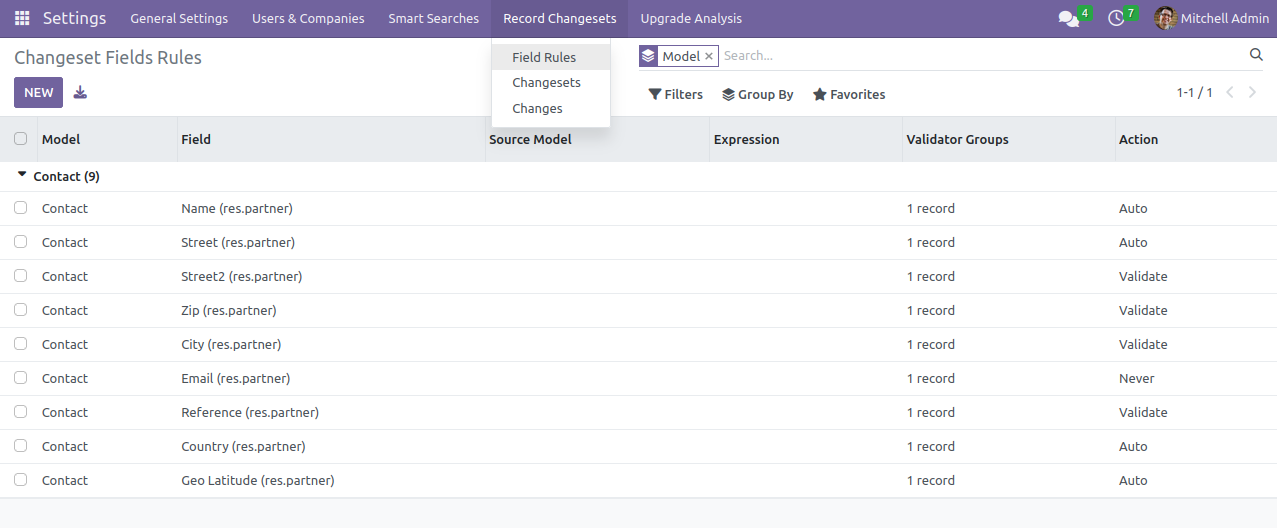
For each record field, an action can be defined:
- Auto: the changes made on this field are always applied
- Validate: the changes made on this field must be manually confirmed by a ‘Changesets User’ user
- Never: the changes made on this field are always refused
In any case, all the changes made by the users are always applied directly on the users, but a ‘validated’ changeset is created for the history.
The supported fields are:
- Char
- Text
- Date
- Datetime
- Integer
- Float
- Monetary
- Boolean
- Many2one
Rules can be global (no source model) or configured by source model. Rules by source model have the priority. If a field is not configured for the source model, it will use the global rule (if existing).
If a field has no rule, it is written to the record without changeset.
Usage
Changeset rules
The first step is to configure the changeset rules. Once that done, writes on records will be created as changesets.
Handling changesets
The list of all the changesets is in Configuration > Record Changesets > Changesets.
By default, only the pending changesets (waiting for validation) are shown. Remove the “Pending” filter to show all the changesets.
Changeset waiting for validation
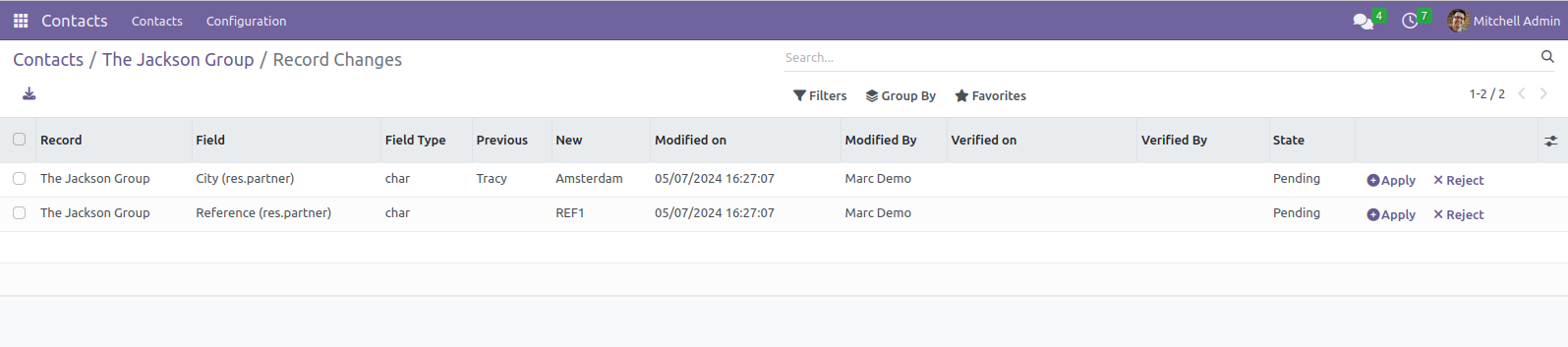
The changes view shows the name of the record’s field, the Origin value and the New value alongside the state of the change. By clicking on the change in some cases a more detailed view is displayed, for instance, links for relations can be clicked on.
A button on a changeset allows to apply or reject all the changes at once.
Handling single changes
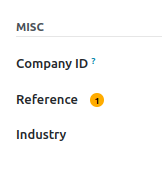
Accessing the changesets gives the full overview of all the changes made. However, it is more convenient to access the single changes directly from the records. When there is a pending change for a field you get a badge with the number of pending changes next to it like this:
Badge with the number of pending changes
When you click on it:
Clicking the badge: red button to reject, green one to apply
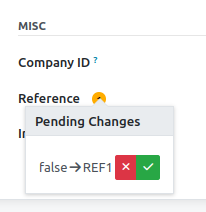
Click the red button to reject the change, click the green one to apply it.
Custom source rules in your addon
Addons wanting to create changeset with their own rules should pass the following keys in the context when they write on the record:
- __changeset_rules_source_model: name of the model which asks for the change
- __changeset_rules_source_id: id of the record which asks for the change
Also, they should extend the selection in ChangesetFieldRule._domain_source_models to add their model (the same that is passed in __changeset_rules_source_model).
The source is used for the application of the rules, allowing to have a different rule for a different source. It is also stored on the changeset for information.
Notes on security
Note that by default, changeset users see all changes on all configured rules. This circumvents read restrictions on the original records, so if you have restrictions on models with changeset rules, changeset users will still see all changes of all records, and applying a change on an inaccessible record will fail.
Known issues / Roadmap
- Only a subset of the type of fields is actually supported
- Multicompany not fully supported
- The popover widget indicating the number of pending changes is not shown for fields without a label at the moment. The approach was already failing in 15.0 (in the case of inline fields such as the partner address fields) and even in 14.0 (in the case of fields for which no value was set yet). Or, for a more flexible approach, implement a kind of view preprocessing that allows a developer to indicate where the widget needs to go (analogous to <label for=”field_name” />).
Bug Tracker
Bugs are tracked on GitHub Issues. In case of trouble, please check there if your issue has already been reported. If you spotted it first, help us to smash it by providing a detailed and welcomed feedback.
Do not contact contributors directly about support or help with technical issues.
Credits
Authors
- Onestein
- Camptocamp
Contributors
- Guewen Baconnier <guewen.baconnier@camptocamp.com>
- Denis Leemann <denis.leemann@camptocamp.com>
- Yannick Vaucher <yannick.vaucher@camptocamp.com>
- Dennis Sluijk <d.sluijk@onestein.nl>
- Andrea Stirpe <a.stirpe@onestein.nl>
- Holger Brunn <mail@hunki-enterprises.com>
- Mark Schuit <mark@gig.solutions>
- Stefan Rijnhart <stefan@opener.amsterdam>
Maintainers
This module is maintained by the OCA.

OCA, or the Odoo Community Association, is a nonprofit organization whose mission is to support the collaborative development of Odoo features and promote its widespread use.
Current maintainer:

This module is part of the OCA/server-tools project on GitHub.
You are welcome to contribute. To learn how please visit https://odoo-community.org/page/Contribute.
| Availability |
Odoo Online
Odoo.sh
On Premise
|
| Lines of code | 1235 |
| Technical Name |
base_changeset |
| License | AGPL-3 |
| Website | https://github.com/OCA/server-tools |
Please log in to comment on this module