Skip to Content
Odoo Menu
  • Sign in
  • Try it free
  • Apps
    Finance
    • Accounting
    • Invoicing
    • Expenses
    • Spreadsheet (BI)
    • Documents
    • Sign
    Sales
    • CRM
    • Sales
    • POS Shop
    • POS Restaurant
    • Subscriptions
    • Rental
    Websites
    • Website Builder
    • eCommerce
    • Blog
    • Forum
    • Live Chat
    • eLearning
    Supply Chain
    • Inventory
    • Manufacturing
    • PLM
    • Purchase
    • Maintenance
    • Quality
    Human Resources
    • Employees
    • Recruitment
    • Time Off
    • Appraisals
    • Referrals
    • Fleet
    Marketing
    • Social Marketing
    • Email Marketing
    • SMS Marketing
    • Events
    • Marketing Automation
    • Surveys
    Services
    • Project
    • Timesheets
    • Field Service
    • Helpdesk
    • Planning
    • Appointments
    Productivity
    • Discuss
    • Approvals
    • IoT
    • VoIP
    • Knowledge
    • WhatsApp
    Third party apps Odoo Studio Odoo Cloud Platform
  • Industries
    Retail
    • Book Store
    • Clothing Store
    • Furniture Store
    • Grocery Store
    • Hardware Store
    • Toy Store
    Food & Hospitality
    • Bar and Pub
    • Restaurant
    • Fast Food
    • Guest House
    • Beverage Distributor
    • Hotel
    Real Estate
    • Real Estate Agency
    • Architecture Firm
    • Construction
    • Estate Management
    • Gardening
    • Property Owner Association
    Consulting
    • Accounting Firm
    • Odoo Partner
    • Marketing Agency
    • Law firm
    • Talent Acquisition
    • Audit & Certification
    Manufacturing
    • Textile
    • Metal
    • Furnitures
    • Food
    • Brewery
    • Corporate Gifts
    Health & Fitness
    • Sports Club
    • Eyewear Store
    • Fitness Center
    • Wellness Practitioners
    • Pharmacy
    • Hair Salon
    Trades
    • Handyman
    • IT Hardware & Support
    • Solar Energy Systems
    • Shoe Maker
    • Cleaning Services
    • HVAC Services
    Others
    • Nonprofit Organization
    • Environmental Agency
    • Billboard Rental
    • Photography
    • Bike Leasing
    • Software Reseller
    Browse all Industries
  • Community
    Learn
    • Tutorials
    • Documentation
    • Certifications
    • Training
    • Blog
    • Podcast
    Empower Education
    • Education Program
    • Scale Up! Business Game
    • Visit Odoo
    Get the Software
    • Download
    • Compare Editions
    • Releases
    Collaborate
    • Github
    • Forum
    • Events
    • Translations
    • Become a Partner
    • Services for Partners
    • Register your Accounting Firm
    Get Services
    • Find a Partner
    • Find an Accountant
      • Get a Tailored Demo
    • Implementation Services
    • Customer References
    • Support
    • Upgrades
    Github Youtube Twitter Linkedin Instagram Facebook Spotify
    +32 2 290 34 90
    • Get a Tailored Demo
  • Pricing
  • Help
  1. APPS
  2. Website
  3. eCommerce product attachments v 16.0
  4. Sales Conditions FAQ

eCommerce product attachments

by Tecnativa https://github.com/OCA/e-commerce , Odoo Community Association (OCA) https://github.com/OCA/e-commerce
Odoo
v 16.0 Third Party 292
Download for v 16.0 Deploy on Odoo.sh
Apps purchases are linked to your Odoo account, please sign in or sign up first.
Availability
Odoo Online
Odoo.sh
On Premise
Odoo Apps Dependencies • eCommerce (website_sale)
• Website (website)
• Discuss (mail)
• Invoicing (account)
Lines of code 182
Technical Name website_sale_product_attachment
LicenseLGPL-3
Websitehttps://github.com/OCA/e-commerce
Versions 12.0 13.0 14.0 15.0 16.0 17.0
You bought this module and need support? Click here!

eCommerce product attachments

Beta License: LGPL-3 OCA/e-commerce Translate me on Weblate Try me on Runboat

This module lets you publish downloadable attachments in a product page.

This is useful if you want to publish firmwares, manuals, specs, warranties, or whatever document related to the product.

Table of contents

  • Configuration
  • Usage
  • Known issues / Roadmap
  • Bug Tracker
  • Credits
    • Authors
    • Contributors
    • Maintainers

Configuration

Instead of configuring attachments per product, to configure products per attachment:

  1. You need permissions to access system settings.
  2. Go to Settings > Dashboard > Activate the developer mode.
  3. Go to Settings > Technical > Database Structure > Attachments.
  4. Pick or create one.
  5. Enable Attached To > Is public document.
  6. Use the field Attached in products to choose the products.
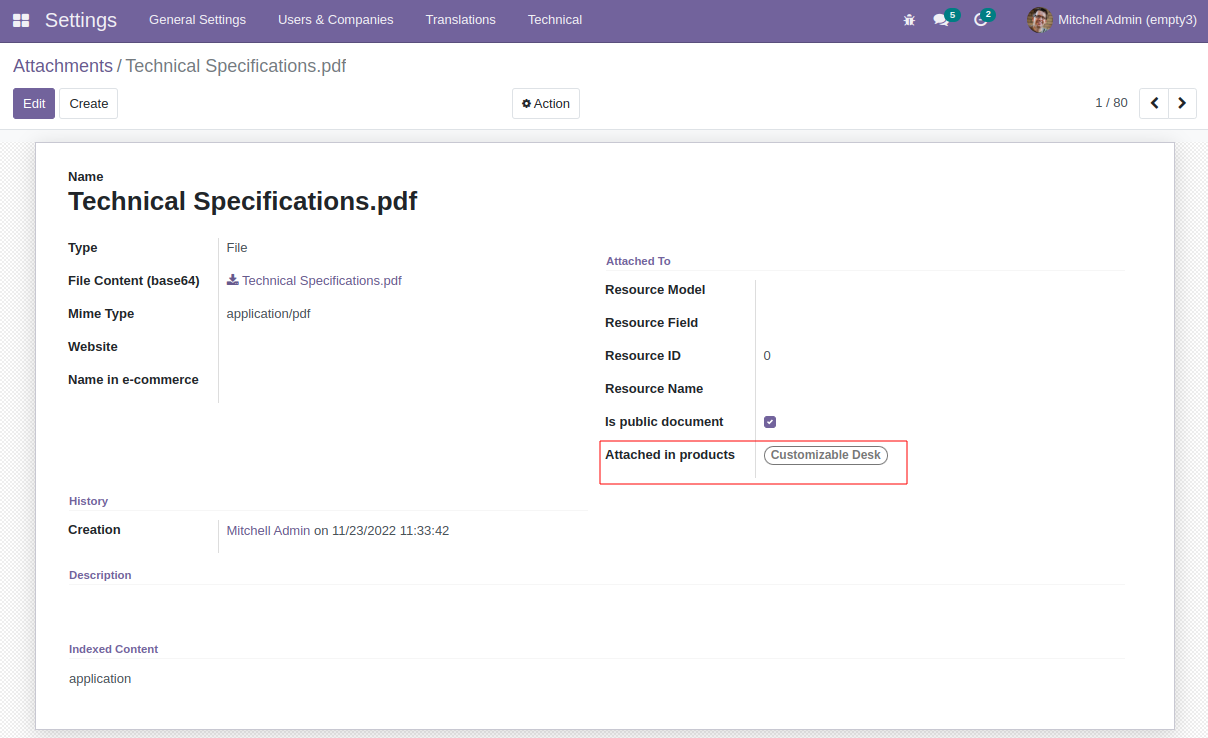
Attachments view in backend

To be able to filter attachments per website:

  1. Go to Website > Configuration > Settings > Website.
  2. Create more than one.
  3. Go to Settings > Technical > Database Structure > Attachments
  4. Pick or create one.
  5. Select a website.
  6. Save

To toggle attachment icons in the website:

  1. Go to any product in your eCommerce.
  2. Toggle Customize > Product downloads > Download icons.
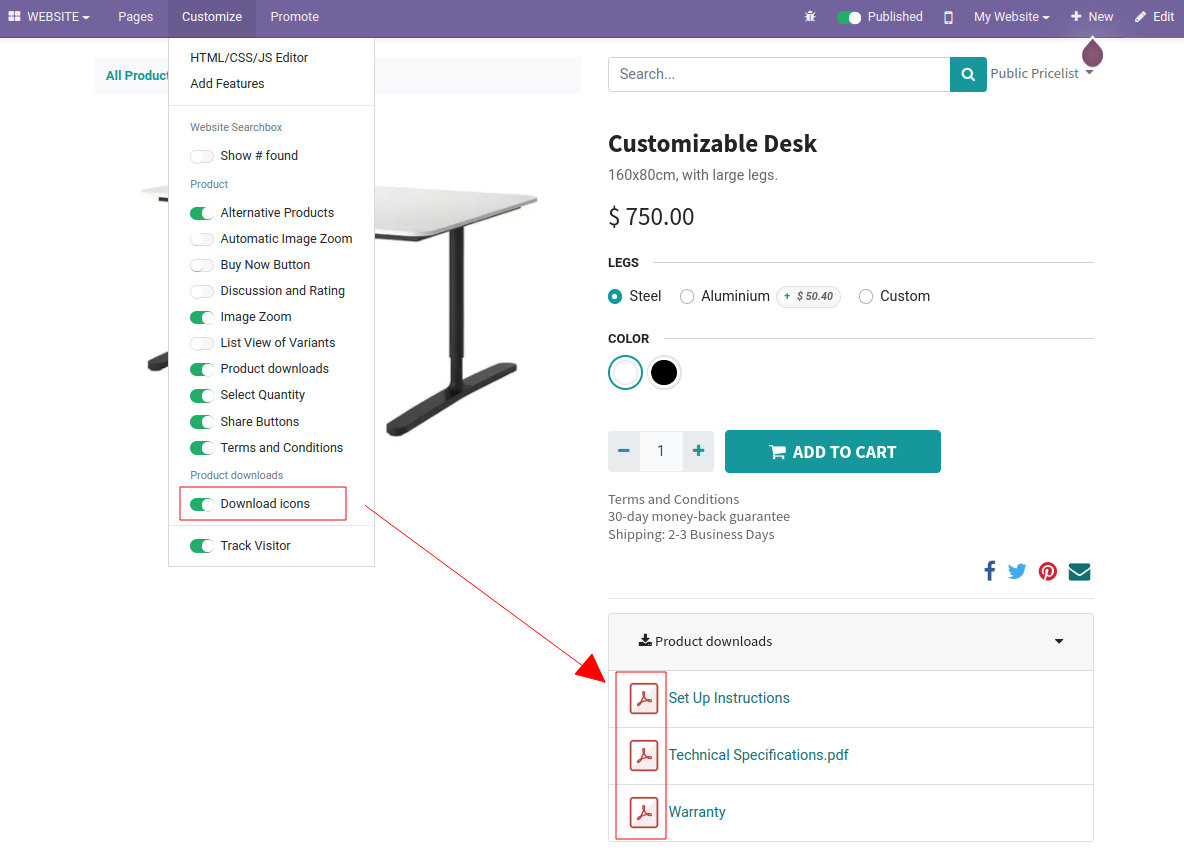
Toggle icons in frontend

Usage

To add publicly downloadable attachments to a product template:

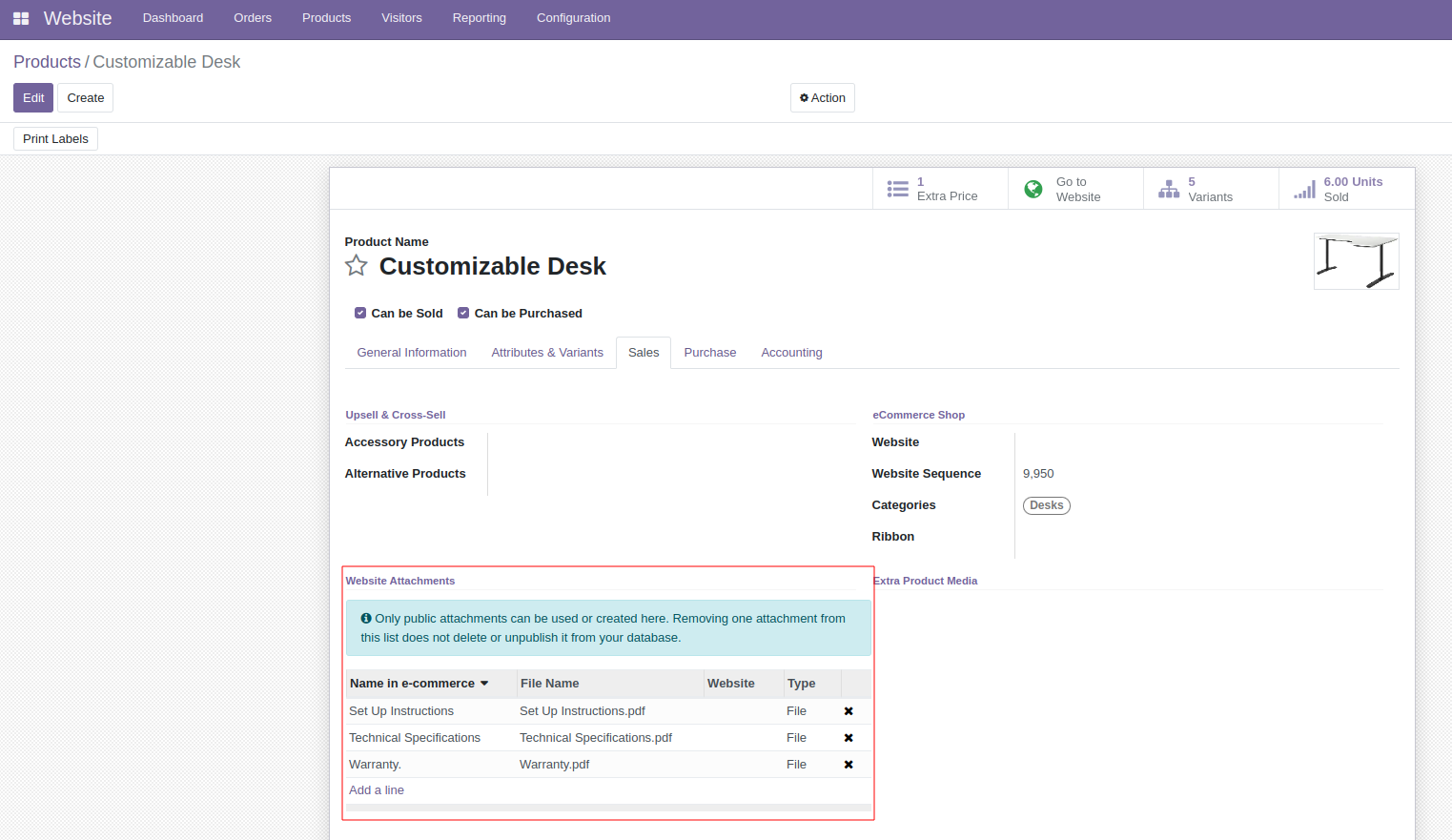
  1. Go to a Website > Products > Products in backend.
  2. Pick or create one.
  3. Go to the eCommerce tab > Website Attachments.
  4. Add any downloadable attachments you want there. They can exist before or be new. They must be public.
  5. Save.
Products view in backend

Once you set up the product attachments, public users will be able to download them:

  1. Go to the product eCommerce page.
  2. Below the product price and description, you will find a dropdown labeled as Product downloads. Click it.
  3. Users will download those attachments from there.
  4. Attachments will appear in name order.
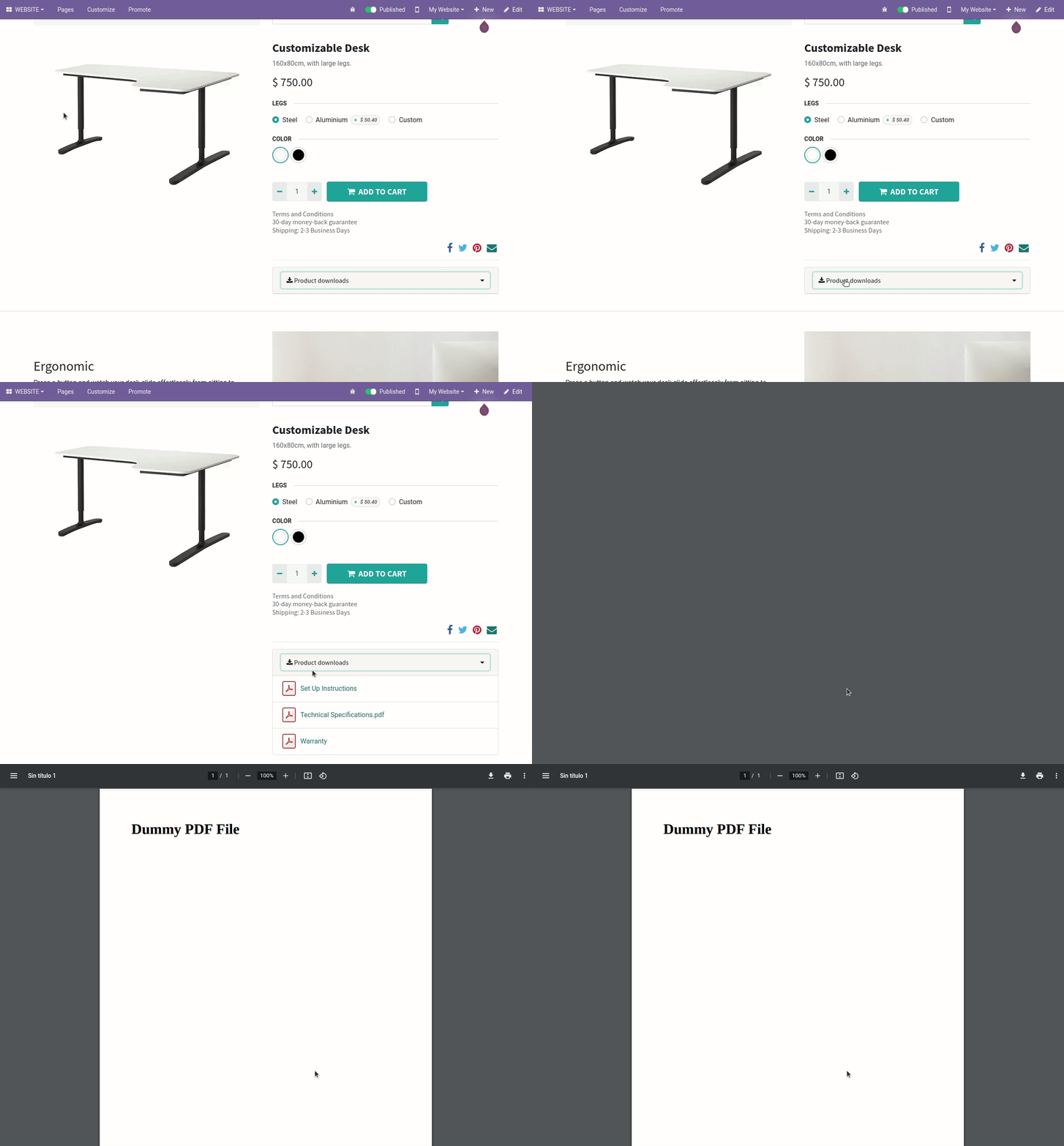
Attachments view in backend

Known issues / Roadmap

  • Make translatable the name of the attachment in the e-commerce. This will mean to deal with the sorting of the translated terms.

Bug Tracker

Bugs are tracked on GitHub Issues. In case of trouble, please check there if your issue has already been reported. If you spotted it first, help us to smash it by providing a detailed and welcomed feedback.

Do not contact contributors directly about support or help with technical issues.

Credits

Authors

  • Tecnativa

Contributors

  • Tecnativa:
    • Jairo Llopis
    • Víctor Martínez
  • Sygel:
    • Ángel García de la Chica Herrera

Maintainers

This module is maintained by the OCA.

Odoo Community Association

OCA, or the Odoo Community Association, is a nonprofit organization whose mission is to support the collaborative development of Odoo features and promote its widespread use.

Current maintainer:

Yajo

This module is part of the OCA/e-commerce project on GitHub.

You are welcome to contribute. To learn how please visit https://odoo-community.org/page/Contribute.

Please log in to comment on this module

  • The author can leave a single reply to each comment.
  • This section is meant to ask simple questions or leave a rating. Every report of a problem experienced while using the module should be addressed to the author directly (refer to the following point).
  • If you want to start a discussion with the author, please use the developer contact information. They can usually be found in the description.
Please choose a rating from 1 to 5 for this module.
Community
  • Tutorials
  • Documentation
  • Forum
Open Source
  • Download
  • Github
  • Runbot
  • Translations
Services
  • Odoo.sh Hosting
  • Support
  • Upgrade
  • Custom Developments
  • Education
  • Find an Accountant
  • Find a Partner
  • Become a Partner
About us
  • Our company
  • Brand Assets
  • Contact us
  • Jobs
  • Events
  • Podcast
  • Blog
  • Customers
  • Legal • Privacy
  • Security

Odoo is a suite of open source business apps that cover all your company needs: CRM, eCommerce, accounting, inventory, point of sale, project management, etc.

Odoo's unique value proposition is to be at the same time very easy to use and fully integrated.

Website made with