

Fennoa Connector


Odoo connector for integrating with the Fennoa accounting platform.
This module synchronizes customer data, exports sales invoices (including credit notes) and synchronized payment data
Table of contents
Use Cases / Context
With this integration, you can handle the day-to-day invoicing in Odoo and have everything automatically synced to Fennoa for accounting and payment processing.
Managing partners and creating invoices and payments are done in Odoo very much the same way as they would be done normally in Odoo. The integration aims to be as non-intrusive as possible, while keeping the user up-to-date about what’s happening at Fennoa’s side.
Installation
Install the module from Apps
Configuration
You need to:
- Create Fennoa API user in Fennoa
- Create Fennoa Backend in Odoo
Fennoa
Go to Fennoa https://app.fennoa.com/ with your admin user
Go to Fennoa > Users (Käyttäjät)
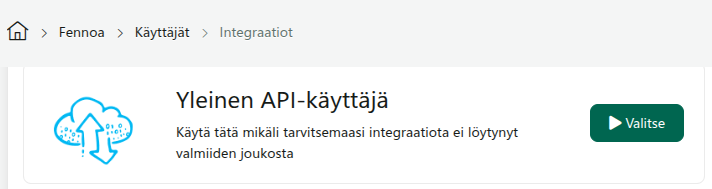
Create a new API user (API-käyttäjä)

Select General API user (Yleinen API-käyttäjä), or Odoo (Futural)
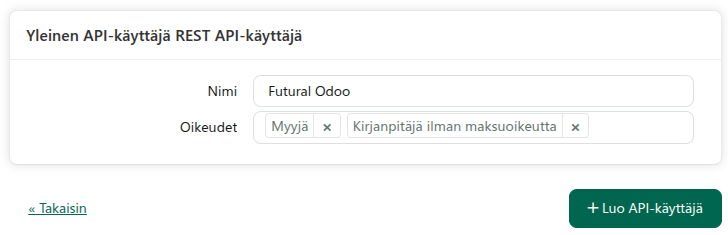
Give an user name (e.g. Futural Odoo), and necessary permissions. Click Create API user (Luo API-käyttäjä)
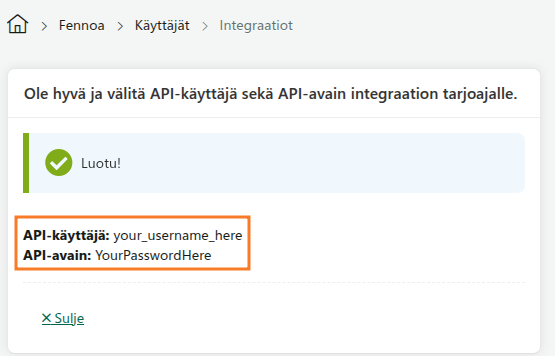
Copy your API-user (API-käyttäjä) and API-key (API-avain) to a safe place
Odoo
Make sure the OCA Job Queue framework is available and configured correctly.
Go to Connectors > Fennoa.
Create a backend for your company (or companies). Use the API-user and API-key from Fennoa API User
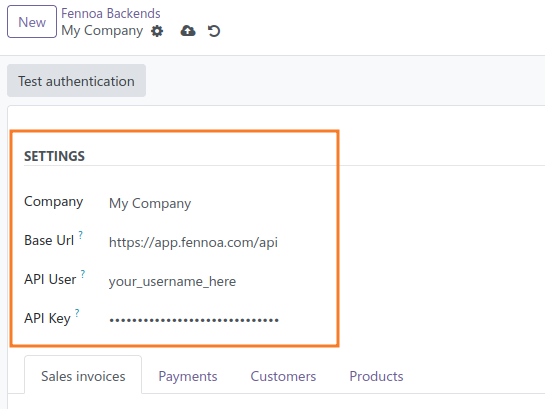
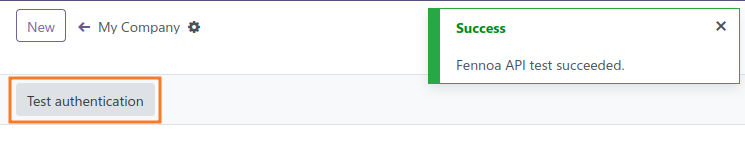
Press Test Connection to validate credentials. You should see a success-message
(Optional) Click Import Customers to fetch customer master data from Fennoa.
(Optional) Configure/disable Schedulers by clicking Scheduled Actions-button
Now you should be good to go! Create an invoice and try sending it. If you get an error, read the error description and act accordingly.
Usage
Customers
- Partners can be imported / updated from Fennoa to Odoo
- On partners, the checkbox Send to Fennoa controls whether the partner should be created/updated in Fennoa.
- When an outgoing invoice is sent to Fennoa, the customer is exported/updated to to fennoa.
Sale invoices
- Sale invoices and credit notes can be sent to Fennoa
- Payments can be sent to Fennoa and matched to invoices
- Payments can be fetched from Fennoa to Odoo and matched to invoices
If you are sending just one invoice, it will be sent immediately. When sending multiple invoices (mass invoicing), the invoices will be sent in a queue.
When sending invoice to Fennoa, Odoo assigns a temporary invoice number “INV/123” to invoice, and after invoice is approved in Fennoa, Odoo updates the invoice number and payment reference from there.
Payments
- Sale invoice payments will be sent to Fennoa and will be matched to existing invoices
- Payments will be fetched automatically from Fennoa and matched to invoices in Odoo
Known issues / Roadmap
- Additional Fennoa API endpoints (e.g. purchase invoices) are not yet covered.
- More transparency to users (about what happend between Odoo and Fennoa)
- Less redundant functionality
- Support new API (coming at the end of 2026)
- Add tests
Changelog
17.0.1.2.7 (2026-06-10) Improve error handling and transmit method data validation
17.0.1.2.6 (2026-05-26) Fix a bug in order identifier mapping
17.0.1.2.5 (2026-05-22) Use correct order identifier Try to get invoice details longer before raising an error
17.0.1.2.4 (2026-05-19)
Update partner reference from Fennoa, when creating a new partner
17.0.1.2.3 (2026-05-18)
Don’t check for duplicate reference, if there is no reference set
17.0.1.2.2 (2026-05-12)
Remove customer reference requirement
17.0.1.2.1 (2026-04-23)
Use invoice customer language for product name
17.0.1.2.0 (2026-03-21)
Add import/export mappers
17.0.1.1.1 (2026-02-19)
Add shipping address information
17.0.1.1.0 (2026-02-19)
Add sale invoice approve/sending configuration.
17.0.1.0.2 (2026-02-13)
Improve field mapping
17.0.1.0.1 (2026-01-07)
Production version
17.0.0.1.0 (2025-12-08)
Initial version
Bug Tracker
Bugs are tracked on GitHub Issues. In case of trouble, please check there if your issue has already been reported. If you spotted it first, help us to smash it by providing a detailed and welcomed feedback.
Do not contact contributors directly about support or help with technical issues.
Credits
Authors
- Futural
Contributors
- Futural Oy:
- Valtteri Lattu valtteri.lattu@futural.fi
- Jarmo Kortetjärvi jarmo.kortetjarvi@futural.fi
Maintainers
This module is part of the tawasta/connector-fennoa project on GitHub.
You are welcome to contribute.
| Availability |
Odoo Online
Odoo.sh
On Premise
|
| Odoo Apps Dependencies |
•
Invoicing (account)
• Discuss (mail) |
| Community Apps Dependencies | Show |
| Lines of code | 8128 |
| Technical Name |
connector_fennoa |
| License | AGPL-3 |
| Website | https://github.com/tawasta/connector-fennoa |
Please log in to comment on this module