

CRM Sale Order Lines | CRM Opportunity Products | CRM Product Catalog | CRM Product Lines | Opportunity Products & Quotations | CRM Line Items | CRM Quote Builder | CRM Quotations | CRM Product Management | Quotation from CRM
by Serynto Technologies https://www.serynto.com$ 58.42
 Last Updated : 19 MAY 2026 (v18.0.0.1.0)
CRM Sale Order Lines
Manage products, quantities, pricing, and customer requirements directly from CRM opportunities in Odoo 18.
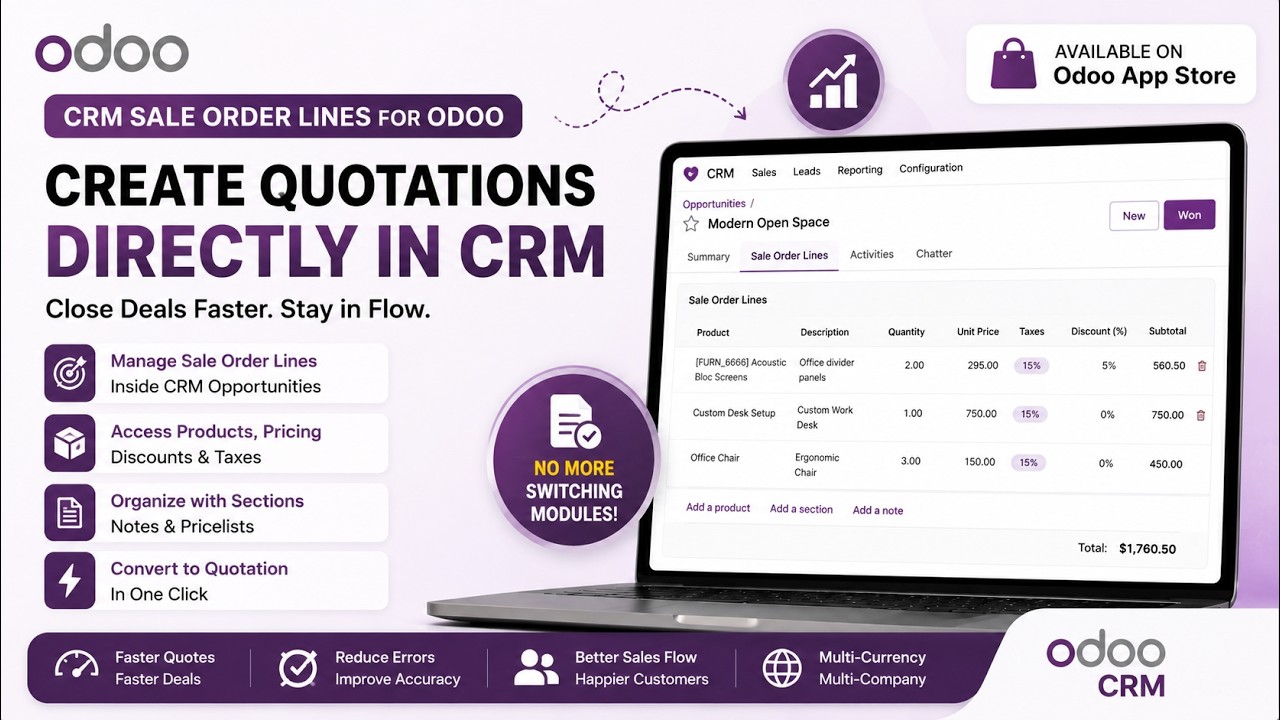
Build quotations during the sales process without leaving the opportunity. Add products, sections, and notes using the familiar Odoo sale order lines interface, complete with catalog support, pricelists, discounts, taxes, variants, and units of measure.
Sales teams can prepare product proposals while discussing requirements with customers, keeping all commercial information visible inside the CRM pipeline until the opportunity is ready to become a quotation or sales order.
Why Use This Module?
Keep Everything in CRM
Manage products, quantities, pricing and notes directly from opportunities.
Faster Lead Qualification
Add products during discussions before creating quotations.
Better Customer Conversations
View selected products, prices and requirements inside CRM.
Catalog Product Selection
Quickly browse and add products using Odoo catalog interface.
Automatic Transfer
Convert opportunity products directly into quotations.
Reduce Navigation
No need to switch screens to check products, prices or notes.
Common Use Cases & Benefits
Common Use Cases
- During customer meetings, salespeople can immediately add products being discussed without creating a quotation first.
- Quickly build product lists from the catalog while qualifying leads and gathering customer requirements.
- Record all required products, services, and notes during the opportunity stage and generate the final quotation when approved.
- Sales teams can progressively refine products and quantities throughout the opportunity lifecycle before creating the quotation.
Benefits
- Fewer clicks and less screen switching.
- Faster quotation preparation.
- Better visibility of proposed products throughout the sales cycle.
- Improved collaboration between sales and operations.
- Reduced data duplication.
- More accurate quotations.
- Better customer experience during product discussions.
- Complete lead-to-quotation workflow from a single CRM screen.
How it works
- Open an opportunity in CRM > Pipeline.
- Use the embedded sale order lines to add products, sections, and notes.
- Apply taxes, discounts, pricelists, and choose variants/UoM as needed.
- Create a quotation or copy lines into a standard sale order when ready.
Key Features

Add products directly from CRM opportunities

Support for product catalog selection

Add sections and notes

Manage quantities, UoM, variants, taxes, and discounts

Pricelist integration

Product availability visibility.

Print product catalogs directly from CRM.

Automatically transfer opportunity lines to quotations and sales orders.

Uses the standard Odoo sale order lines experience.
Version 18.0.0.1.0 | Released on : 19th May, 2026
Support
Get Immediate support for any of your query
You will get free support for any doubt, queries, and bug fixing (excluding data recovery) or any type of issue related to this module.
WRITE TO US AT :
sales@serynto.comFor any help and doubt or issue regarding the module, Drop a mail to our technical team.
RAISE A TICKET AT :
https://serynto.com/helpdeskFor support or to request customization, Create A Support Ticket by copying the link and opening it in a new tab.
| Availability |
Odoo Online
Odoo.sh
On Premise
|
| Odoo Apps Dependencies |
•
CRM (crm)
• Calendar (calendar) • Contacts (contacts) • Discuss (mail) • Invoicing (account) |
| Lines of code | 1019 |
| Technical Name |
crm_sale_order_lines |
| License | OPL-1 |
| Website | https://www.serynto.com |
Odoo Proprietary License v1.0

This software and associated files (the "Software") may only be used (executed,
modified, executed after modifications) if you have purchased a valid license
from the authors, typically via Odoo Apps, or if you have received a written
agreement from the authors of the Software (see the COPYRIGHT file).

You may develop Odoo modules that use the Software as a library (typically
by depending on it, importing it and using its resources), but without copying
any source code or material from the Software. You may distribute those
modules under the license of your choice, provided that this license is
compatible with the terms of the Odoo Proprietary License (For example:
LGPL, MIT, or proprietary licenses similar to this one).

It is forbidden to publish, distribute, sublicense, or sell copies of the Software
or modified copies of the Software.

The above copyright notice and this permission notice must be included in all
copies or substantial portions of the Software.

THE SOFTWARE IS PROVIDED "AS IS", WITHOUT WARRANTY OF ANY KIND, EXPRESS OR
IMPLIED, INCLUDING BUT NOT LIMITED TO THE WARRANTIES OF MERCHANTABILITY,
FITNESS FOR A PARTICULAR PURPOSE AND NONINFRINGEMENT.
IN NO EVENT SHALL THE AUTHORS OR COPYRIGHT HOLDERS BE LIABLE FOR ANY CLAIM,
DAMAGES OR OTHER LIABILITY, WHETHER IN AN ACTION OF CONTRACT, TORT OR OTHERWISE,
ARISING FROM, OUT OF OR IN CONNECTION WITH THE SOFTWARE OR THE USE OR OTHER
DEALINGS IN THE SOFTWARE.
Please log in to comment on this module