

WMS Landed Costs by LOT
by CLuedoo https://www.cluedoo.com/shop/lic-clu-set-snl-0018-wms-landed-costs-by-lot-5298$ 500.00
ODOO'S FUNCTION
Standard Odoo allocates Landed Costs (freight, duties, etc.) based on total product quantity or value. It lacks the native capability to assign these costs to specific Lot or Serial Numbers within a single transfer, leading to averaged rather than specific batch valuation.
CLUEDOO'S FUNCTION
CONFIGURATION
|
|
|
Go to Inventory → Configuration → Product Categories . Select the product category used for the tracked product, then set the Costing Method to Lot/Serial Number . |
|
|
For v17 , make sure Stock Accounting Automatic is enabled on the user, then set Inventory Valuation to Automated instead of Manual . |
|
Update:In v19 , the Inventory Valuation options are shown as Periodic (at closing) and Perpetual (at invoicing) . |
|
USAGE |
|
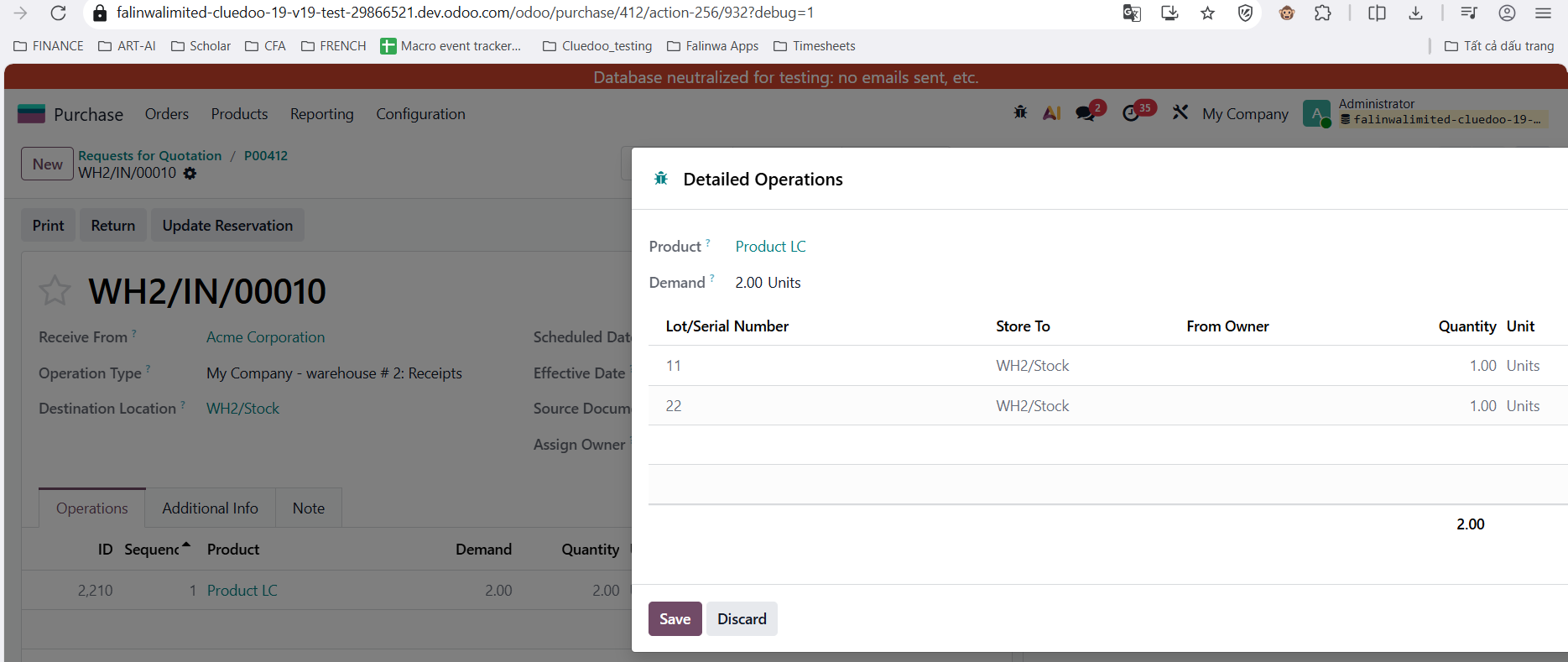
1Create a Purchase Order for a product assigned to the product category with Costing Method = Lot/Serial Number , then open the related Receipt of that product.
|

|
|
|
|
|
|
|
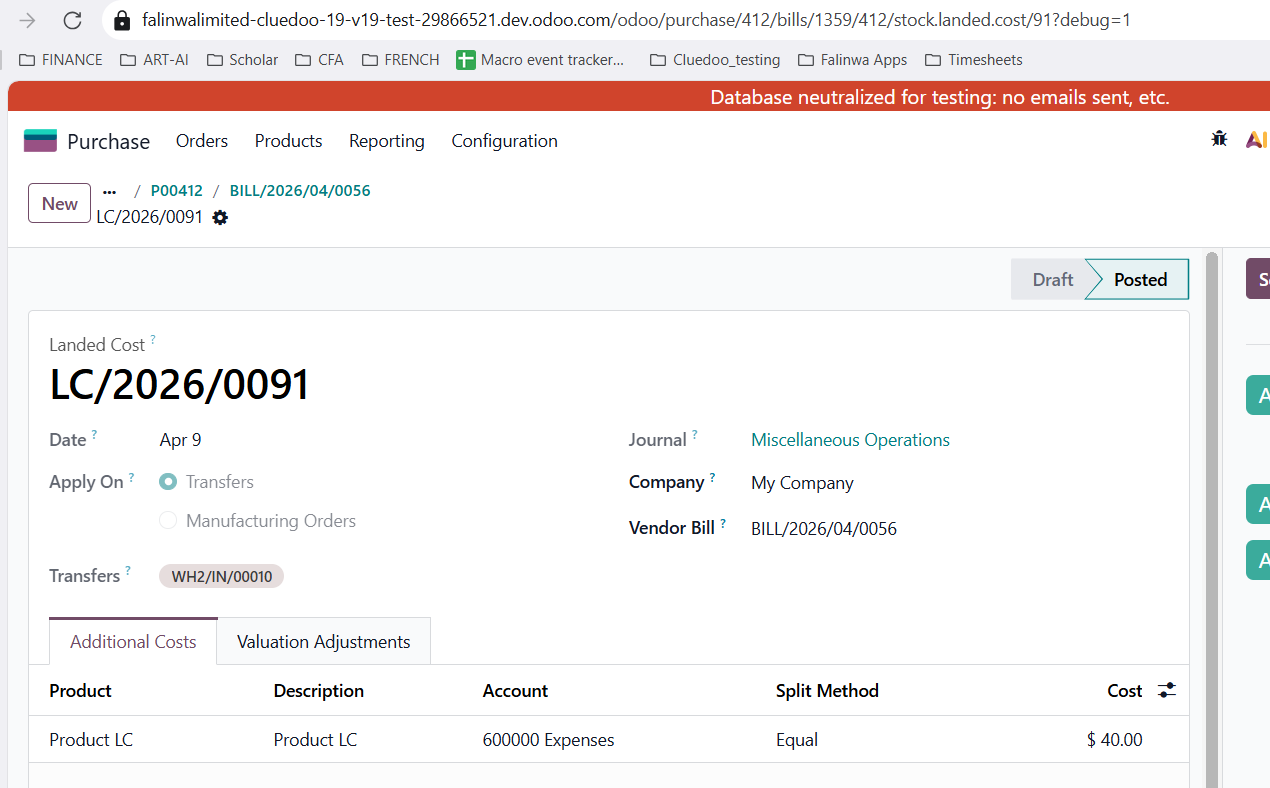
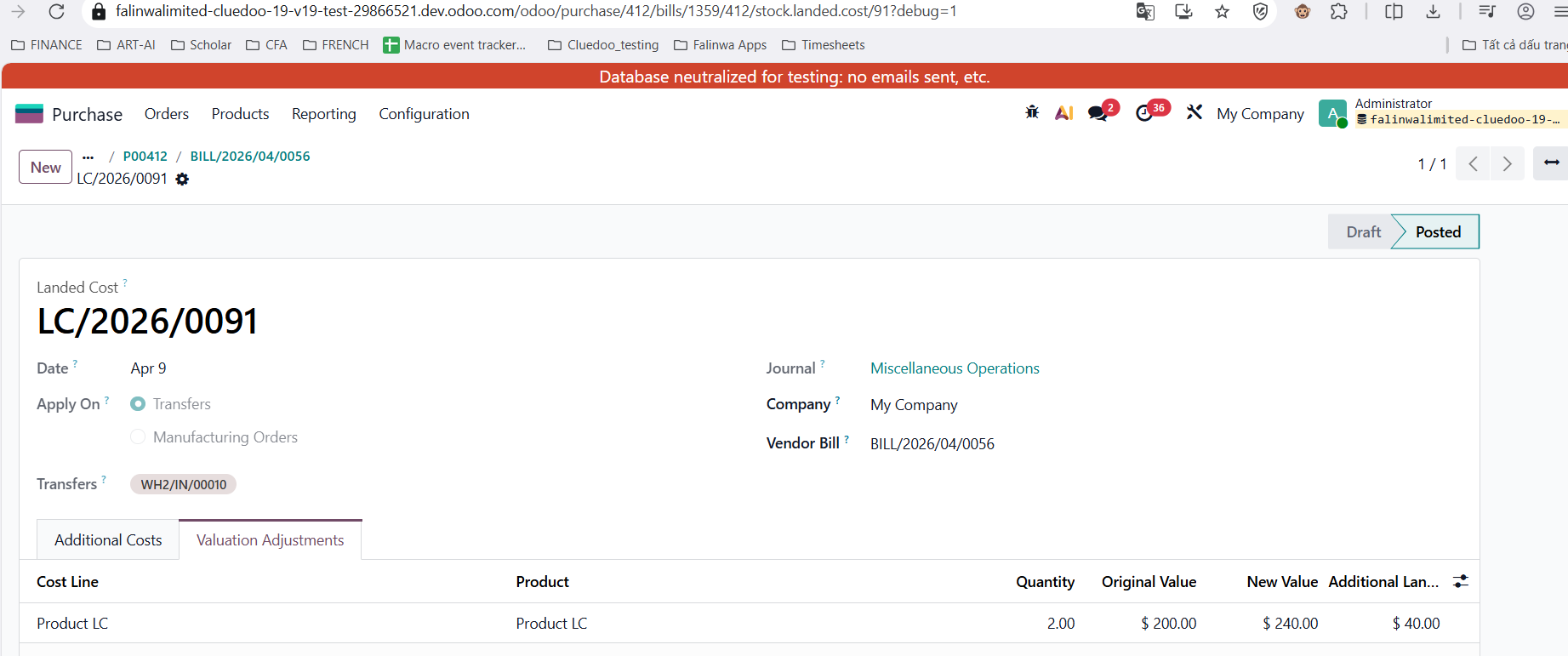
2Create a Bill but do not confirm it yet. From the bill, create the Landed Cost using the receipt transfer that was just created. Add the landed cost amount, for example $40 , then click Validate . Go back to the bill and click Confirm . Open the Landed Cost record and check the Valuation Adjustments tab. |
|
|
Example: Original Value ($200) + Additional Value ($40 - Landed Cost) = New Value ($240). |
|
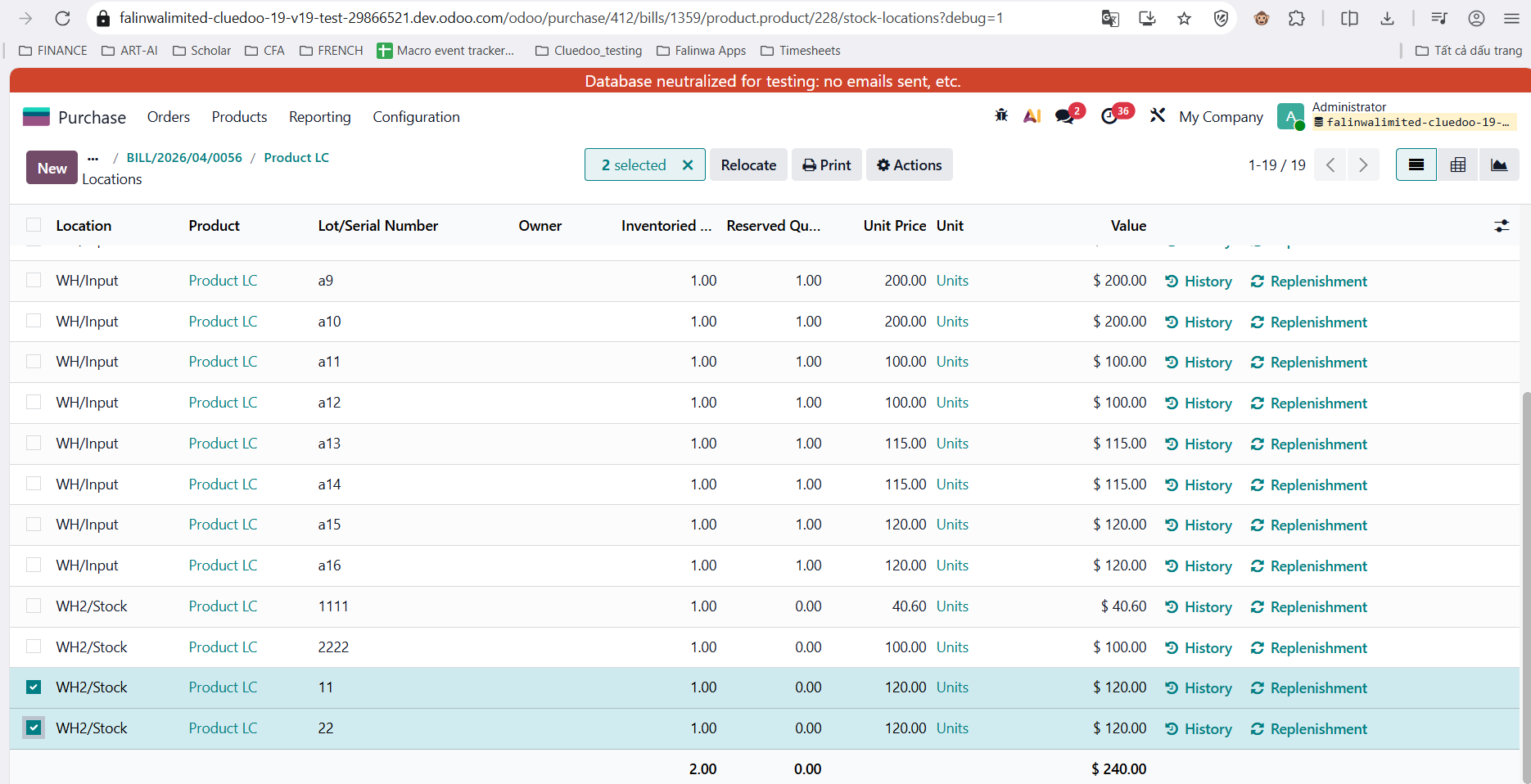
3Go to the product’s Qty On Hand → On Hand , then check the valuation layer of each lot. The total value of all lots should match the New Value after landed cost allocation. |
|


STORY BEHIND THE FEATURES
ODOO BEHAVIOUR
Standard Odoo allocates Landed Costs (freight, duties, etc.) based on total product quantity or value. It lacks the native capability to assign these costs to specific Lot or Serial Numbers within a single transfer, leading to averaged rather than specific batch valuation.
CLUEDOO BEHAVIOUR
HOW TO USE THIS MODULE ?
1
On Product Category, we have additional option for costing method: Lot/Serial Number. The Inventory Valuation also has to be Automated instead of Manual.
Update: v19, Inventory Valuation: Periodic (at closing) and Perpetual (at invoiceing).


2
Create a PO > receipt of the product that is included in the product category with costing method Lot/Serial Number.


3
We can create Bill (do not confirm) > create landed cost using the transfer that we just created > change Landed Cost (eg> I use 40$ here) > Validate > go back Bill > Confirm > go to Landed Cost > Check Valuation Adjustment.
Original Value ($200) + Additional Value ($40 - Landed Cost) = New Value ($240).
4. Go Product Qty Onhand > Onhand > check the valuation layer of each lot > sum lot = New Value
5. In v17, needs to set the inventory valuation to automatic by going to Users => Stock Accounting Automatic


| Availability |
Odoo Online
Odoo.sh
On Premise
|
| Odoo Apps Dependencies |
•
Purchase (purchase)
• Invoicing (account) • Discuss (mail) • Inventory (stock) |
| Community Apps Dependencies | Show |
| Lines of code | 614 |
| Technical Name |
fal_stock_landed_cost_lot |
| License | OPL-1 |
| Website | https://www.cluedoo.com/shop/lic-clu-set-snl-0018-wms-landed-costs-by-lot-5298 |
Odoo Proprietary License v1.0

This software and associated files (the "Software") may only be used (executed,
modified, executed after modifications) if you have purchased a valid license
from the authors, typically via Odoo Apps, or if you have received a written
agreement from the authors of the Software (see the COPYRIGHT file).

You may develop Odoo modules that use the Software as a library (typically
by depending on it, importing it and using its resources), but without copying
any source code or material from the Software. You may distribute those
modules under the license of your choice, provided that this license is
compatible with the terms of the Odoo Proprietary License (For example:
LGPL, MIT, or proprietary licenses similar to this one).

It is forbidden to publish, distribute, sublicense, or sell copies of the Software
or modified copies of the Software.

The above copyright notice and this permission notice must be included in all
copies or substantial portions of the Software.

THE SOFTWARE IS PROVIDED "AS IS", WITHOUT WARRANTY OF ANY KIND, EXPRESS OR
IMPLIED, INCLUDING BUT NOT LIMITED TO THE WARRANTIES OF MERCHANTABILITY,
FITNESS FOR A PARTICULAR PURPOSE AND NONINFRINGEMENT.
IN NO EVENT SHALL THE AUTHORS OR COPYRIGHT HOLDERS BE LIABLE FOR ANY CLAIM,
DAMAGES OR OTHER LIABILITY, WHETHER IN AN ACTION OF CONTRACT, TORT OR OTHERWISE,
ARISING FROM, OUT OF OR IN CONNECTION WITH THE SOFTWARE OR THE USE OR OTHER
DEALINGS IN THE SOFTWARE.
Please log in to comment on this module