

Xero Odoo Connector | Accounting, Invoice & Payment Synchronization | Odoo Xero Integration | Accounting Connector | Xero Financial Synchronization | Xero Invoice Sync
by Serynto Technologies https://www.serynto.com$ 128.49
| Availability |
Odoo Online
Odoo.sh
On Premise
|
| Odoo Apps Dependencies |
•
Contacts (contacts)
• Inventory (stock) • Invoicing (account) • Purchase (purchase) • Sales (sale_management) • Discuss (mail) |
| Lines of code | 2778 |
| Technical Name |
st_xero_connector |
| License | OPL-1 |
| Website | https://www.serynto.com |
| Versions | 18.0 19.0 |
 Last Updated : 19 MAY 2026 (v18.0.0.1.0)
Xero Odoo Connector
Reliable bidirectional synchronization between Xero and Odoo, designed for businesses with existing data in both systems.
Connect your Xero accounting platform with Odoo and keep customers, suppliers, products, invoices, bills, taxes, payments, and reconciliations synchronized. The connector intelligently maps existing records, prevents duplicate imports, and allows businesses to adopt the integration without requiring a fresh setup.
Whether you're migrating to Odoo, running both systems in parallel, or using Xero as your accounting platform, the connector provides a seamless and controlled synchronization experience.
Why Use This Connector?
Works with Existing Data
Most businesses already have customers, products, and accounting records in both Xero and Odoo.
Prevents Duplicate Records
Advanced matching logic helps identify existing Customers, Suppliers, Products, Taxes, and Accounts.
Bidirectional Synchronization
Import data from Xero into Odoo or export Odoo data to Xero depending on your business process.
Accounting Reconciliation Sync
Import reconciliation information from Xero into Odoo to maintain financial visibility and consistency between systems.
Full Visibility & Control
Monitor synchronization history, logs, and errors to quickly identify and resolve issues.
Common Use Cases & Benefits
Common Use Cases
- Continue using historical Xero data while managing operations in Odoo without creating duplicate contacts or products.
- Use Odoo for Sales, Inventory, CRM, Purchasing, and Operations while keeping accounting synchronized with Xero.
- Allow teams to work in their preferred platform while maintaining consistent master and accounting data.
- Keep invoices, payments, and reconciliations aligned across both systems.
Benefits
- Eliminates manual data entry between Xero and Odoo.
- Works safely with existing data in both systems.
- Prevents duplicate contacts, products, and accounting records.
- Synchronizes reconciliation data from Xero to Odoo.
- Supports complete accounting synchronization workflows.
- Reduces accounting errors and inconsistencies.
- Speeds up implementation for existing businesses.
- * Enables a smooth integration between operational and accounting processes.
- Provides full visibility through detailed synchronization logs.
How it works
- Configure the Xero connection using your Client ID and Client Secret.
- Authorize Odoo through Xero OAuth authentication.
- Configure mapping and synchronization settings.
- Select the data to synchronize : Contacts, Products, Taxes, Accounts, Invoices, Bills, Payments, Reconciliations.
- The connector automatically detects existing records and prevents duplicates.
- Run synchronization manually or schedule automatic sync jobs.
- Review logs and synchronization history when needed.
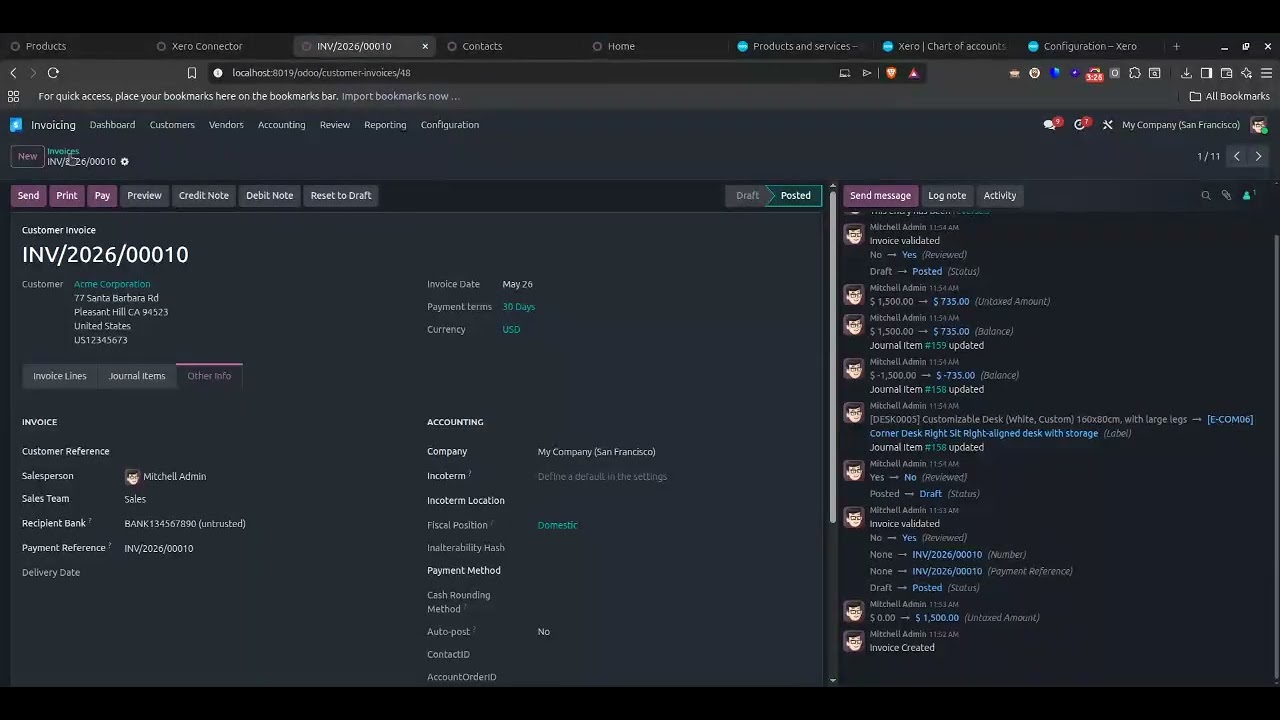
Example
A business already has:
5,000 contacts in Xero
4,500 contacts in Odoo
2,000 products in both systems
Instead of importing duplicates, the connector intelligently matches existing records and synchronizes only missing or updated data, allowing the business to start using the integration immediately without extensive data cleanup.
Key Features
Master Data Synchronization
- Customers / Contacts
- Suppliers / Vendors
- Products
- Product Categories
- Taxes
- Accounts
- Currencies

Accounting Synchronization
- Customer Invoices
- Vendor Bills
- Credit Notes
- Payments
- Bank Transactions
- Reconciliation Data

Smart Data Matching
- Existing record detection
- Duplicate prevention
- Flexible mapping options
- Safe synchronization for live databases

Operational Features
- Manual and scheduled synchronization
- Detailed sync logs
- Error tracking and troubleshooting
- Multi-company support
- Incremental synchronization
- OAuth-based Xero authentication
Version 18.0.0.1.0 | Released on : 19th May, 2026
Support
Get Immediate support for any of your query
You will get 90 days free support for any doubt, queries, and bug fixing (excluding data recovery) or any type of issue related to this module.
WRITE TO US AT :
sales@serynto.comFor any help and doubt or issue regarding the module, Drop a mail to our technical team.
RAISE A TICKET AT :
https://serynto.com/helpdeskFor support or to request customization, Create A Support Ticket by copying the link and opening it in a new tab.
| Availability |
Odoo Online
Odoo.sh
On Premise
|
| Odoo Apps Dependencies |
•
Contacts (contacts)
• Inventory (stock) • Invoicing (account) • Purchase (purchase) • Sales (sale_management) • Discuss (mail) |
| Lines of code | 2778 |
| Technical Name |
st_xero_connector |
| License | OPL-1 |
| Website | https://www.serynto.com |
Odoo Proprietary License v1.0

This software and associated files (the "Software") may only be used (executed,
modified, executed after modifications) if you have purchased a valid license
from the authors, typically via Odoo Apps, or if you have received a written
agreement from the authors of the Software (see the COPYRIGHT file).

You may develop Odoo modules that use the Software as a library (typically
by depending on it, importing it and using its resources), but without copying
any source code or material from the Software. You may distribute those
modules under the license of your choice, provided that this license is
compatible with the terms of the Odoo Proprietary License (For example:
LGPL, MIT, or proprietary licenses similar to this one).

It is forbidden to publish, distribute, sublicense, or sell copies of the Software
or modified copies of the Software.

The above copyright notice and this permission notice must be included in all
copies or substantial portions of the Software.

THE SOFTWARE IS PROVIDED "AS IS", WITHOUT WARRANTY OF ANY KIND, EXPRESS OR
IMPLIED, INCLUDING BUT NOT LIMITED TO THE WARRANTIES OF MERCHANTABILITY,
FITNESS FOR A PARTICULAR PURPOSE AND NONINFRINGEMENT.
IN NO EVENT SHALL THE AUTHORS OR COPYRIGHT HOLDERS BE LIABLE FOR ANY CLAIM,
DAMAGES OR OTHER LIABILITY, WHETHER IN AN ACTION OF CONTRACT, TORT OR OTHERWISE,
ARISING FROM, OUT OF OR IN CONNECTION WITH THE SOFTWARE OR THE USE OR OTHER
DEALINGS IN THE SOFTWARE.
Please log in to comment on this module