
You bought this module and need support?
Click here!

| Availability |
Odoo Online
Odoo.sh
On Premise
|
| Lines of code | 190 |
| Technical Name |
user_wise_datetime_formatter_odonity |
| License | See License tab |
| Website | https://www.odonity.com |
| Versions | 16.0 17.0 18.0 19.0 |
User Wise Datetime Formatter
Set Your Own Preferred Date & Time Format
Enhance your Odoo experience by allowing each user to personalize how dates and times are displayed — directly from their profile.
Key Features
- Per-User Datetime Format Configuration
- Directly Accessible from User Profile
- Supports Both Date and Time Formats
- Timezone & Locale Friendly
Preview Screens
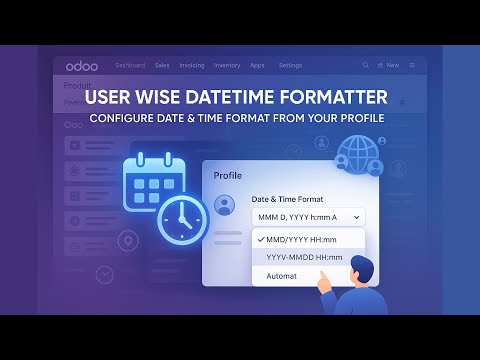
Datetime Format Settings in User Profile

Installation & Usage
- Install the module like any standard Odoo module
- Go to My Profile from the top-right user menu
- Set your preferred Date and Time Format in the added section
- Save the profile — your formats are now applied system-wide for your view
Compatibility
- Compatible with Odoo 18
- No additional configuration required
- User-level personalization with no global impact
Need Help or Customization?
Need custom features or assistance? Reach out to our team:
- Email: odonity.services@gmail.com
- Website: www.odonity.com
| Availability |
Odoo Online
Odoo.sh
On Premise
|
| Lines of code | 190 |
| Technical Name |
user_wise_datetime_formatter_odonity |
| License | See License tab |
| Website | https://www.odonity.com |
User Wise Datetime Formatter
User Wise Datetime Formatter by Odonity allows each user to configure their own preferred date and time format directly from the My Profile page. This enhances localization, personal productivity, and data clarity for global teams using Odoo.
Perfect for multi-region businesses and distributed teams, this app ensures that every user sees dates and times in their familiar format without affecting other users or global settings.
Key Features
- Per-User Datetime Format Settings: - Each user can independently choose their date and time display format.
- Profile-Level Configuration: - Accessible directly from the My Profile page for ease of use.
- Supports Date and Time Together: - Format both date and time display as per individual preferences.
- Timezone-Friendly for Global Teams: - Enhances readability for users working in different time zones or regions.
- Clean Odonity Branding: - Developed with performance, compatibility, and SEO naming in mind.
Installation
- Copy this module to your Odoo custom addons directory.
- Restart your Odoo server.
- Activate Developer Mode from the General Settings.
- Go to Apps, click on Update Apps List, and install User Wise Datetime Formatter.
Usage
- Go to My Profile from the top-right user menu.
- Locate the Datetime Format section added by the module.
- Choose your preferred Date Format and Time Format using predefined options or custom patterns.
- Save the changes — your selection will now apply to all Odoo date and time displays, visible only to you.
Support & Customization
Need help or want to tailor this module to your business?
- Website: https://www.odonity.com
- Email: odonity.services@gmail.com
Changelog
1.0.0 (2025-05-17)
- Initial release of User Wise Datetime Formatter for Odoo 18.
- Enables per-user configuration of date and time formats.
- Fully integrated with user profile settings page.
Odoo Proprietary License v1.1 - Strict Commercial Use

© 2025-Present Odonity. All Rights Reserved.
Module Name: User Wise Datetime Formatter (By Odonity)
License Owner: Odonity (https://www.odonity.com)
Support Email: odonity.services@gmail.com

This software is protected by copyright laws and international treaties. It is licensed, not sold. You are granted a **non-transferable, non-sublicensable, and non-exclusive license** to use this software ONLY under the terms below:

--------------------------------------------
STRICT TERMS OF USE
--------------------------------------------

PERMITTED:

- Use the module in one Odoo production instance only (with staging/test allowed only for that instance).
- Use for internal company operations.
- Request support, upgrades, or customization services from Odonity.

PROHIBITED WITHOUT WRITTEN PERMISSION FROM ODONITY:

- Modifying, altering, or extending the source code in any way.
- Reselling, sublicensing, or redistributing any part of the module.
- Sharing the code with third parties, including freelancers or other vendors.
- Uploading this module to public or private repositories, websites, or forums.
- Creating derivative works or using snippets in other modules.
- Using the module as a base to develop similar competing products.

WARNING:

This software contains **branding, code-level markers, and security tracking** for anti-piracy purposes. Tampering with these or violating this license may result in:

- Permanent termination of your usage rights
- Legal action under local and international intellectual property laws
- Immediate take-down notices for marketplaces and hosting providers

--------------------------------------------
LICENSE VERIFICATION & SUPPORT
--------------------------------------------

License Keys / Validation (optional): Odonity reserves the right to implement license key checks in future versions.
Support is only available to verified license holders.
Invoice or proof of purchase must be retained for all license claims.

For official support, licensing clarifications, or enterprise usage, please contact:
odonity.services@gmail.com | https://www.odonity.com

--------------------------------------------

BY INSTALLING THIS MODULE, YOU AGREE TO BE BOUND BY ALL TERMS ABOVE.

Unauthorized use, reproduction, or redistribution is strictly prohibited.
Please log in to comment on this module