

Access Right for "Add properties" feature
by CLuedoo https://www.cluedoo.com/shop/lic-clu-set-invc-0070-access-right-for-add-properties-feature-7198$ 50.05
ODOO'S FUNCTION
In Odoo, the "Add Properties" feature is available to all users by default. There is no specific access right to restrict who can create new custom fields, which can lead to an unmanaged database with too many unwanted fields created by unauthorized users.
CLUEDOO'S FUNCTION
CLuedoo introduces a dedicated access right to control this feature. Only users assigned to the specific group "Add properties" can see and use this function. For all other users, the "Add Properties" option is completely hidden from the interface, ensuring better data governance and preventing unauthorized field creation.
CONFIGURATION |
|
1.Set up individually
Go to
Settings
>
Users and companies
>
Users
> Choose one user > Tick/ Untick the checkbox "
Add properties
"
|
|
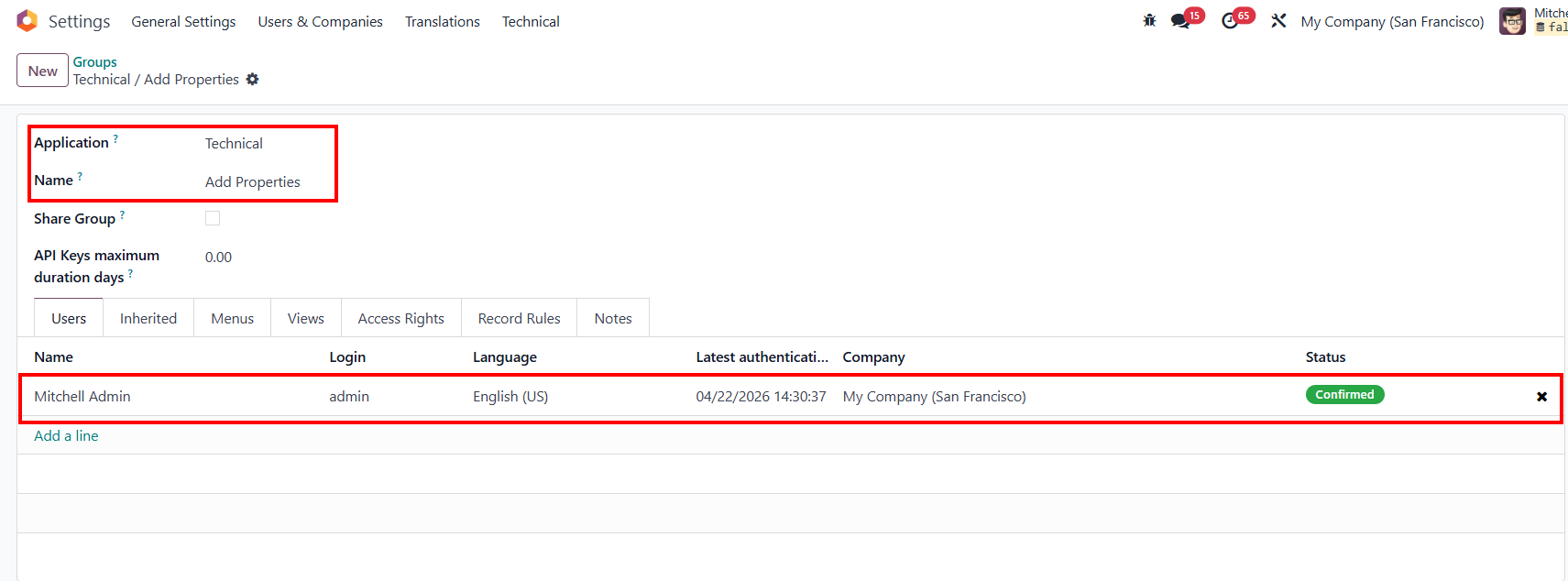
2. Or set up in groupsGo to Settings > Users and Companies > Groups > Search for "Technical / Add Properties" > Add users |
|
USAGE |
|
|
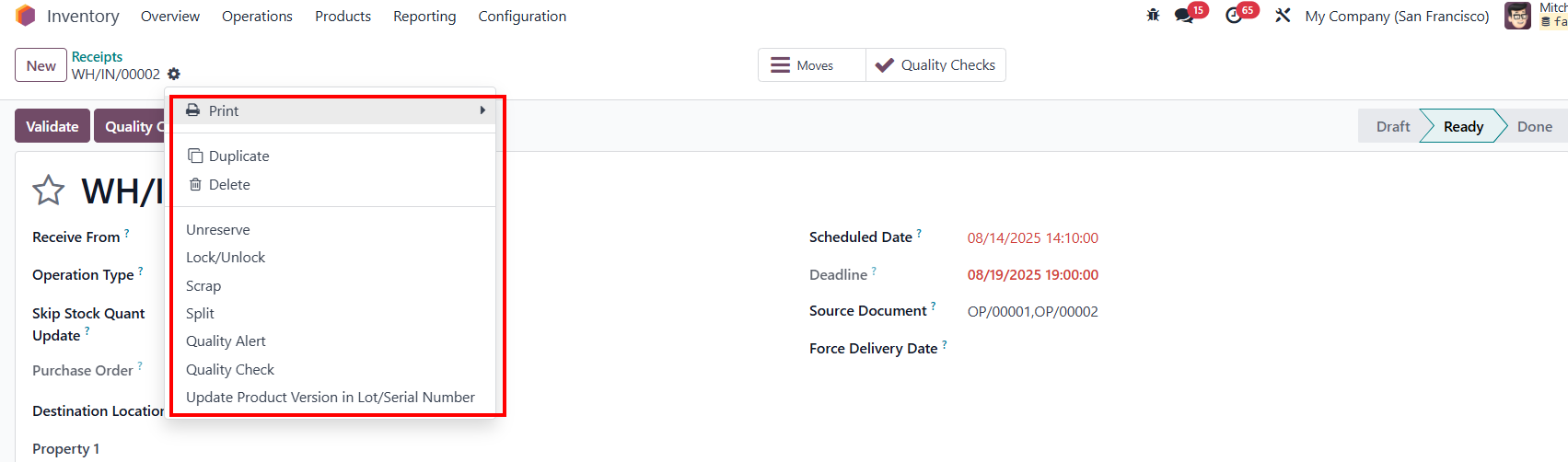
Go to Inventory > Operations > Receipts > Click on the gear button > User can see the button " Add Properties ". |
|
|
4. If untick the checkbox in Settings or delete the user from the group " Technical/ Add Properties " |
|
|
The button Add Properties is hidden. |
|



| Availability |
Odoo Online
Odoo.sh
On Premise
|
| Lines of code | 22 |
| Technical Name |
cds_add_properties_access_rights |
| License | OPL-1 |
| Website | https://www.cluedoo.com/shop/lic-clu-set-invc-0070-access-right-for-add-properties-feature-7198 |
Odoo Proprietary License v1.0

This software and associated files (the "Software") may only be used (executed,
modified, executed after modifications) if you have purchased a valid license
from the authors, typically via Odoo Apps, or if you have received a written
agreement from the authors of the Software (see the COPYRIGHT file).

You may develop Odoo modules that use the Software as a library (typically
by depending on it, importing it and using its resources), but without copying
any source code or material from the Software. You may distribute those
modules under the license of your choice, provided that this license is
compatible with the terms of the Odoo Proprietary License (For example:
LGPL, MIT, or proprietary licenses similar to this one).

It is forbidden to publish, distribute, sublicense, or sell copies of the Software
or modified copies of the Software.

The above copyright notice and this permission notice must be included in all
copies or substantial portions of the Software.

THE SOFTWARE IS PROVIDED "AS IS", WITHOUT WARRANTY OF ANY KIND, EXPRESS OR
IMPLIED, INCLUDING BUT NOT LIMITED TO THE WARRANTIES OF MERCHANTABILITY,
FITNESS FOR A PARTICULAR PURPOSE AND NONINFRINGEMENT.
IN NO EVENT SHALL THE AUTHORS OR COPYRIGHT HOLDERS BE LIABLE FOR ANY CLAIM,
DAMAGES OR OTHER LIABILITY, WHETHER IN AN ACTION OF CONTRACT, TORT OR OTHERWISE,
ARISING FROM, OUT OF OR IN CONNECTION WITH THE SOFTWARE OR THE USE OR OTHER
DEALINGS IN THE SOFTWARE.
Please log in to comment on this module