Skip to Content
Odoo Menu
  • Sign in
  • Try it free
  • Apps
    Finance
    • Accounting
    • Invoicing
    • Expenses
    • Spreadsheet (BI)
    • Documents
    • Sign
    Sales
    • CRM
    • Sales
    • POS Shop
    • POS Restaurant
    • Subscriptions
    • Rental
    Websites
    • Website Builder
    • eCommerce
    • Blog
    • Forum
    • Live Chat
    • eLearning
    Supply Chain
    • Inventory
    • Manufacturing
    • PLM
    • Purchase
    • Maintenance
    • Quality
    Human Resources
    • Employees
    • Recruitment
    • Time Off
    • Appraisals
    • Referrals
    • Fleet
    Marketing
    • Social Marketing
    • Email Marketing
    • SMS Marketing
    • Events
    • Marketing Automation
    • Surveys
    Services
    • Project
    • Timesheets
    • Field Service
    • Helpdesk
    • Planning
    • Appointments
    Productivity
    • Discuss
    • Approvals
    • IoT
    • VoIP
    • Knowledge
    • WhatsApp
    Third party apps Odoo Studio Odoo Cloud Platform
  • Industries
    Retail
    • Book Store
    • Clothing Store
    • Furniture Store
    • Grocery Store
    • Hardware Store
    • Toy Store
    Food & Hospitality
    • Bar and Pub
    • Restaurant
    • Fast Food
    • Guest House
    • Beverage Distributor
    • Hotel
    Real Estate
    • Real Estate Agency
    • Architecture Firm
    • Construction
    • Property Management
    • Gardening
    • Property Owner Association
    Consulting
    • Accounting Firm
    • Odoo Partner
    • Marketing Agency
    • Law firm
    • Talent Acquisition
    • Audit & Certification
    Manufacturing
    • Textile
    • Metal
    • Furnitures
    • Food
    • Brewery
    • Corporate Gifts
    Health & Fitness
    • Sports Club
    • Eyewear Store
    • Fitness Center
    • Wellness Practitioners
    • Pharmacy
    • Hair Salon
    Trades
    • Handyman
    • IT Hardware & Support
    • Solar Energy Systems
    • Shoe Maker
    • Cleaning Services
    • HVAC Services
    Others
    • Nonprofit Organization
    • Environmental Agency
    • Billboard Rental
    • Photography
    • Bike Leasing
    • Software Reseller
    Browse all Industries
  • Community
    Learn
    • Tutorials
    • Documentation
    • Certifications
    • Training
    • Blog
    • Podcast
    Empower Education
    • Education Program
    • Scale Up! Business Game
    • Visit Odoo
    Get the Software
    • Download
    • Compare Editions
    • Releases
    Collaborate
    • Github
    • Forum
    • Events
    • Translations
    • Become a Partner
    • Services for Partners
    • Register your Accounting Firm
    Get Services
    • Find a Partner
    • Find an Accountant
      • Get a Tailored Demo
    • Implementation Services
    • Customer References
    • Support
    • Upgrades
    Github Youtube Twitter Linkedin Instagram Facebook Spotify
    +32 2 290 34 90
    • Get a Tailored Demo
  • Pricing
  • Help
  1. APPS
  2. Extra Tools
  3. Mileage Allowance Management: Fleet v 19.0
  4. Sales Conditions FAQ

Mileage Allowance Management: Fleet

by CLuedoo https://www.cluedoo.com/shop/lic-clu-set-tlm-0003-mileage-allowance-management-fleet-7306
Odoo

$ 150.12

v 19.0 Third Party
Apps purchases are linked to your Odoo account, please sign in or sign up first.
You bought this module and need support? Click here!
Availability
Odoo Online
Odoo.sh
On Premise
Odoo Apps Dependencies • Expenses (hr_expense)
• Fleet (fleet)
• Employees (hr)
• Invoicing (account)
• Discuss (mail)
Lines of code 85
Technical Name cds_fleet
LicenseOPL-1
Websitehttps://www.cluedoo.com/shop/lic-clu-set-tlm-0003-mileage-allowance-management-fleet-7306
  • Description
  • Manifest
  • License


ODOO'S FUNCTION

Odoo Expenses allows employees to claim mileage expenses based on a reimbursement rate and generate expense reports.


Limitation: Odoo only provides basic mileage management using a fixed reimbursement rate and does not support mileage scale history or complex reimbursement formulas.


This can be insufficient for companies that reimburse employees for the use of their personal vehicles according to official mileage scales, such as Indemnités Kilométriques (IK) in France. These tax-deductible reimbursements are calculated based on government-published scales (e.g., URSSAF rates) and are also common in countries such as the United Kingdom, Ireland, Germany, and Belgium.


CLUEDOO'S FUNCTION

The Mileage Scale module extends the standard Odoo mileage feature by supporting official mileage scales (e.g., URSSAF) and their evolution over time.

Key Features

  • Configure mileage scales based on any criteria, such as vehicle power, distance ranges, vehicle type, or custom business rules.
  • Define flexible reimbursement formulas using Python expressions to match country-specific regulations or company policies.
  • Automatically apply the appropriate mileage scale when an expense is created. For example, in the URSSAF case, the reimbursement amount can be calculated based on the total distance traveled by the employee during the current year.
  • Track and preserve vehicle odometer history for accurate mileage calculations and auditability.

Benefits

  • Ensures compliance with local mileage reimbursement regulations.
  • Supports complex and evolving reimbursement policies.
  • Provides accurate historical records and audit traceability.
  • Reduces manual maintenance and calculation errors.
CONFIGURATION


1. Fleet Configuration (cds_fleet)
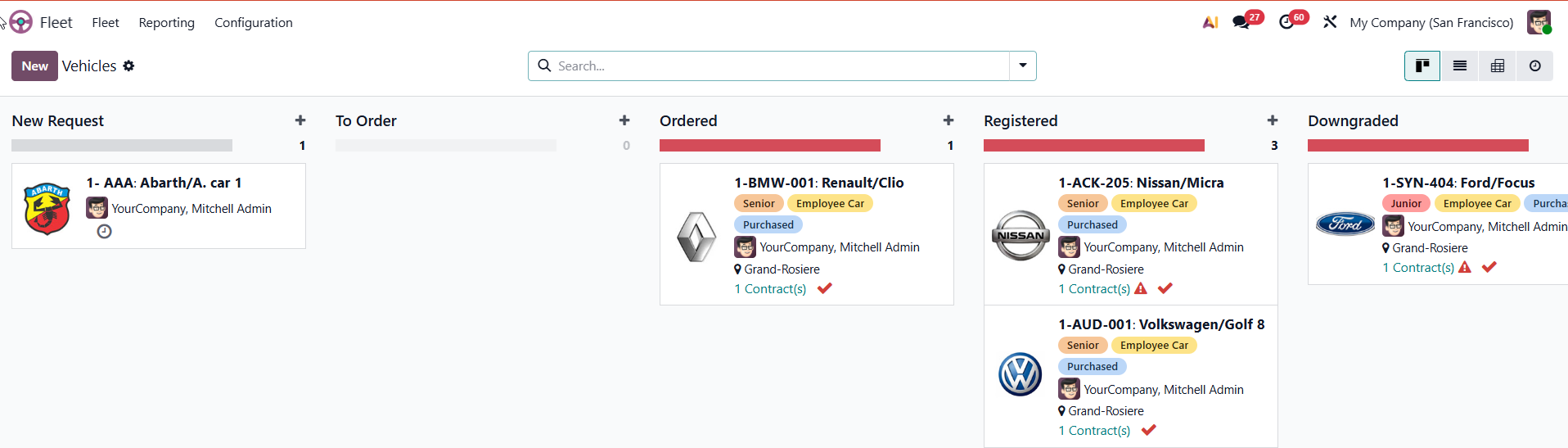
  • Go to Fleet > Vehicles . You can select an existing vehicle from the list or click New to add a new car.
  • Select driver of the vehicle.


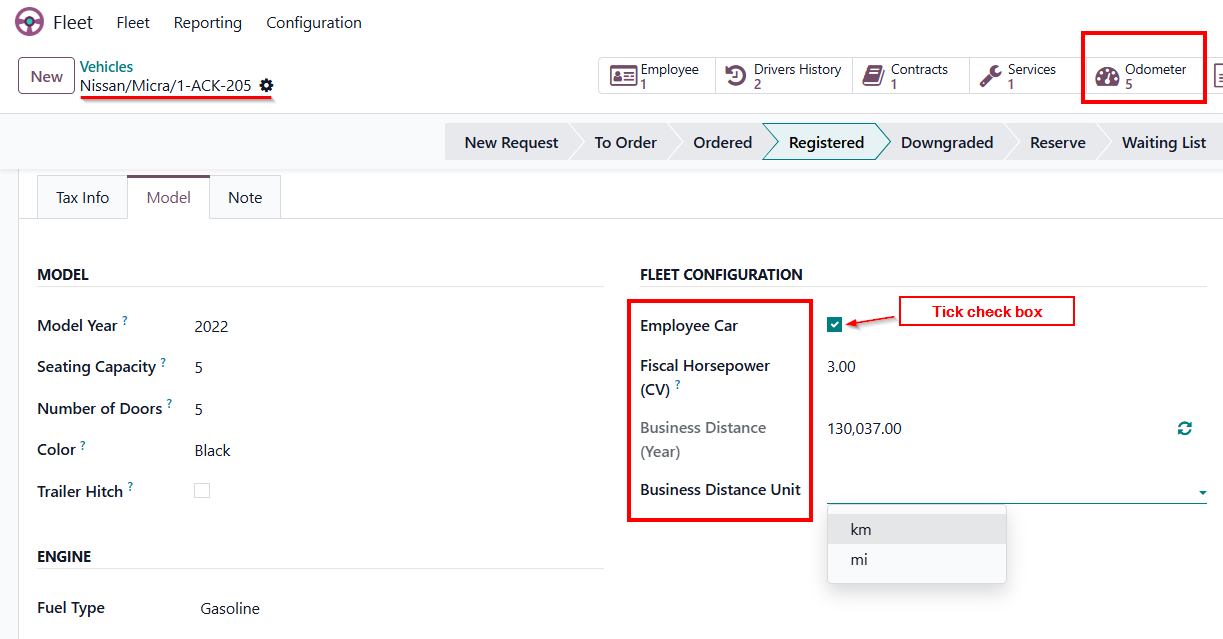
  • Employee Car: Tick this checkbox to prioritize tracking professional business distance rather than the total vehicle mileage.
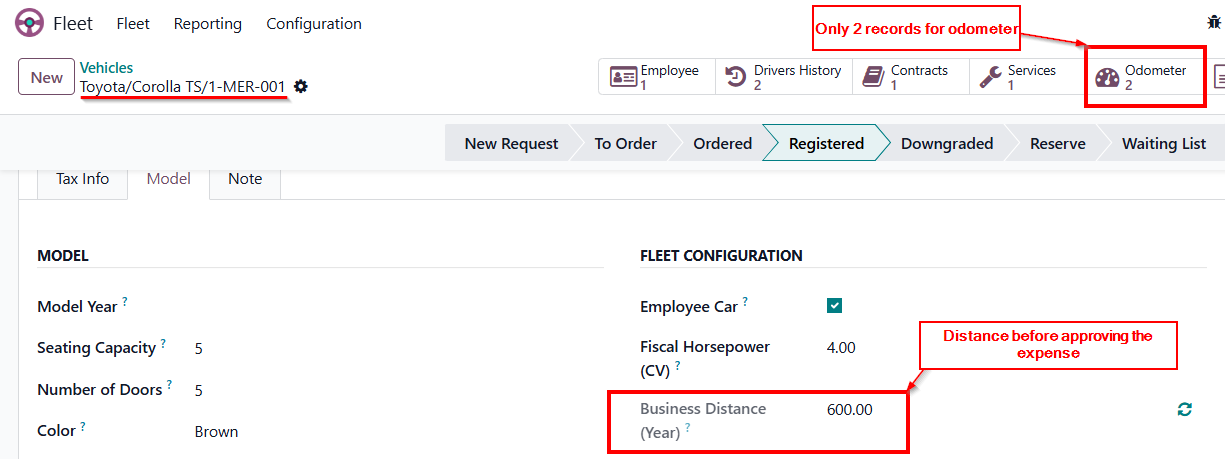
  • Fiscal Horsepower: Enter the vehicle's power rating. (Note: This field is formatted strictly as a float number).
  • Business Distance Unit: Select your preferred operational unit ( km or mi ). (Note: This only updates the unit display format on the interface, it does not convert the underlying numerical values).
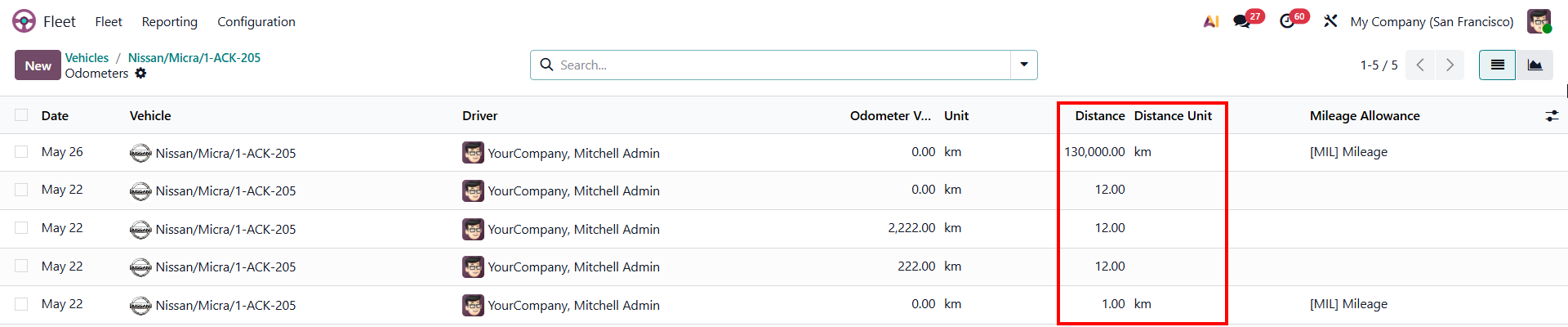
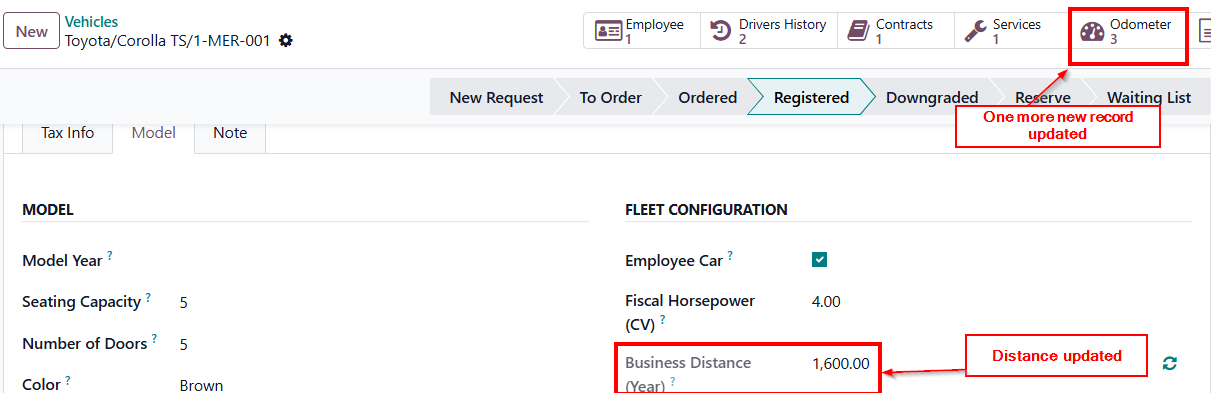
  • Business Distance (Year): This field automatically sums up all the distance records from the vehicle's Odometer logs for the current year.

  • Odometer: Tracks the vehicle's mileage history. The system automatically records approved expenses here, but you can also manually add new entries anytime.

2. Mileage Scale Configuration

(cds_mileage_allowance)


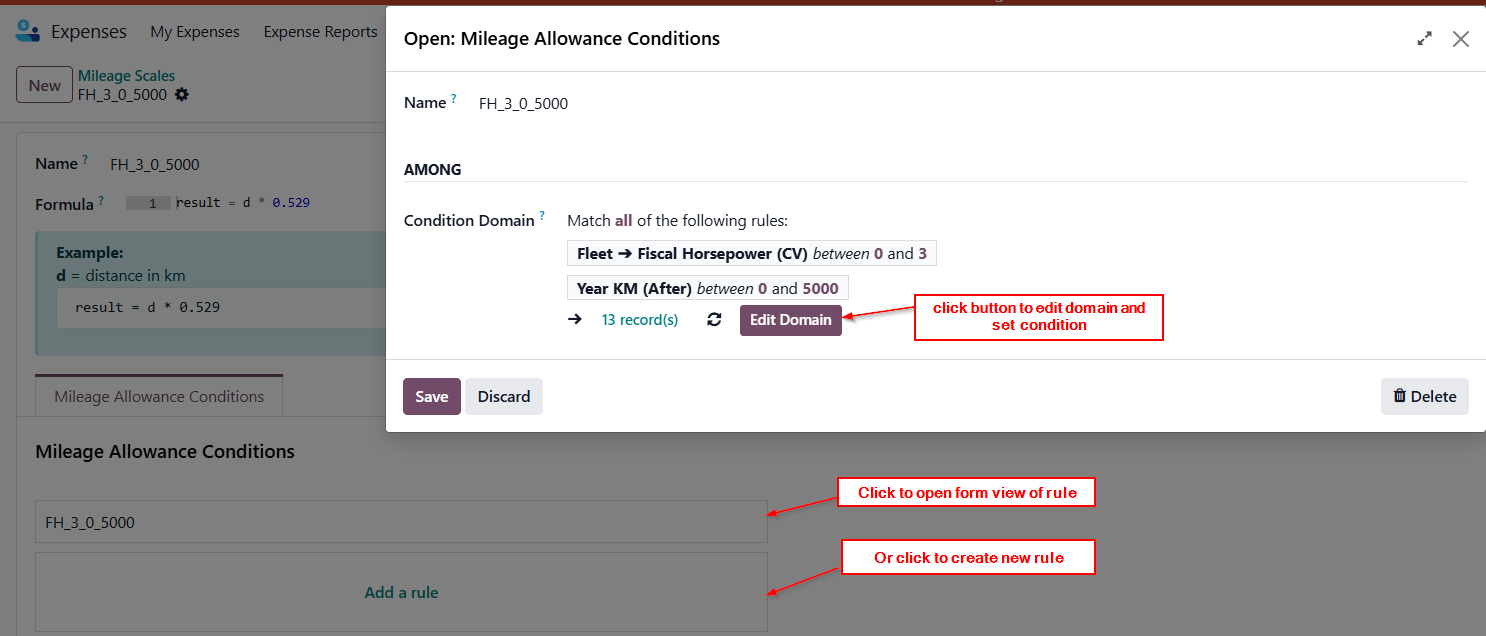
  • Go to Expenses > Mileage > Mileage Scale > click New to create a rule.
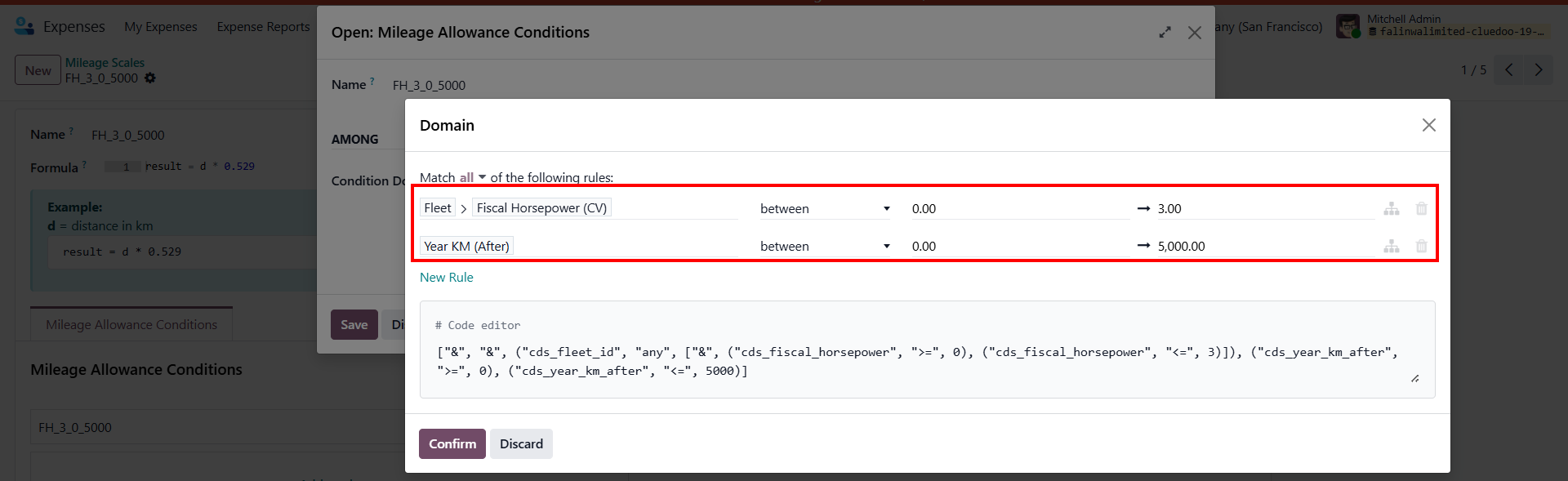
  • Name: Give the scale a clear identifier, such as FH_3_0_5000.
  • Formula: Define the calculation logic using a Python formula
    (for example result = d * 0.529)

  • Mileage Allowance Conditions: Click Edit Domain to define the criteria used to determine when a mileage scale applies. These conditions allow the system to automatically select the appropriate reimbursement formula based on expense and vehicle data, such as the vehicle's F iscal Horsepower (CV) , cumulative annual mileage ( Year KM Afte r), vehicle type, or any other configured parameter.

  • Setup Example (URSSAF Mileage Allowance): You can easily translate standard governmental matrices into the system. Beside is a reference table based on French URSSAF scales:
Fiscal horsepower (CV) Up to 5,000 km From 5,001 to 20,000 km Beyond 20,000 km
=< 3 cv d * 0.529 (d * 0.316) + 1065 d * 0.370
4 cv d * 0.606 (d * 0.340) + 1330 d * 0.407
5 cv d * 0.636 (d * 0.357) + 1395 d * 0.427
6 cv d * 0.665 (d * 0.374) + 1457 d * 0.447
>= 7 cv d * 0.697 (d * 0.394) + 1515 d * 0.470
3. Mileage Allowance Application
  • Go to Expenses > Mileage > Mileage Allowance . This dedicated view only shows [MIL] Mileage expenses.
  • Click New to create a new mileage allowance record.

USAGE

When creating a new Mileage Allowance:

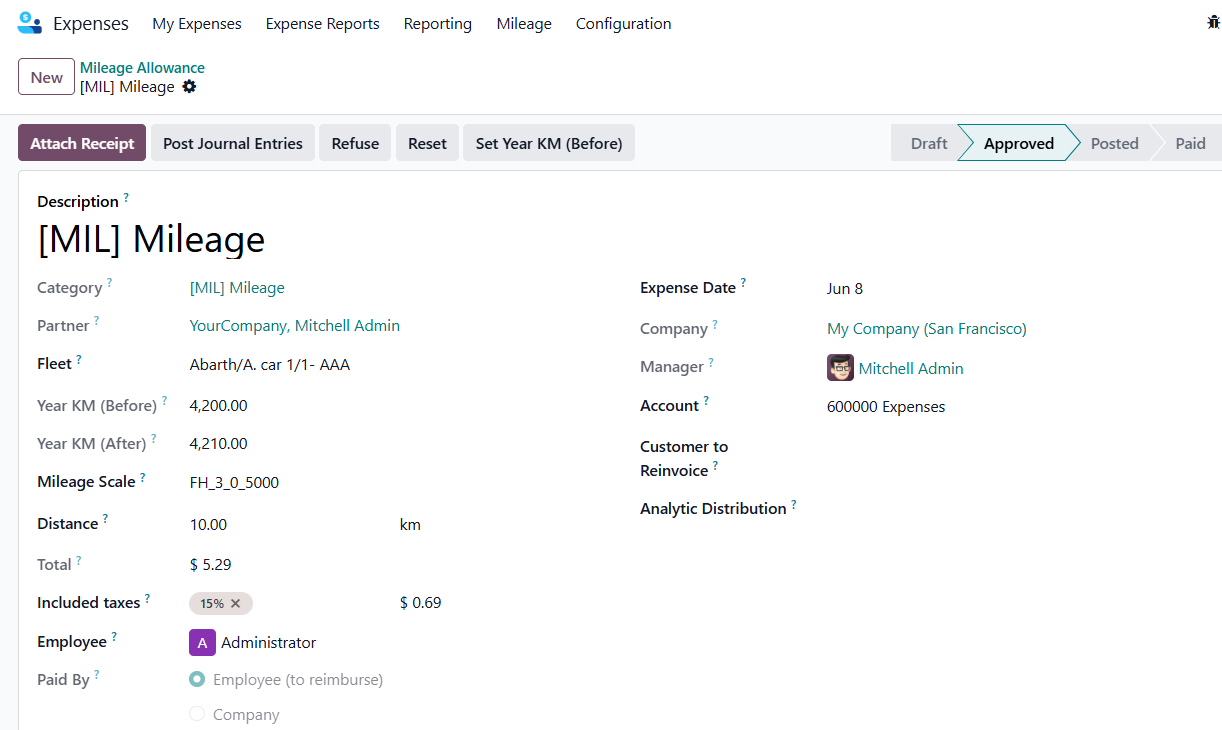
Inside the new record (Category: [MIL] Mileage), fill in the details to trigger dynamic calculations:

  • Vehicle & Distance: Select the vehicle assigned to the employee and enter the distance traveled.
  • Annual Mileage Tracking: The system automatically retrieves the vehicle's accumulated mileage for the year ( Year KM Before ) and calculates the updated total ( Year KM After ) based on the entered distance.
  • Mileage Scale (Auto-Matching): The system automatically identifies the applicable mileage scale by evaluating the expense data against the configured criteria. For example, it can consider the vehicle's fiscal horsepower (CV) and the employee's cumulative annual distance to determine the correct scale. No manual selection is required.
  • Reimbursement Amount: Once the matching scale is found, the system executes the configured Python formula and automatically calculates the reimbursement amount.

1. Dynamic Calculation & Odometer Syncing

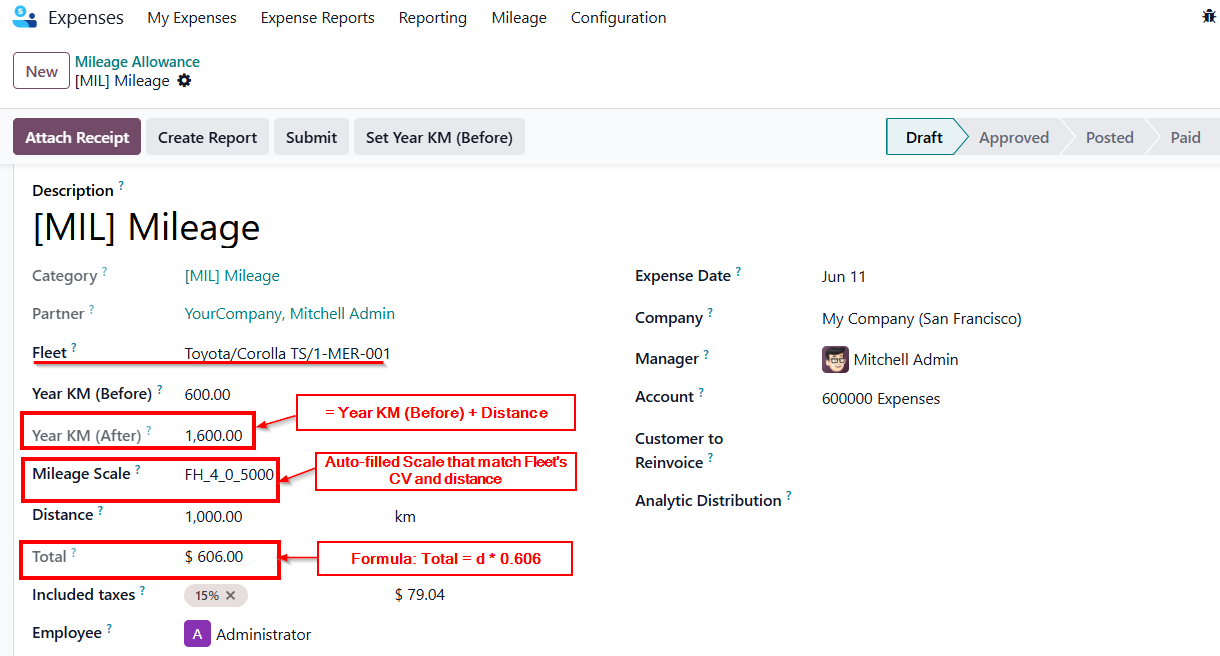
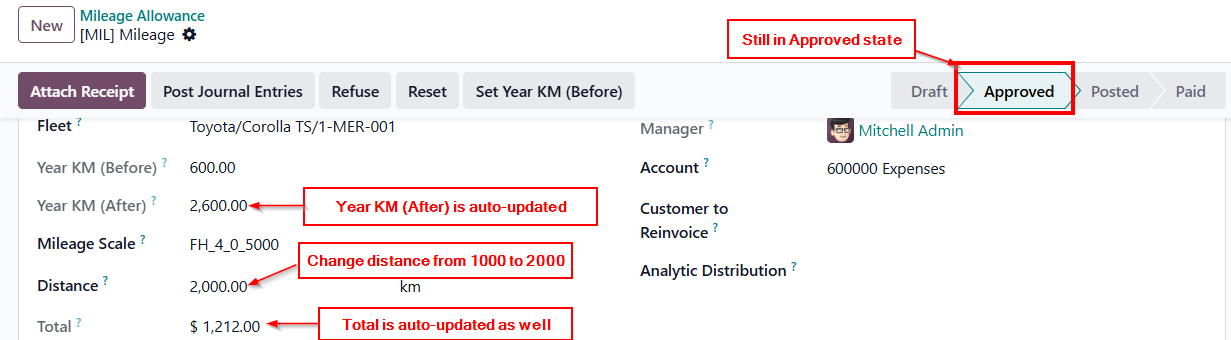
  • The system automatically retrieves the vehicle's accumulated annual mileage ( Year KM Before ) and calculates the updated value ( Year KM After = Year KM Before + Distance ).
  • Based on the configured matching criteria (e.g., vehicle Fiscal Horsepower (CV) and annual mileage), the system automatically selects the appropriate Mileage Scale.
  • The reimbursement amount ( Total ) is then calculated using the formula defined on the selected Mileage Scale.

  • Once the expense aka milleage allowance is Approved , the system automatically creates an Odometer log to sync this new distance directly with the vehicle's history.

2. Modification After Approval

  • If you change the Distance on an approved expense, the system smoothly handles the update: it auto-syncs the linked Odometer log, recalculates the Fleet's total distance, and refreshes the Expense Total.
  • (Note: Refused or deleted expenses will automatically delete their linked odometer logs to prevent phantom data).

3. Handling Parallel Expenses (The Refresh Button)

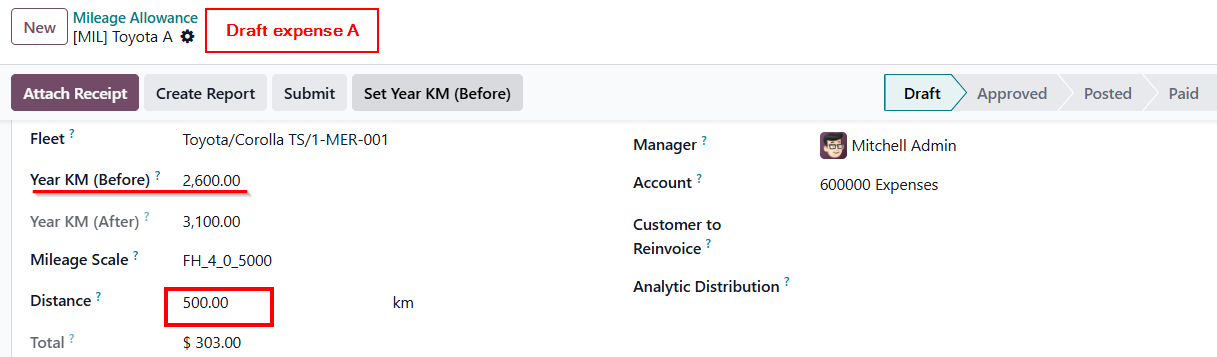
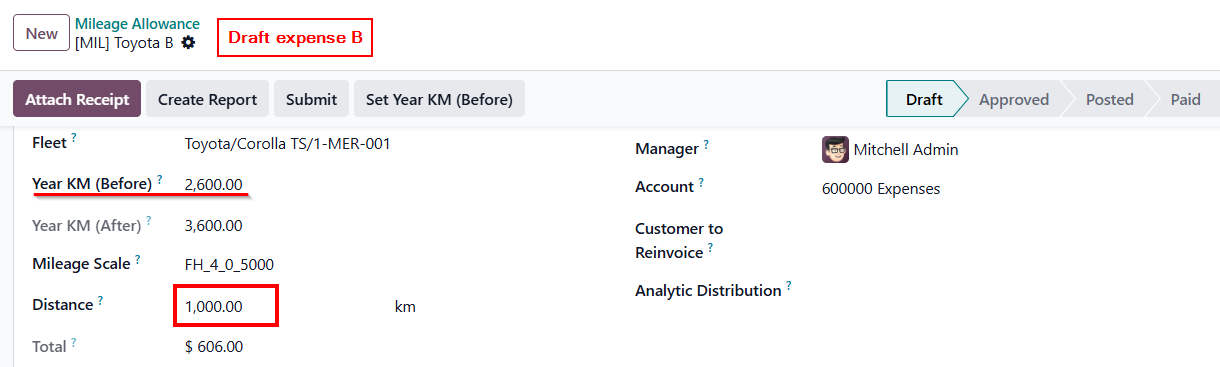
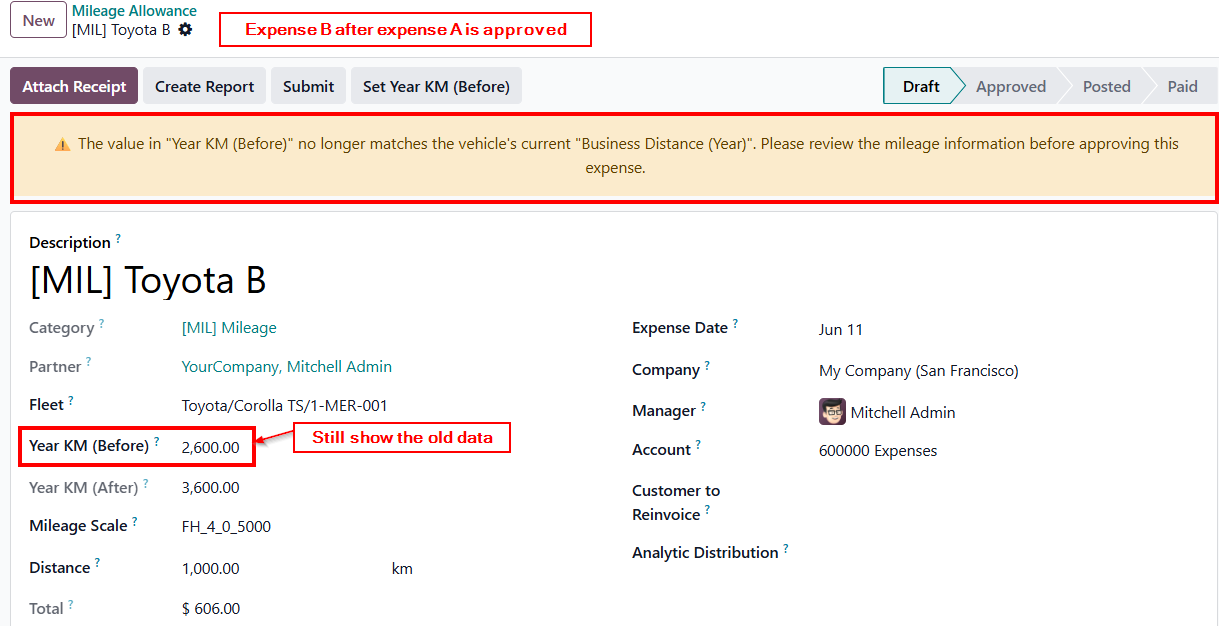
  • Scenario: You have two Draft expenses (A & B) for the same car. If Expense A is approved first, the car's total mileage increases, making Expense B's Year KM (Before) outdated.
  • Note: There will be a warning showing that the Year KM Before is outdated.


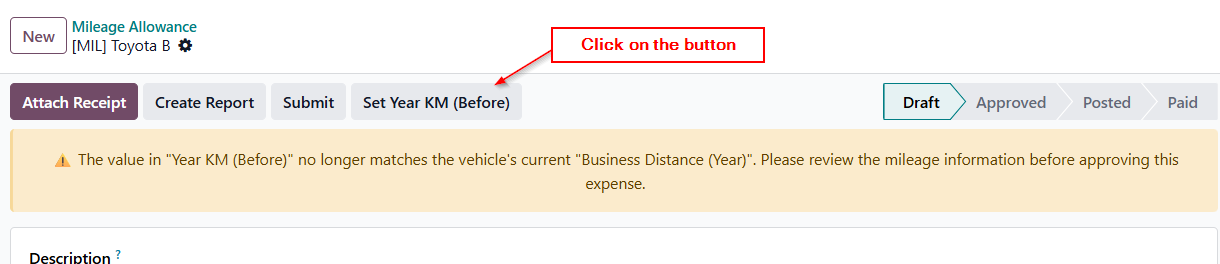
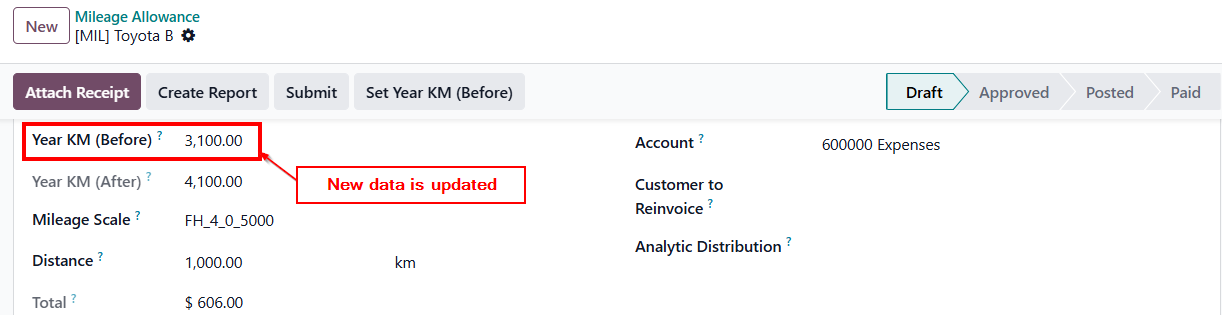
  • Solution: While Expense B is still in Draft, simply click the Set Year KM (Before) button. This manually fetches the latest data from the Fleet to ensure perfect calculations. (This button permanently locks once the expense is submitted).


Availability
Odoo Online
Odoo.sh
On Premise
Odoo Apps Dependencies • Expenses (hr_expense)
• Fleet (fleet)
• Employees (hr)
• Invoicing (account)
• Discuss (mail)
Lines of code 85
Technical Name cds_fleet
LicenseOPL-1
Websitehttps://www.cluedoo.com/shop/lic-clu-set-tlm-0003-mileage-allowance-management-fleet-7306
Odoo Proprietary License v1.0

This software and associated files (the "Software") may only be used (executed,
modified, executed after modifications) if you have purchased a valid license
from the authors, typically via Odoo Apps, or if you have received a written
agreement from the authors of the Software (see the COPYRIGHT file).

You may develop Odoo modules that use the Software as a library (typically
by depending on it, importing it and using its resources), but without copying
any source code or material from the Software. You may distribute those
modules under the license of your choice, provided that this license is
compatible with the terms of the Odoo Proprietary License (For example:
LGPL, MIT, or proprietary licenses similar to this one).

It is forbidden to publish, distribute, sublicense, or sell copies of the Software
or modified copies of the Software.

The above copyright notice and this permission notice must be included in all
copies or substantial portions of the Software.

THE SOFTWARE IS PROVIDED "AS IS", WITHOUT WARRANTY OF ANY KIND, EXPRESS OR
IMPLIED, INCLUDING BUT NOT LIMITED TO THE WARRANTIES OF MERCHANTABILITY,
FITNESS FOR A PARTICULAR PURPOSE AND NONINFRINGEMENT.
IN NO EVENT SHALL THE AUTHORS OR COPYRIGHT HOLDERS BE LIABLE FOR ANY CLAIM,
DAMAGES OR OTHER LIABILITY, WHETHER IN AN ACTION OF CONTRACT, TORT OR OTHERWISE,
ARISING FROM, OUT OF OR IN CONNECTION WITH THE SOFTWARE OR THE USE OR OTHER
DEALINGS IN THE SOFTWARE.

Please log in to comment on this module

  • The author can leave a single reply to each comment.
  • This section is meant to ask simple questions or leave a rating. Every report of a problem experienced while using the module should be addressed to the author directly (refer to the following point).
  • If you want to start a discussion with the author or have a question related to your purchase, please use the support page.
Community
  • Tutorials
  • Documentation
  • Forum
Open Source
  • Download
  • Github
  • Runbot
  • Translations
Services
  • Odoo.sh Hosting
  • Support
  • Upgrade
  • Custom Developments
  • Education
  • Find an Accountant
  • Find a Partner
  • Become a Partner
About us
  • Our company
  • Brand Assets
  • Contact us
  • Jobs
  • Events
  • Podcast
  • Blog
  • Customers
  • Legal • Privacy
  • Security

Odoo is a suite of open source business apps that cover all your company needs: CRM, eCommerce, accounting, inventory, point of sale, project management, etc.

Odoo's unique value proposition is to be at the same time very easy to use and fully integrated.

Website made with