

Forecast with Pending for forecast computation
by CLuedoo https://www.cluedoo.com/shop/licclusetbud0045-forecast-with-pending-for-forecast-computation-6813$ 245.93
| Availability |
Odoo Online
Odoo.sh
On Premise
|
| Odoo Apps Dependencies |
•
Inventory (stock)
• Manufacturing (mrp) • Purchase (purchase) • Sales (sale_management) • Discuss (mail) • Invoicing (account) |
| Community Apps Dependencies | Show |
| Lines of code | 226 |
| Technical Name |
fal_forecast_include_pending |
| License | OPL-1 |
| Website | https://www.cluedoo.com/shop/licclusetbud0045-forecast-with-pending-for-forecast-computation-6813 |
| Availability |
Odoo Online
Odoo.sh
On Premise
|
| Odoo Apps Dependencies |
•
Inventory (stock)
• Manufacturing (mrp) • Purchase (purchase) • Sales (sale_management) • Discuss (mail) • Invoicing (account) |
| Community Apps Dependencies | Show |
| Lines of code | 226 |
| Technical Name |
fal_forecast_include_pending |
| License | OPL-1 |
| Website | https://www.cluedoo.com/shop/licclusetbud0045-forecast-with-pending-for-forecast-computation-6813 |
ODOO'S FUNCTION
In standard Odoo, the “To Order” quantity on the Replenishment screen is based only on confirmed Purchase, Sales, and Manufacturing Orders → may miss upcoming demand
CLUEDOO'S FUNCTION
Cluedoo shows both Forecast & Forecast Pending side by side, letting users toggle calculation mode for more accurate planning.
✅ Adds Forecast Pending column showing quantities from both confirmed and pending documents.
✅ Adds Calculate Forecast Pending checkbox:
-
Checked: “To Order” uses Forecast Pending.
-
Unchecked: “To Order” uses standard Forecast.
|
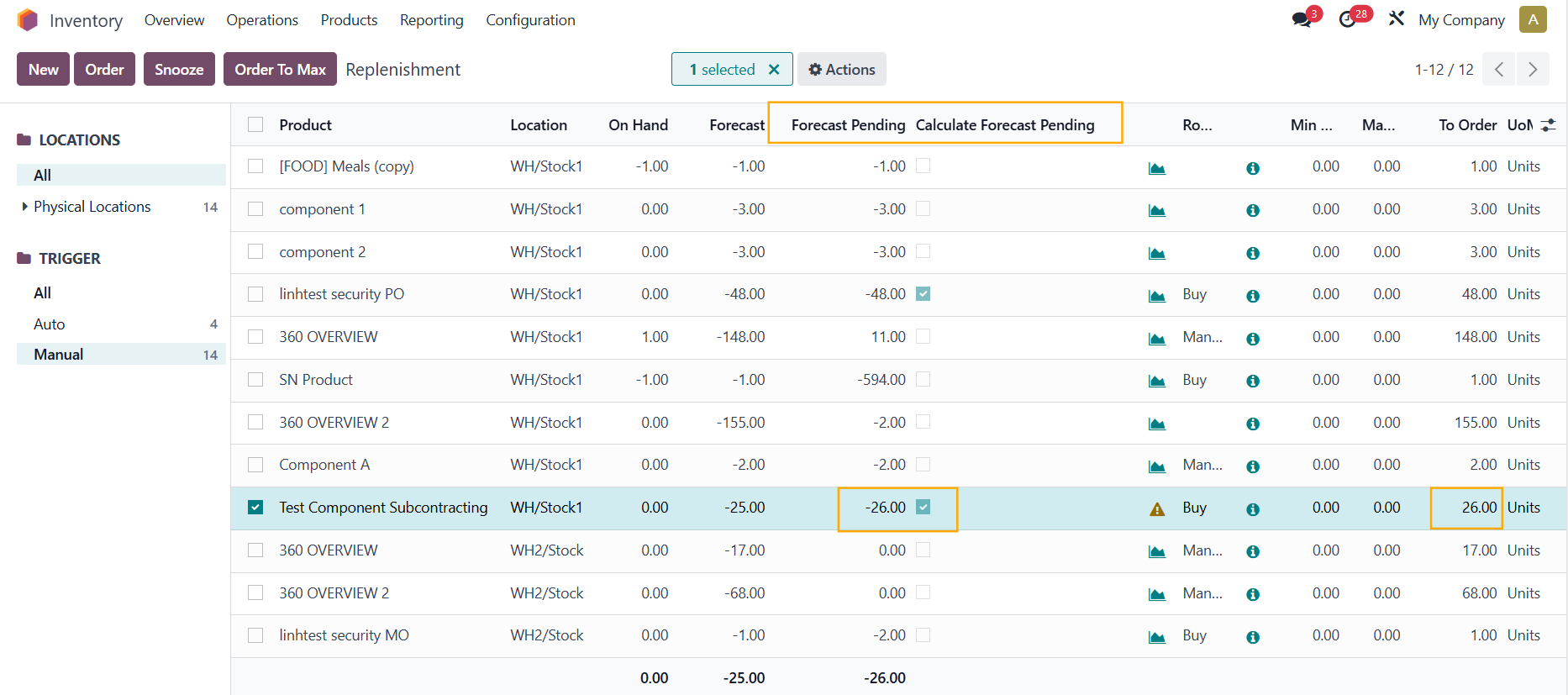
1. In the list view of Replenishment , new columns Forecast Pending and Calculate Forecast Pending are added to determine whether the To order will be calculated from Forecast or Forecast Pending.
|

|
|
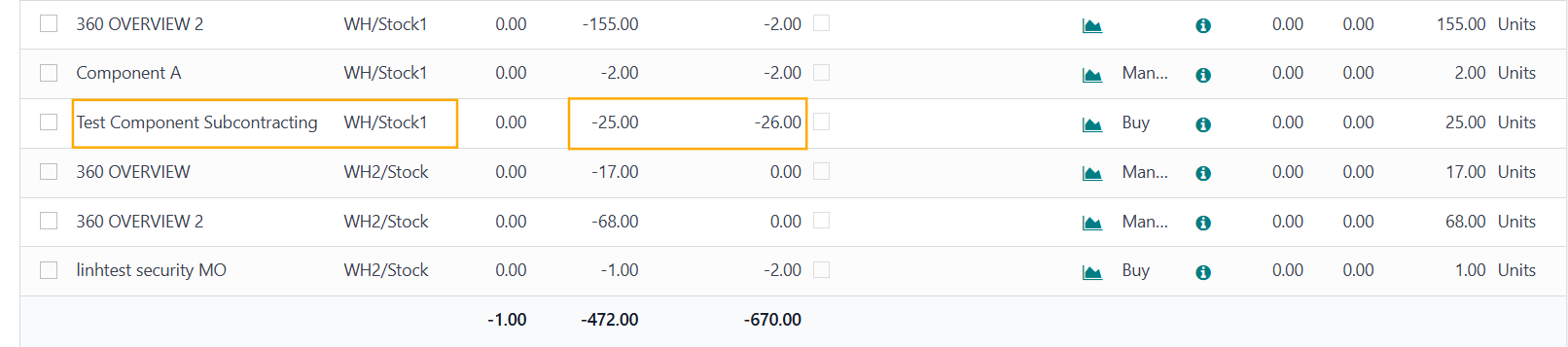
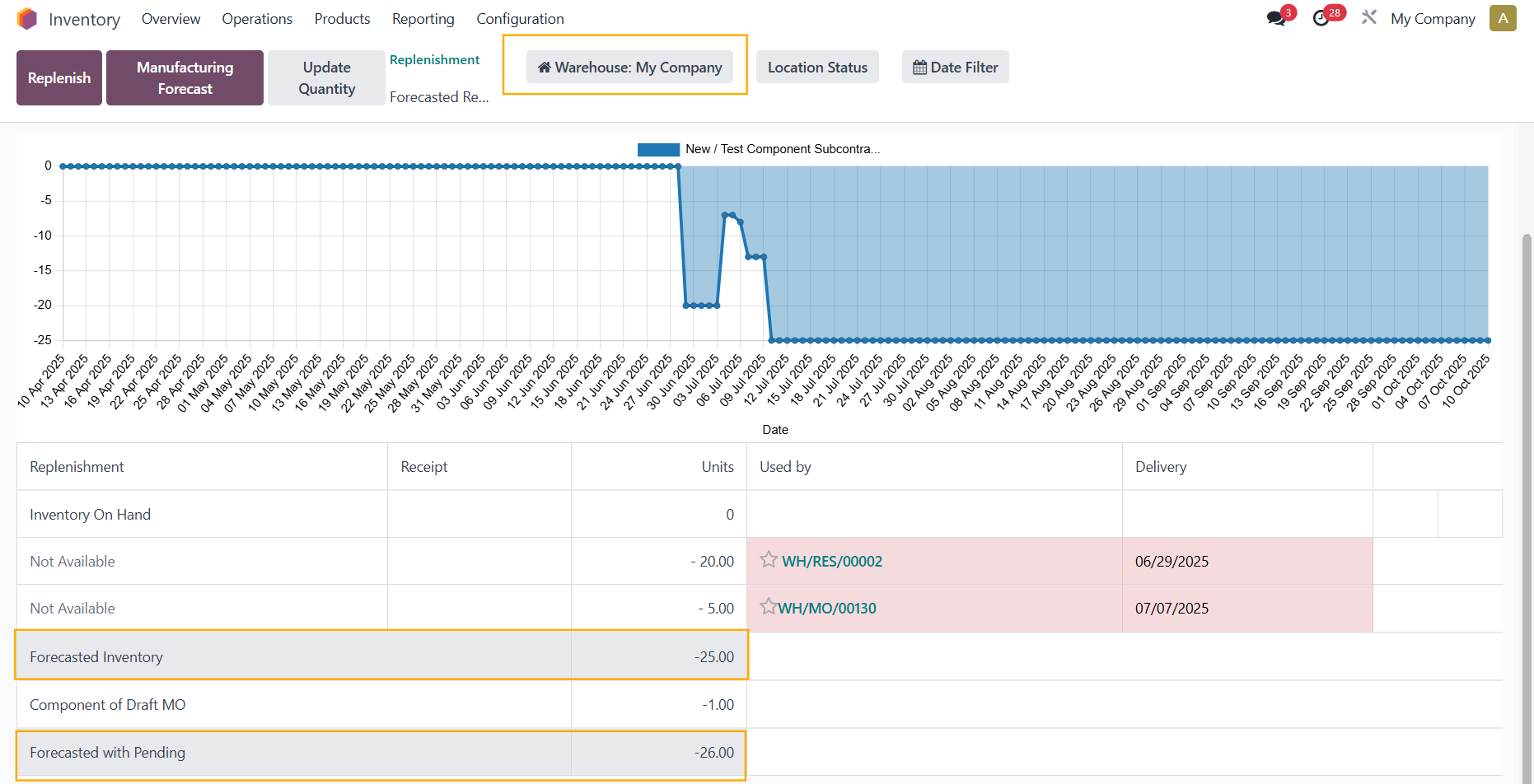
2. The quantities shown in Forecast and Forecast Pending are taken from the Location of the Warehouse that you chose |

|
|
You can see here, for product
Test Component Subcontracting
, when you change the
Location
, the
Forecast
and
Forecast Pending
quantities will be updated accordingly
Note:
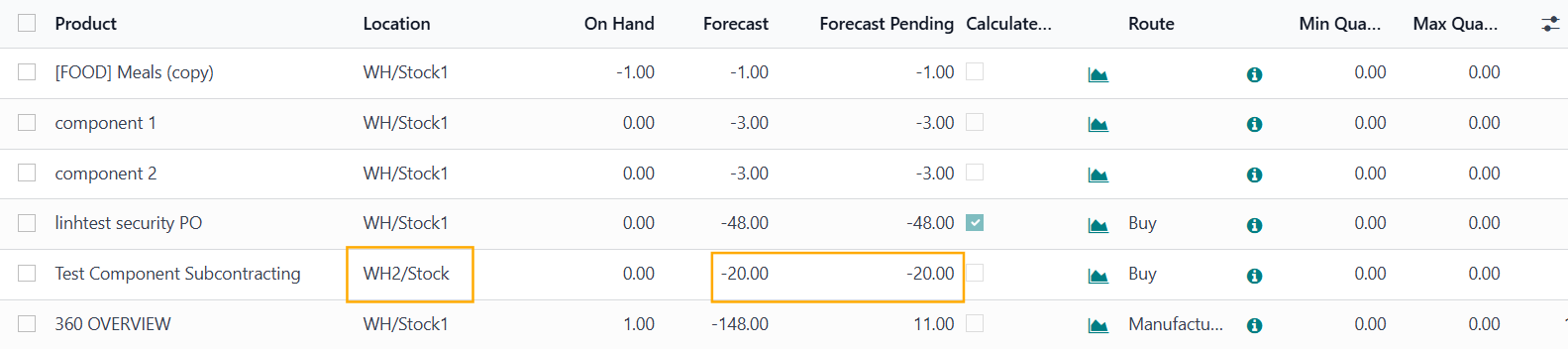
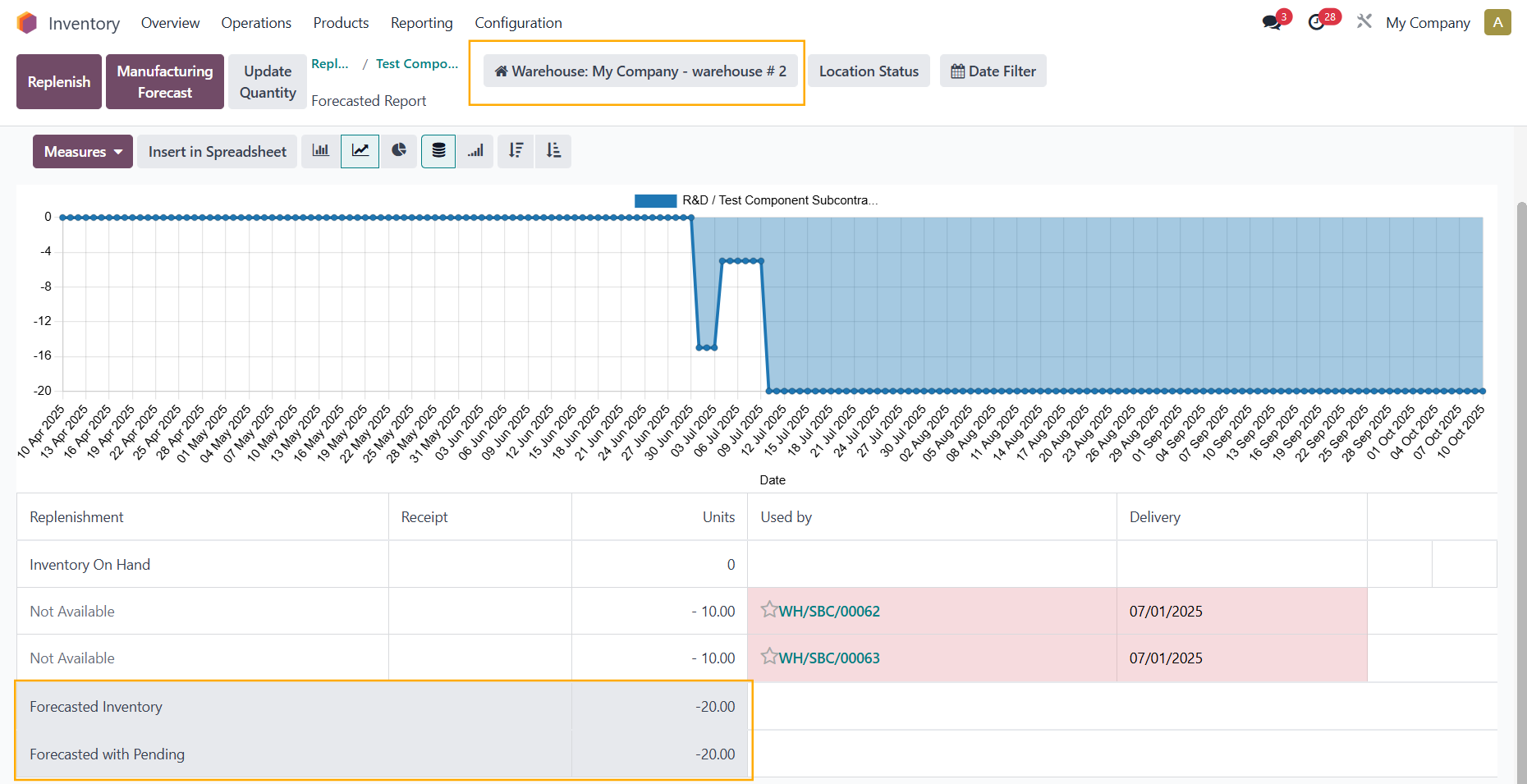
In case there are several locations in a warehouse, the quantities in the Forecasted Report are included from
all locations
of that warehouse
|
|
|
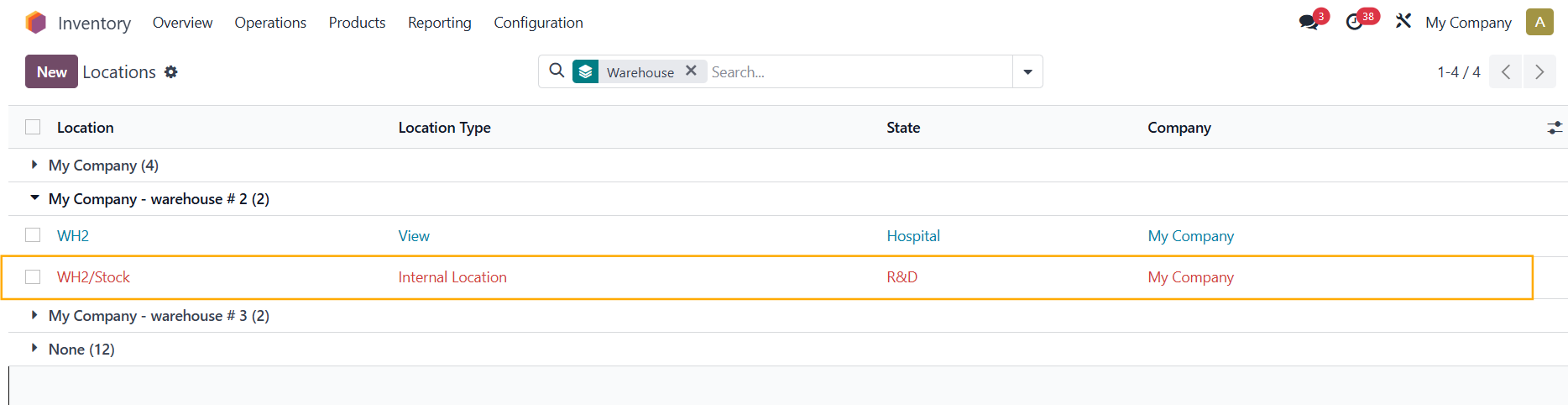
In this example, since the warehouse
My Company - warehouse # 2
only has 1 location, the quantities in the Replenishment = the quantities in the Forecasted Report
Note :
|
|
|
|
|
|
|
|
STORY BEHIND THE FEATURE
ODOO BEHAVIOR
In standard Odoo, the “To Order” quantity on the Replenishment screen is based only on confirmed Purchase, Sales, and Manufacturing Orders.
→ may miss upcoming demand.
CLUEDOO BEHAVIOR
Shows both Forecast & Forecast Pending side by side, letting users toggle calculation mode for more accurate planning.
✅ Adds Forecast Pending column showing quantities from both confirmed and pending documents.
✅ Adds Calculate Forecast Pending checkbox:
-
Checked: “To Order” uses Forecast Pending.
-
Unchecked: “To Order” uses standard Forecast.
BUSINESS CASE
Example: Product “IoT2” has 0 on hand and a pending SO of 4.
-
Odoo: No replenishment suggested.
-
Cluedoo: “To Order” shows 4 when Calculate Forecast Pending is enabled → helps plan ahead.
OUR FEATURES AS SOLUTIONS
New column Forecast Pending in the list view of Replenishment
New checkbox Calculate Forecast Pending to enable calculating Forecast Pending
HOW TO USE THIS MODULE
|
1.
In the list view of
Replenishment
,
new columns
Forecast Pending
and
Calculate
Forecast Pending
are added to determine whether the
To order
will be calculated from
Forecast
or
Forecast Pending
|


|
|
2.
The quantities shown in
Forecast
and
Forecast Pending
are taken from the
Location
of the Warehouse that you chose
|


|
|
You can see here, for product
Test Component Subcontracting
, when you change the
Location
, the
Forecast
and
Forecast Pending
quantities will be updated accordingly
Note:
In case there are several locations in a warehouse, the quantities in the Forecasted Report are included from
all locations
of that warehouse
|


|
|
In this example, since the warehouse
My Company - warehouse # 2
only has 1 location, the quantities in the Replenishment = the quantities in the Forecasted Report
|

|
|
Note :
|
|
Odoo Proprietary License v1.0

This software and associated files (the "Software") may only be used (executed,
modified, executed after modifications) if you have purchased a valid license
from the authors, typically via Odoo Apps, or if you have received a written
agreement from the authors of the Software (see the COPYRIGHT file).

You may develop Odoo modules that use the Software as a library (typically
by depending on it, importing it and using its resources), but without copying
any source code or material from the Software. You may distribute those
modules under the license of your choice, provided that this license is
compatible with the terms of the Odoo Proprietary License (For example:
LGPL, MIT, or proprietary licenses similar to this one).

It is forbidden to publish, distribute, sublicense, or sell copies of the Software
or modified copies of the Software.

The above copyright notice and this permission notice must be included in all
copies or substantial portions of the Software.

THE SOFTWARE IS PROVIDED "AS IS", WITHOUT WARRANTY OF ANY KIND, EXPRESS OR
IMPLIED, INCLUDING BUT NOT LIMITED TO THE WARRANTIES OF MERCHANTABILITY,
FITNESS FOR A PARTICULAR PURPOSE AND NONINFRINGEMENT.
IN NO EVENT SHALL THE AUTHORS OR COPYRIGHT HOLDERS BE LIABLE FOR ANY CLAIM,
DAMAGES OR OTHER LIABILITY, WHETHER IN AN ACTION OF CONTRACT, TORT OR OTHERWISE,
ARISING FROM, OUT OF OR IN CONNECTION WITH THE SOFTWARE OR THE USE OR OTHER
DEALINGS IN THE SOFTWARE.
Please log in to comment on this module