

Production Order 360 views and plan
by CLuedoo https://www.cluedoo.com/shop/lic-clu-set-ppo-0088-production-order-360-views-and-plan-6843$ 600.47
ODOO'S FUNCTION
Odoo standard only provides a Manufacturing Order menu in the Manufacturing app, but no Production Order menu which displays material requirements for a production order with the links to all related moves. This limitation prevents users from creating production orders or utilizing the related functions, thereby restricting their capabilities in planning and production management.
CLUEDOO'S FUNCTION
This module enhances the limitation by providing a 360-degree view for Production Orders, improving planning, replenishment, and traceability with the following features:
- Adds Production Leadtime and Production Capacity fields at the product level to calculate the Scheduled Starting Date for POs.
- Supports spliting MOs based on Production Capacity with sequential scheduling.
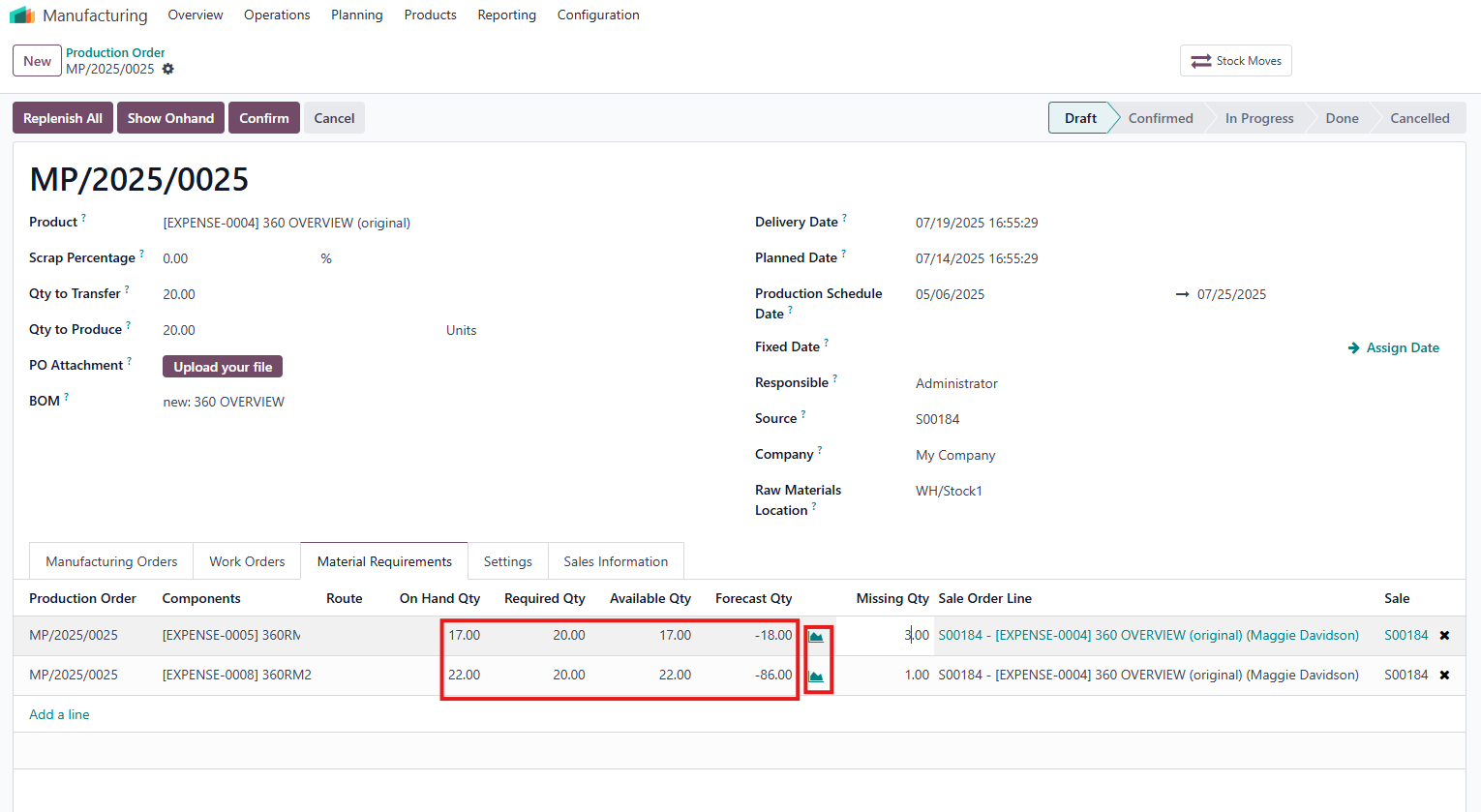
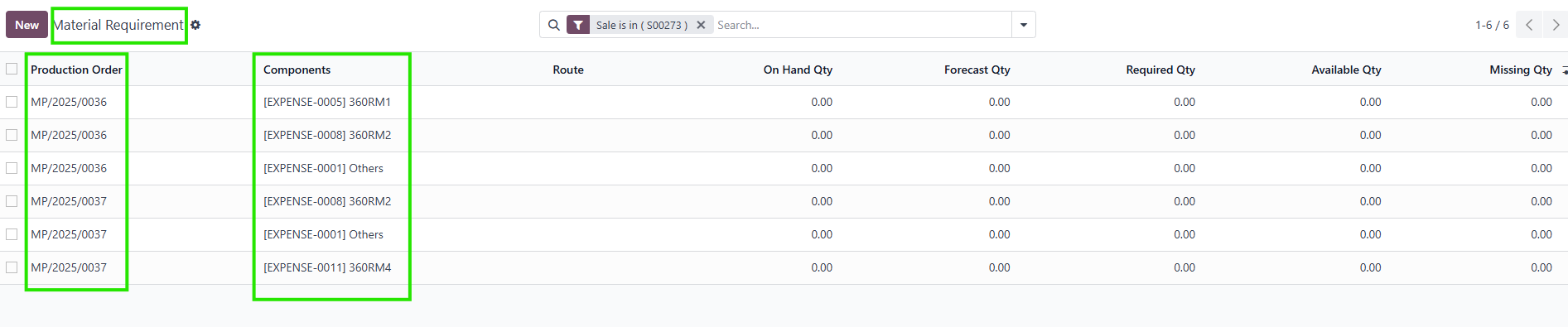
- Introduces a Material Requirements tab and a dedicated menu displaying Qty Required , Qty on Hand , Available Qty , Forecast Qty , and Qty Missing , with manual updates via an Update button.
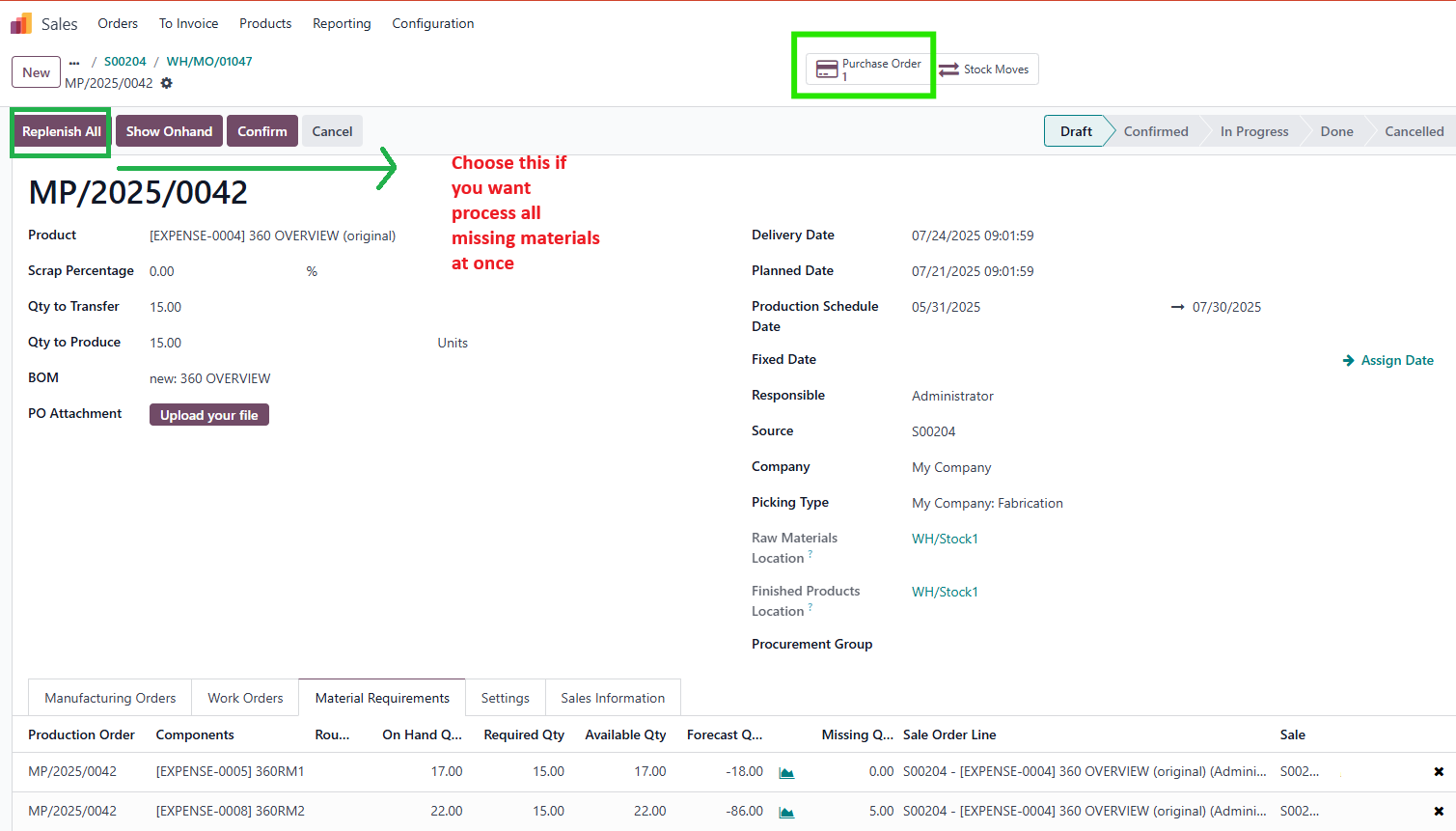
- Streamlines replenishment with Replenish and Replenish All buttons directly in the PO
- Consolidates material requirements for the same product within a PO using a Merge Requirement feature, accessible in the PO and Material Requirements List View .
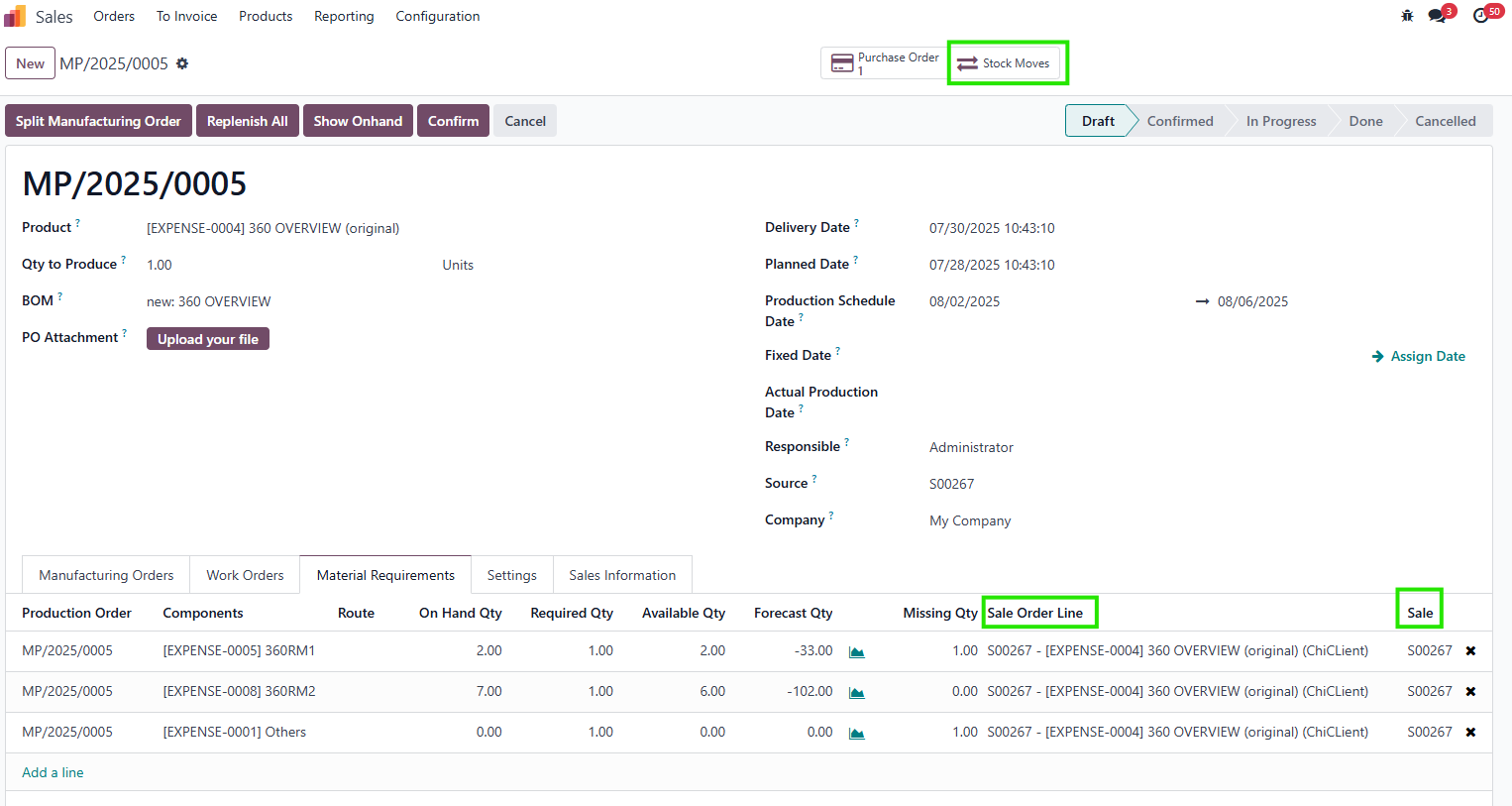
- Links POs to Sales Orders (SOs), Sale Order Lines (SOLs, for single-variant cases), RFQs, PO lines, stock moves, and a dedicated document folder for full traceability.
- Supports multiple main MOs with different product variants (same Product Template) in a single PO, compatible with Odoo v18.
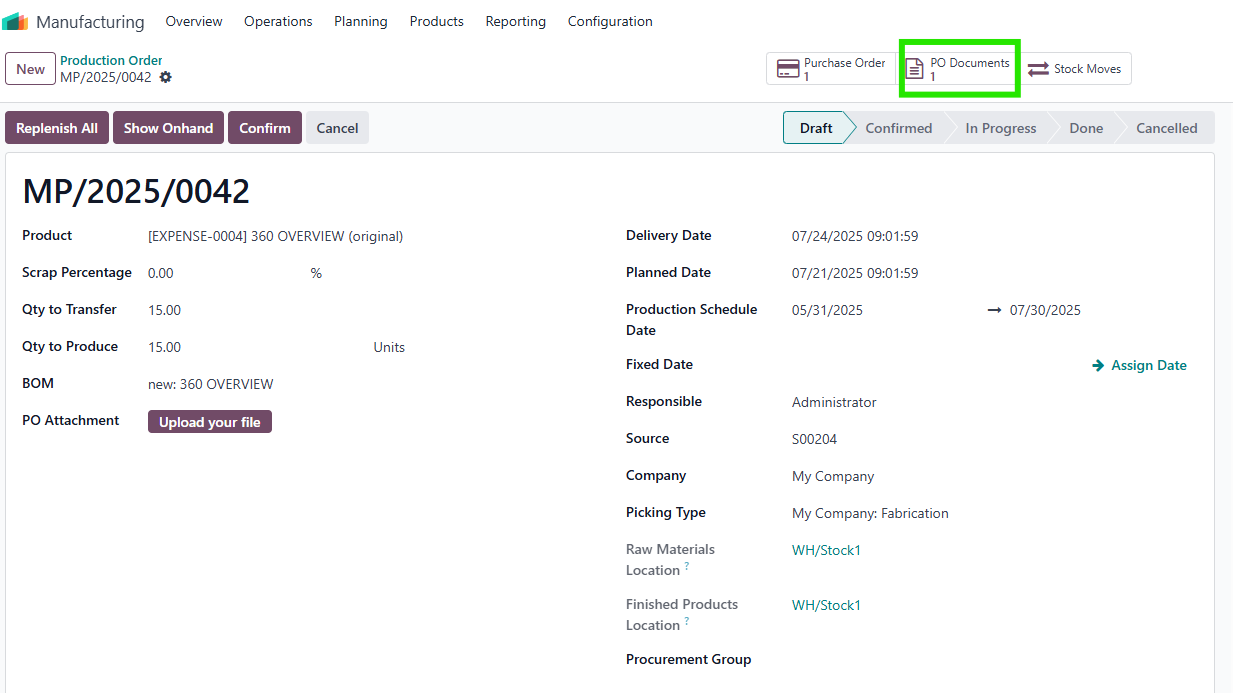
- Provides a dedicated document folder per PO, accessible via a smart button in the PO form.
- Allows manual editing of Qty Missing to handle cases where the same product appears in multiple POs or when semi-product Qty Missing is zero.
CONFIGURATION
|
|
||||
|
1. Go to Manufacturing > Products > Products and select the product you want to configure for production.
2. Go to
Inventory
field
>
Production Leadtime
(e.g., 20 days). This is the total time to produce the finished product, including sub-MOs and main-MO.
Go to Production Capacity > Set the quantity (e.g., 5 units per period) to define the number of finished products that can be produced in a given period.
Note
: If Production Leadtime or Production Capacity is not set, the module
will not calculate
the Scheduled Starting Date correctly.
|

|
||||
USAGE |
|
||||
|
1. Go to
Manufacturing > Operations > Production Orders
and create a new Production Order (PO)
or
Go to
Sales > Sales Order (SO)
for
Make-to-Order (MTO)
.
|

|
||||
|
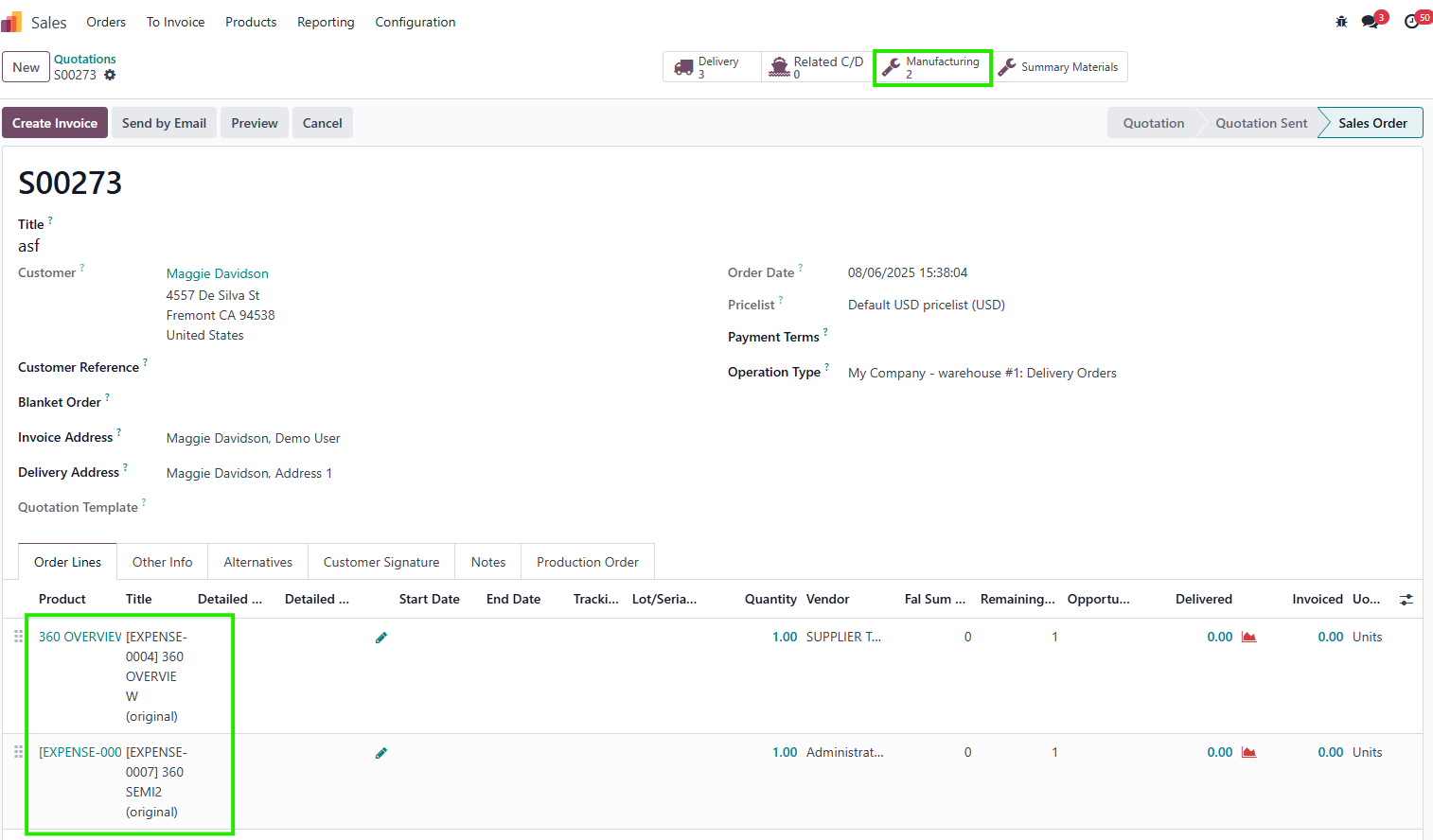
Watchout : Order Date: Jul, 06. 2026 Go to Manufacturing smart button. |
|
||||
|
Click Confirm . |

|
||||
|
Go to Miscellaneous tab > P roduction Order field > Go to PO Number linked. |
|
||||
|
Look for
:
Scheduled Starting Date
: For MTO, this is automatically calculated using the formula:
Scheduled Starting Date = SO Commitment Date - roundup (PO Quantity / Production Capacity) × Production Leadtime
For example
:
If Quantity to Produce = 20, Production Capacity = 5, Production Leadtime = 20 days, and SO Order Date (Commitment Date) = Jul, 6. 2026, then :
Duration = roundup (20 / 5) × 20 = 4 × 20 = 80 days.
Scheduled Starting Date = Jul, 06 - 80 days = Apr, 17. |

|
||||
|
Note
:
If the PO is created manually (not from an SO), the Scheduled Starting Date will be calculated based on the inputted Delivery Date automatically Calculation. |

|
||||
|
2. Go to
Manufacturing > Operations > Manufacturing Orders
or view MOs directly from the PO form.
|

|
||||
|
Look for
:
The system automatically splits the PO into
multiple MOs
based on Production Capacity when you click
"Split Manufacturing Order"
.
Each MO has a Scheduled Date calculated as:
MO Scheduled Date = Production Scheduled date + X Leadtime, where X is the number of the MO.
Example
: If Production Scheduled Date = Apr, 20. 2026 and Leadtime = 20 days:
MO.1: Apr, 20
MO.2: May, 10
MO.3: May, 30
MO.4: Jun, 19 |

|
||||
|
3. Click Show Onhand button to Refresh & update On Hand Qty, Available Qty, and Forecast Qty. Merge Requirement : Use the Merge Requirement button in the PO or the Merge action in the Material Requirements List View to consolidate requirements for the same product within the same PO (sum Qty Required, recalculate On Hand, Available, Forecast, and Missing quantities) ( Still developing ). Access the Material Requirements tab in the PO form.
Look for
:
Columns displaying:
Sources : Links to Sale Order (SO) and Sale Order Line (SOL) . For multiple product variants in one PO, only the SO link is shown.
Note
:
|

|
||||
|

|
||||
|
Note
:
|
|
||||
|
|

|
||||
|
|
|
||||
|
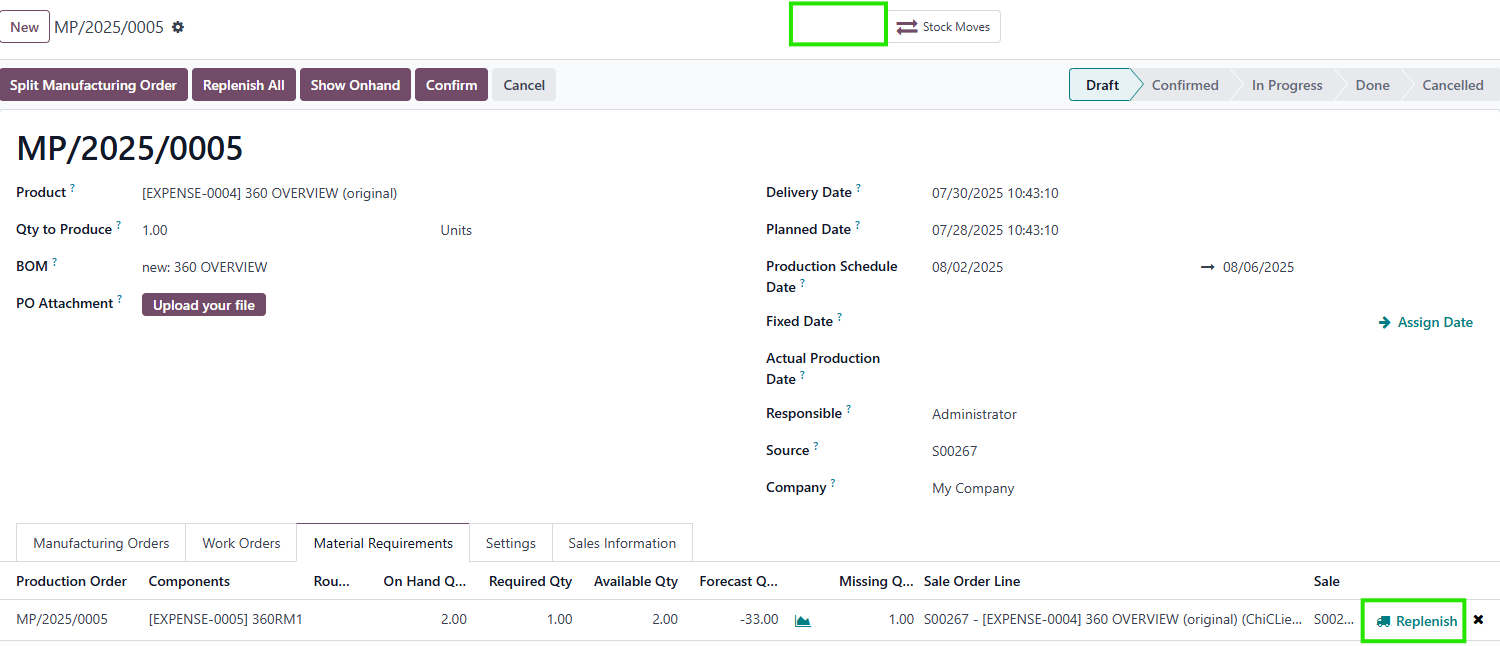
4. Replenish Materials Go to Material Requirements tab in the PO form.
Look for
:
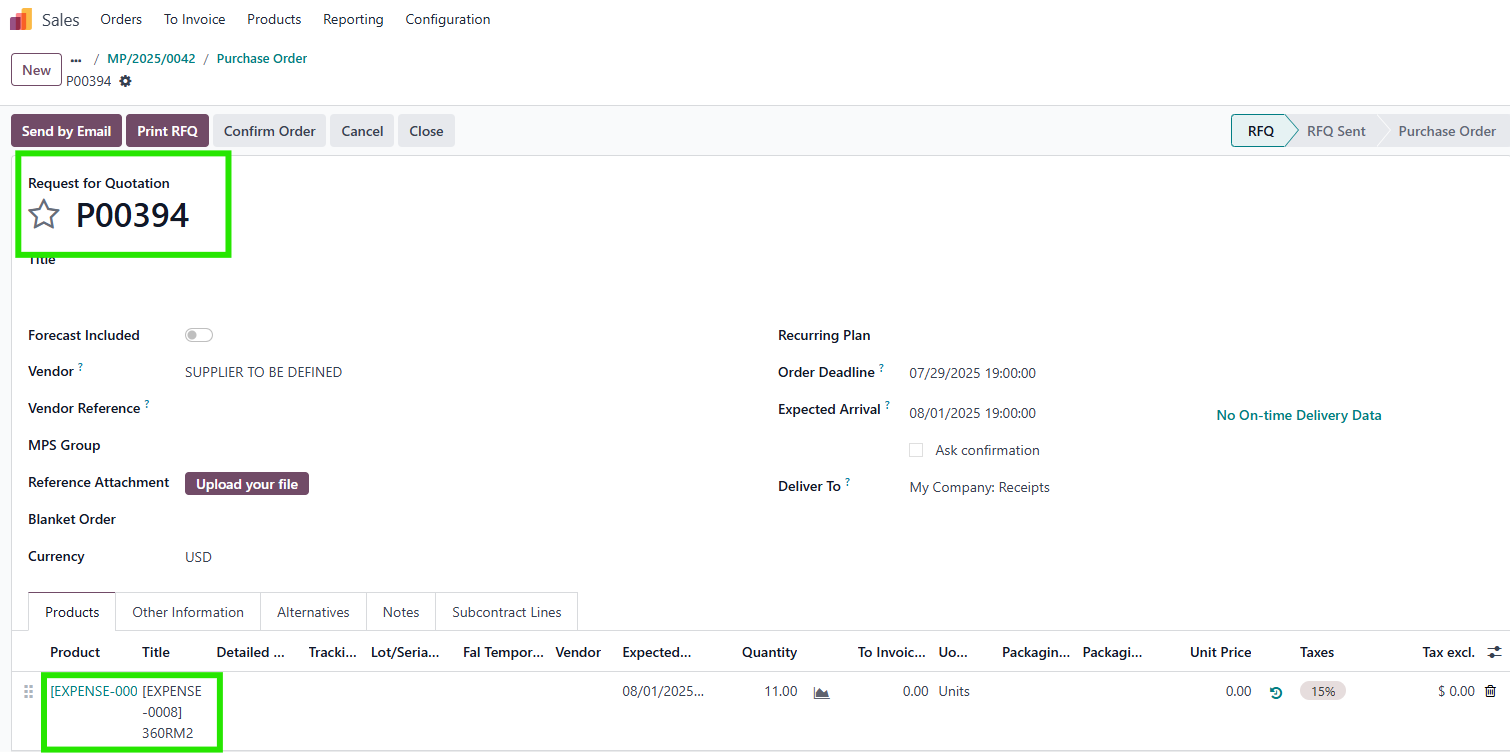
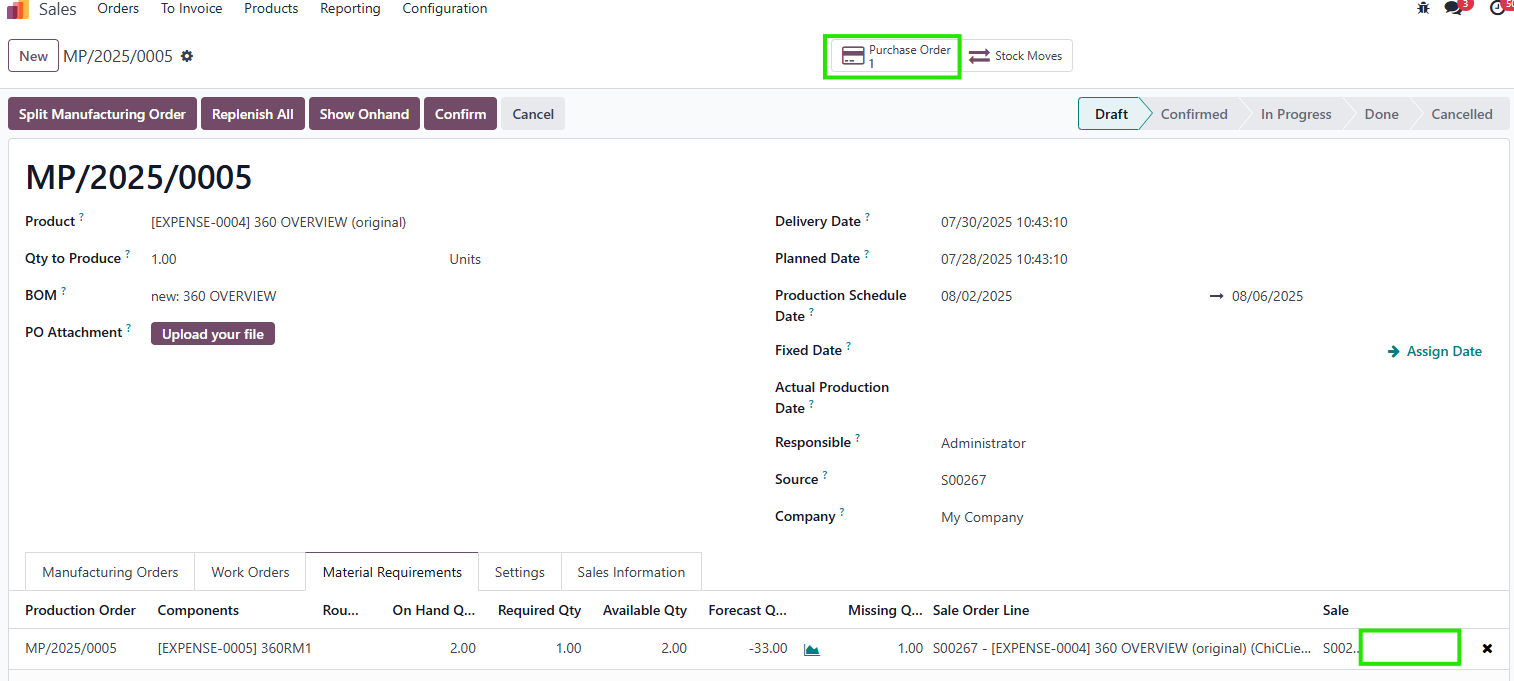
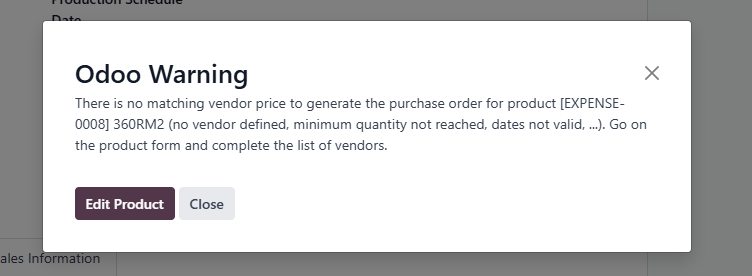
Replenish button: Appears only when there is a Qty Missing for a material. Replenish All button: Replenishes all missing materials in one action.
|

|
||||
|
After using Replenish All button. |
|
||||
|
Note
:
The button Replenish only visible when there is a missing Qty. |

|
||||
|
|
||||
|
Note
:
|


|
||||
|
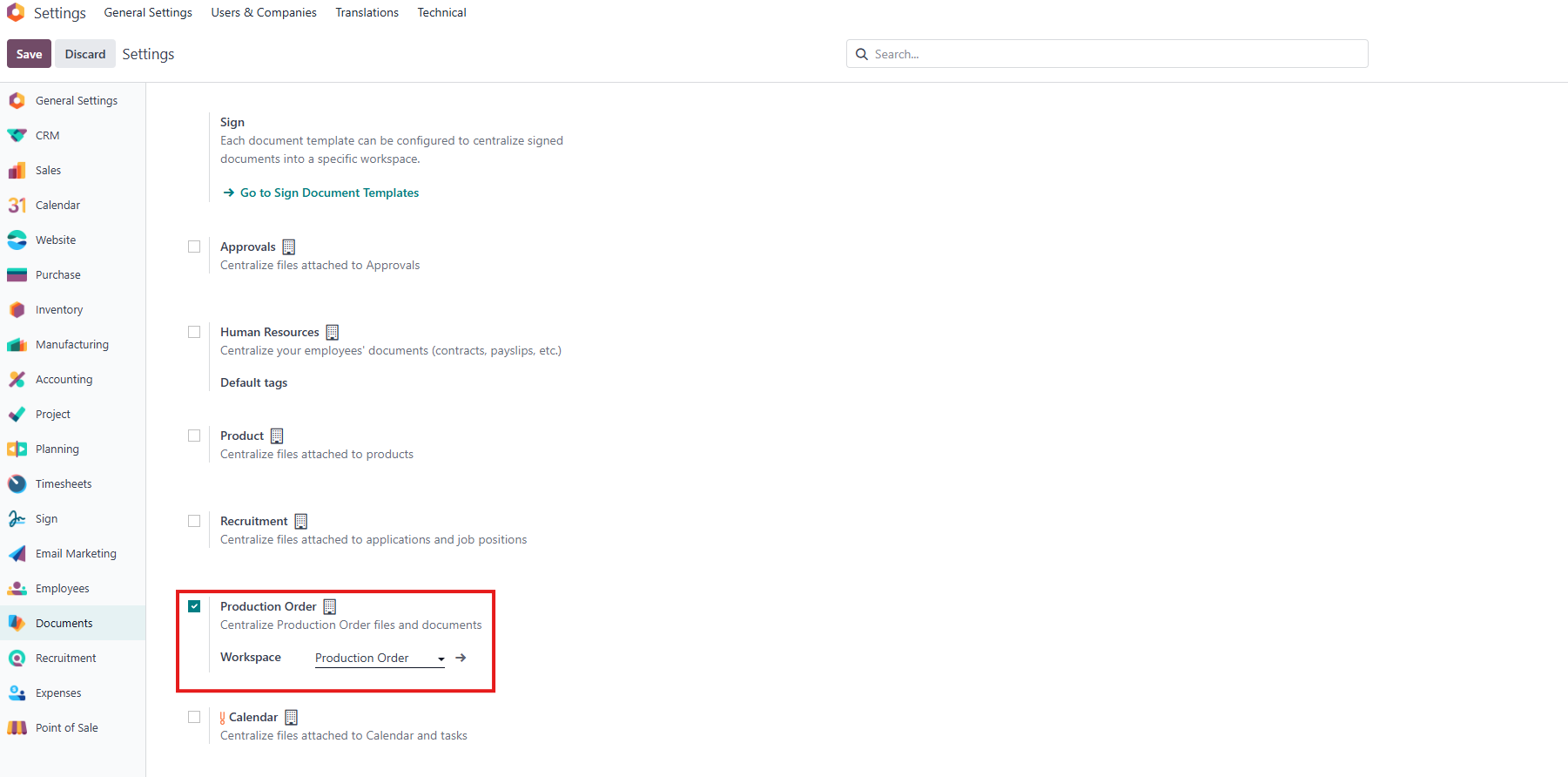
5. Manage Documents
Go to
Settings >
Choose a
workspace
.
|
|
||||
|
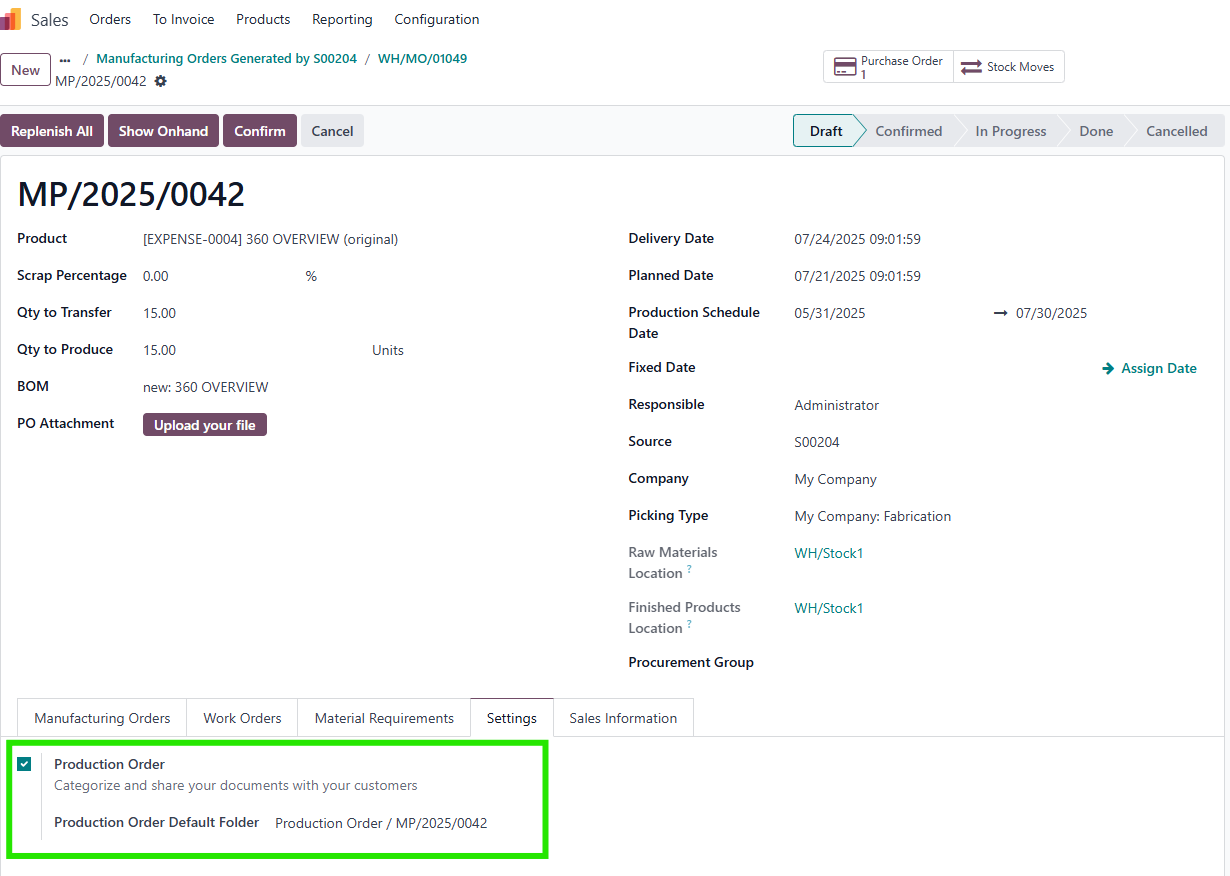
Create a Production Order > Go to Settings Tab > The sub-folder of P O will be created. |
|
|
|
|
|
|
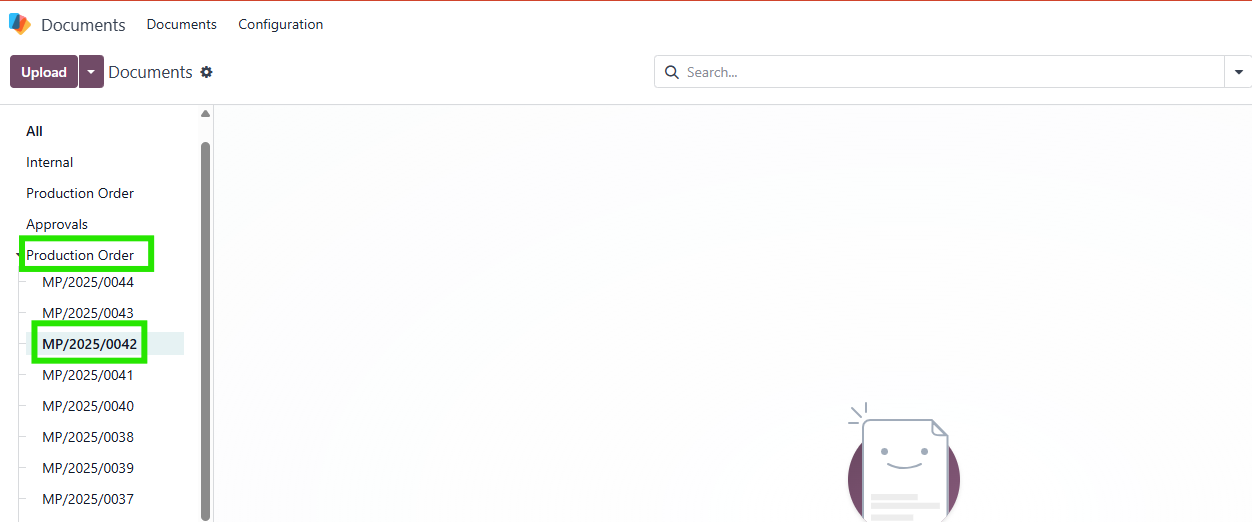
Go to
Documents > Find your sub-folder.
|
|
|
|
|
|
|
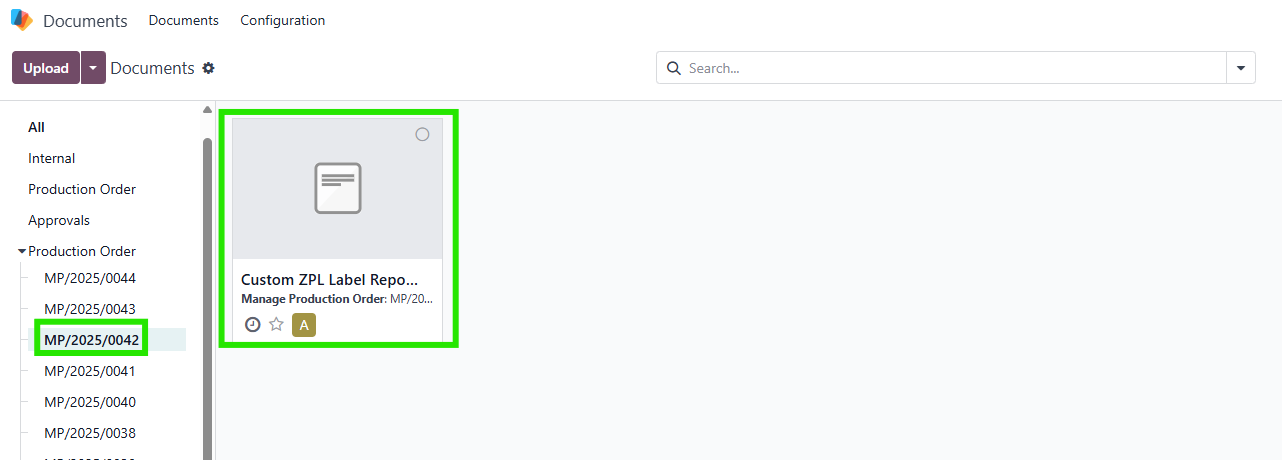
Upload document . |
|
|
|
|
|
|
Return to your PO > A smart button which links to sub-folder will appear. |
|
|
|
|
|
|
7. Link to Related Records
Go to
Production Order
form.
Look for
: Links to:
|
|
|
|
|
|


STORY BEHIND THE FEATURE
ODOO BEHAVIOUR
By default, Odoo only provides a Manufacturing Order menu in the Manufacturing app, but no Production Order menu which displays material requirements for a production order with the links to all related moves. This limitation prevents users from creating production orders or utilizing the related functions, thereby restricting their capabilities in planning and production management.
CLUEDOO BEHAVIOUR
The fal_production_order_view_and_plan module enhances Odoo's manufacturing capabilities by providing a 360-degree view for Production Orders, improving planning, replenishment, and traceability with the following features:
- Adds Production Leadtime and Production Capacity fields at the product level to calculate the Scheduled Starting Date for POs.
- Supports spliting MOs based on Production Capacity with sequential scheduling.
- Introduces a Material Requirements tab and a dedicated menu displaying Qty Required , Qty on Hand , Available Qty , Forecast Qty , and Qty Missing , with manual updates via an Update button.
- Streamlines replenishment with Replenish and Replenish All buttons directly in the PO
- Consolidates material requirements for the same product within a PO using a Merge Requirement feature, accessible in the PO and Material Requirements List View .
- Links POs to Sales Orders (SOs), Sale Order Lines (SOLs, for single-variant cases), RFQs, PO lines, stock moves, and a dedicated document folder for full traceability.
- Supports multiple main MOs with different product variants (same Product Template) in a single PO, compatible with Odoo v18.
- Provides a dedicated document folder per PO, accessible via a smart button in the PO form.
- Allows manual editing of Qty Missing to handle cases where the same product appears in multiple POs or when semi-product Qty Missing is zero.
BUSINESS CASE
This module is ideal for manufacturing businesses that require precise production planning and comprehensive visibility into their production processes. For companies using Make-to-Order (MTO) strategies, the module simplifies scheduling by accounting for Production Leadtime and Production Capacity , ensuring timely production. It is particularly valuable for businesses with complex BOMs, multiple product variants, or high-volume production, where managing material requirements, replenishment, and traceability is critical. The 360-degree view reduces manual navigation, minimizes errors in replenishment, and ensures all related data (SOs, RFQs, stock moves, documents) is accessible from a single interface, improving operational efficiency and decision-making.
HOW TO USE THIS MODULE
HOW TO USE THIS MODULE
1. Configure Product Settings
|

|
2. Create and Configure Production Orders
|


|
|
Note
:
|

|
3. Manage Manufacturing Orders (MOs)
Go to
Manufacturing > Operations > Manufacturing Orders
or view MOs directly from the PO form.
Look for
:
|


|
4. Manage Material Requirements
Note
:
Forecast Qty
column has been
removed
from the Material Requirements tab since
v19
|


|
|
Note
:
|


|
|
Note
:
|


|
5. Replenish Materials
|


|
|


|
|


|
6. Manage Documents
|


|
7. Link to Related Records
|

|
| Availability |
Odoo Online
Odoo.sh
On Premise
|
| Odoo Apps Dependencies |
•
Approvals (approvals)
• Documents (documents) • Discuss (mail) • Employees (hr) • Manufacturing (mrp) • Inventory (stock) • Purchase (purchase) • Invoicing (account) |
| Community Apps Dependencies | Show |
| Lines of code | 2608 |
| Technical Name |
fal_production_order_view_and_plan |
| License | OPL-1 |
| Website | https://www.cluedoo.com/shop/lic-clu-set-ppo-0088-production-order-360-views-and-plan-6843 |
Odoo Proprietary License v1.0

This software and associated files (the "Software") may only be used (executed,
modified, executed after modifications) if you have purchased a valid license
from the authors, typically via Odoo Apps, or if you have received a written
agreement from the authors of the Software (see the COPYRIGHT file).

You may develop Odoo modules that use the Software as a library (typically
by depending on it, importing it and using its resources), but without copying
any source code or material from the Software. You may distribute those
modules under the license of your choice, provided that this license is
compatible with the terms of the Odoo Proprietary License (For example:
LGPL, MIT, or proprietary licenses similar to this one).

It is forbidden to publish, distribute, sublicense, or sell copies of the Software
or modified copies of the Software.

The above copyright notice and this permission notice must be included in all
copies or substantial portions of the Software.

THE SOFTWARE IS PROVIDED "AS IS", WITHOUT WARRANTY OF ANY KIND, EXPRESS OR
IMPLIED, INCLUDING BUT NOT LIMITED TO THE WARRANTIES OF MERCHANTABILITY,
FITNESS FOR A PARTICULAR PURPOSE AND NONINFRINGEMENT.
IN NO EVENT SHALL THE AUTHORS OR COPYRIGHT HOLDERS BE LIABLE FOR ANY CLAIM,
DAMAGES OR OTHER LIABILITY, WHETHER IN AN ACTION OF CONTRACT, TORT OR OTHERWISE,
ARISING FROM, OUT OF OR IN CONNECTION WITH THE SOFTWARE OR THE USE OR OTHER
DEALINGS IN THE SOFTWARE.
Please log in to comment on this module