

| Availability |
Odoo Online
Odoo.sh
On Premise
|
| Odoo Apps Dependencies |
Discuss (mail)
|
| Lines of code | 4149 |
| Technical Name |
scanner_integration |
| License | OPL-1 |
| Website | https://youtu.be/eVYmdfLoyVs |
| Versions | 16.0 17.0 18.0 19.0 |
Direct Document Scanner
for Odoo 19 Community Edition
Brings physical scanner hardware directly into Odoo forms over a local WebSocket bridge. Supports flatbed scanning, ADF bulk-feed, interactive cropping, multi-page PDF assembly, and full attachment management — all inside a standard Odoo field widget.
🎬 Live Demo Videos
Watch the Scanner Bridge in action — real hardware scanning directly inside an Odoo 19 form view.
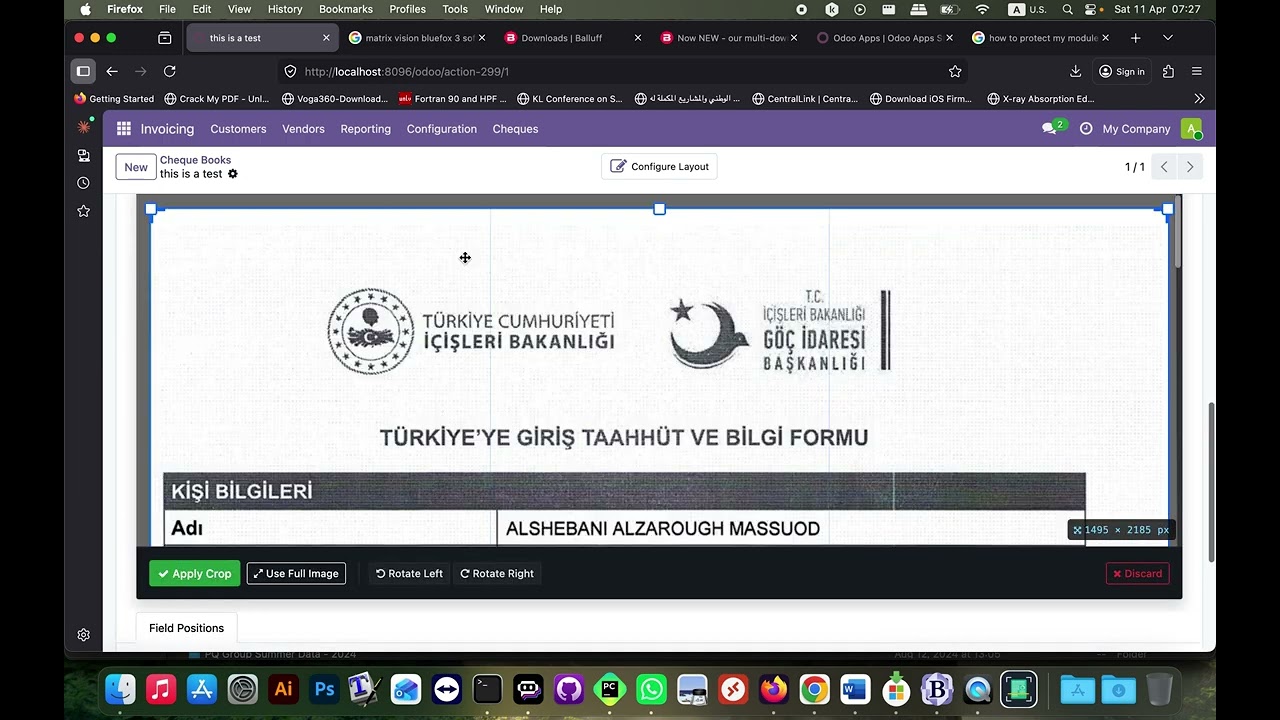
🎞️ Scanner Widget Overview
⚡ Key Features
100% Local Processing
Zero cloud dependency. All image processing runs in the browser and on the local workstation — no data ever leaves your network.
Interactive Crop & Rotating Editor
8 resize handles, draggable crop box, rule-of-thirds grid, and live pixel readout — rendered directly inside the Odoo form. Rotate pages 90° left/right!
ADF Bulk-Feed Scanning
Scan entire document stacks in one click. All pages are processed, thumbnailed, and queued for PDF assembly automatically.
Multi-Page PDF Assembly
Reorder pages, re-crop individual pages, set custom filename, and generate a PDF — all stored as ir.attachment in Odoo.
USB + Wi-Fi + Ethernet
Network scanners discovered automatically via eSCL/AirScan. No manual IP configuration needed.
Native OWL 2 Widget
Drop-in widget= attribute integration.
Works on any binary or many2many field in any Odoo 19 form view.
Module Support
1 Year full support, that including how to run the scanner_bridge (.py or binary once).
| 📱 WhatsApp: +218922586515 |
🧩 Two Purpose-Built OWL Widgets
Place either widget on any Odoo 19 form view using a single
widget= attribute.
Attaches to a
binary field
- Single-image capture for document & cheque scanning
- Stores image directly in the record's binary field
- Full interactive crop editor inside the form
- Upload from disk as fallback
- Clear button to remove stored image
- Live Bridge Status indicator
- Fully respects Odoo readonly attribute
Attaches to a
many2many field
- Multi-page workflow with page queue & PDF assembly
- Manages full ir.attachment records
- ADF bulk-feed in a single operation
- Attachment list with preview, download, deletion
- Direct file upload bypassing scan queue
- PDF preview via browser's native renderer
- Custom filename dialog before saving
📖 How to Use the Scanner Widget
📄 For PDF Documents (Many2many Attachments)
Step 1: Define the Field
pdf_attachment = fields.Many2many(
    comodel_name='ir.attachment',
    relation='cheque_book_ir_attachment_rel',
    column1='cheque_book_id',
    column2='attachment_id',
    string='Attached/Scanned Documents',
)
Step 2: Add to Form View
<div class="o_field_widget o_wrap_field px-0">
    <field name="pdf_attachment"
           widget="scanner_pdf"
           nolabel="1"/>
</div>
🖼️ For Images (Binary Field)
Step 1: Define the Field
cheque_image = fields.Binary('Cheque Background Image', attachment=True)
Step 2: Add to Form View
<div class="o_field_widget o_wrap_field px-0">
    <field name="cheque_image"
           widget="scanner_image"
           nolabel="1"/>
</div>
💡 Usage Tips
- PDF Widget: Use
scanner_pdffor multiple document scanning and attachment - Image Widget: Use
scanner_imagefor single image capture and storage - Field Relations: Customize the relation name to match your model requirements
- Responsive Design: The widgets are fully responsive and work on all devices
- Security: All uploads are validated and secured through Odoo's attachment system
🖨️ Universal Hardware Support
Works with virtually all major scanner brands connected via USB, Wi-Fi, or Ethernet.
🔌 WebSocket Bridge Protocol
The widget communicates with the local Python scanner bridge over a persistent WebSocket. The bridge runs entirely on the user's workstation — no data leaves the local network.
| Action | Direction | Purpose | Timeout |
|---|---|---|---|
ping
|
→ Bridge | Health check — verifies the bridge is alive | 2 s |
list_scanners
|
→ Bridge | Returns all detected scanner devices with display names | 8 s |
scan
|
→ Bridge | Triggers flatbed scan. Returns Base64 image. | 30 s |
scan_adf
|
→ Bridge | Triggers ADF bulk-feed scan. Returns Base64 images array. | 120 s |
make_pdf
|
→ Bridge | Assembles Base64 images into PDF. Returns Base64 PDF. | 60 s |
🛠️ System Requirements
Python 3.8 or later required. Install platform-specific dependencies,
then run
scanner_bridge.py
on the workstation connected to the scanner. It's located at the main module root folder inside a folder
named bridge!
Windows
Windows 10 / 11
pip install websockets Pillow pywin32
Linux
Ubuntu 20.04+ · Fedora · RHEL
sudo apt install sane sane-utils
pip install websockets Pillow \
    python-sane
macOS
macOS 12+
brew install sane-backends
pip install websockets Pillow
Windows Service — Compiled Bridge
Copy this link and paste it into a new browser tab:
https://github.com/alzarough1106/scanner-bridge-binaries/releases/tag/v19.0.1.0.0
🖨️ Direct Document Scanner
Native OWL Widget for Odoo 19 CE · Cross-platform · No cloud dependency · USB, Wi-Fi & Ethernet support
© 2026 Alzarough — All Rights Reserved | License: OPL-1 | alzarough@gmail.com
| Availability |
Odoo Online
Odoo.sh
On Premise
|
| Odoo Apps Dependencies |
Discuss (mail)
|
| Lines of code | 4149 |
| Technical Name |
scanner_integration |
| License | OPL-1 |
| Website | https://youtu.be/eVYmdfLoyVs |
Odoo Proprietary License v1.0

This software and associated files (the "Software") may only be used (executed,
modified, executed after modifications) if you have purchased a valid license
from the authors, typically via Odoo Apps, or if you have received a written
agreement from the authors of the Software (see the COPYRIGHT file).

You may develop Odoo modules that use the Software as a library (typically
by depending on it, importing it and using its resources), but without copying
any source code or material from the Software. You may distribute those
modules under the license of your choice, provided that this license is
compatible with the terms of the Odoo Proprietary License (For example:
LGPL, MIT, or proprietary licenses similar to this one).

It is forbidden to publish, distribute, sublicense, or sell copies of the Software
or modified copies of the Software.

The above copyright notice and this permission notice must be included in all
copies or substantial portions of the Software.

THE SOFTWARE IS PROVIDED "AS IS", WITHOUT WARRANTY OF ANY KIND, EXPRESS OR
IMPLIED, INCLUDING BUT NOT LIMITED TO THE WARRANTIES OF MERCHANTABILITY,
FITNESS FOR A PARTICULAR PURPOSE AND NONINFRINGEMENT.
IN NO EVENT SHALL THE AUTHORS OR COPYRIGHT HOLDERS BE LIABLE FOR ANY CLAIM,
DAMAGES OR OTHER LIABILITY, WHETHER IN AN ACTION OF CONTRACT, TORT OR OTHERWISE,
ARISING FROM, OUT OF OR IN CONNECTION WITH THE SOFTWARE OR THE USE OR OTHER
DEALINGS IN THE SOFTWARE.
Please log in to comment on this module