Skip to Content
Odoo Menu
  • Sign in
  • Try it free
  • Apps
    Finance
    • Accounting
    • Invoicing
    • Expenses
    • Spreadsheet (BI)
    • Documents
    • Sign
    Sales
    • CRM
    • Sales
    • POS Shop
    • POS Restaurant
    • Subscriptions
    • Rental
    Websites
    • Website Builder
    • eCommerce
    • Blog
    • Forum
    • Live Chat
    • eLearning
    Supply Chain
    • Inventory
    • Manufacturing
    • PLM
    • Purchase
    • Maintenance
    • Quality
    Human Resources
    • Employees
    • Recruitment
    • Time Off
    • Appraisals
    • Referrals
    • Fleet
    Marketing
    • Social Marketing
    • Email Marketing
    • SMS Marketing
    • Events
    • Marketing Automation
    • Surveys
    Services
    • Project
    • Timesheets
    • Field Service
    • Helpdesk
    • Planning
    • Appointments
    Productivity
    • Discuss
    • Approvals
    • IoT
    • VoIP
    • Knowledge
    • WhatsApp
    Third party apps Odoo Studio Odoo Cloud Platform
  • Industries
    Retail
    • Book Store
    • Clothing Store
    • Furniture Store
    • Grocery Store
    • Hardware Store
    • Toy Store
    Food & Hospitality
    • Bar and Pub
    • Restaurant
    • Fast Food
    • Guest House
    • Beverage Distributor
    • Hotel
    Real Estate
    • Real Estate Agency
    • Architecture Firm
    • Construction
    • Property Management
    • Gardening
    • Property Owner Association
    Consulting
    • Accounting Firm
    • Odoo Partner
    • Marketing Agency
    • Law firm
    • Talent Acquisition
    • Audit & Certification
    Manufacturing
    • Textile
    • Metal
    • Furnitures
    • Food
    • Brewery
    • Corporate Gifts
    Health & Fitness
    • Sports Club
    • Eyewear Store
    • Fitness Center
    • Wellness Practitioners
    • Pharmacy
    • Hair Salon
    Trades
    • Handyman
    • IT Hardware & Support
    • Solar Energy Systems
    • Shoe Maker
    • Cleaning Services
    • HVAC Services
    Others
    • Nonprofit Organization
    • Environmental Agency
    • Billboard Rental
    • Photography
    • Bike Leasing
    • Software Reseller
    Browse all Industries
  • Community
    Learn
    • Tutorials
    • Documentation
    • Certifications
    • Training
    • Blog
    • Podcast
    Empower Education
    • Education Program
    • Scale Up! Business Game
    • Visit Odoo
    Get the Software
    • Download
    • Compare Editions
    • Releases
    Collaborate
    • Github
    • Forum
    • Events
    • Translations
    • Become a Partner
    • Services for Partners
    • Register your Accounting Firm
    Get Services
    • Find a Partner
    • Find an Accountant
      • Get a Tailored Demo
    • Implementation Services
    • Customer References
    • Support
    • Upgrades
    Github Youtube Twitter Linkedin Instagram Facebook Spotify
    +32 2 290 34 90
    • Get a Tailored Demo
  • Pricing
  • Help
  1. APPS
  2. Inventory
  3. Valued Delivery Slip v 19.0
  4. Sales Conditions FAQ

Valued Delivery Slip

by BenAmor Rayeen https://www.benamor.tech/
Odoo
v 19.0 Third Party 1
Download for v 19.0 Deploy on Odoo.sh
Apps purchases are linked to your Odoo account, please sign in or sign up first.
You bought this module and need support? Click here!
  • Description
  • Manifest

Valued Delivery Slip

Show Sales Order pricing, discount and tax on the Delivery Slip / Picking report

Production/Stable License: LGPL-3

This Odoo 19 module adds financial details directly to your PDF Delivery Slip (stock.picking). It displays unit prices, discounts, taxes, and amounts, as well as a complete financial summary (untaxed amount, taxes, and total) if the delivery is linked to a confirmed Sales Order.

A clean, light, and robust module designed to inherit the standard report to display complete financial information when needed, without altering non-valued internal transfers.

Features

  • Financial Columns: Adds Unit Price, Discount %, Taxes, and Amount columns to the delivery lines.
  • Totals Summary: Includes Untaxed Amount, detailed Tax breakdown, and Total amount.
  • Smart Conditional Visibility: Financial data is only shown when the delivery is linked to a confirmed Sales Order. Internal transfers automatically keep the standard quantities-only layout.
  • No Database Overheads: 100% QWeb (XML) implementation with no database alterations and no custom Python code.

Configuration & Usage

Configuration

No configuration is required for this module. Once installed, it automatically updates the standard delivery slip report layout.

Usage Steps

  1. Go to the Sales app and create a new Sales Order (SO).
  2. Add lines with products, unit prices, discounts, and taxes, then Confirm the Sales Order.
  3. Open the linked Delivery transfer generated under the Sales Order.
  4. Click on Print > Delivery Slip. The PDF report will contain the detailed pricing columns and financial summary.
  5. If you print a Delivery Slip that is not linked to any confirmed Sales Order, it will automatically fall back to the standard layout (quantities only).

Screenshots

Before — Standard Odoo Delivery Slip (quantities only):
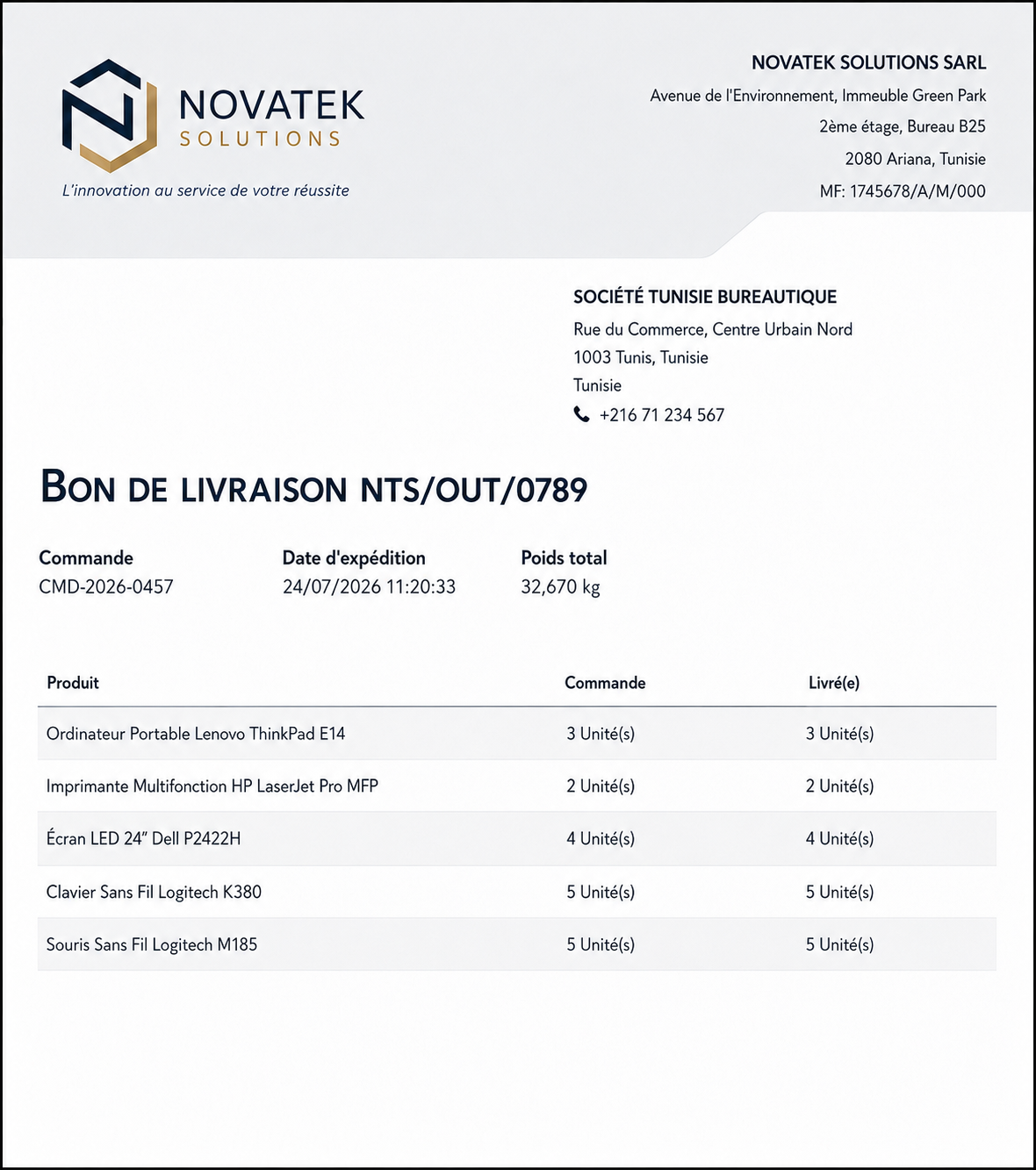
Delivery Slip before
After — With Valued Delivery Slip installed (pricing, discount, tax, totals):
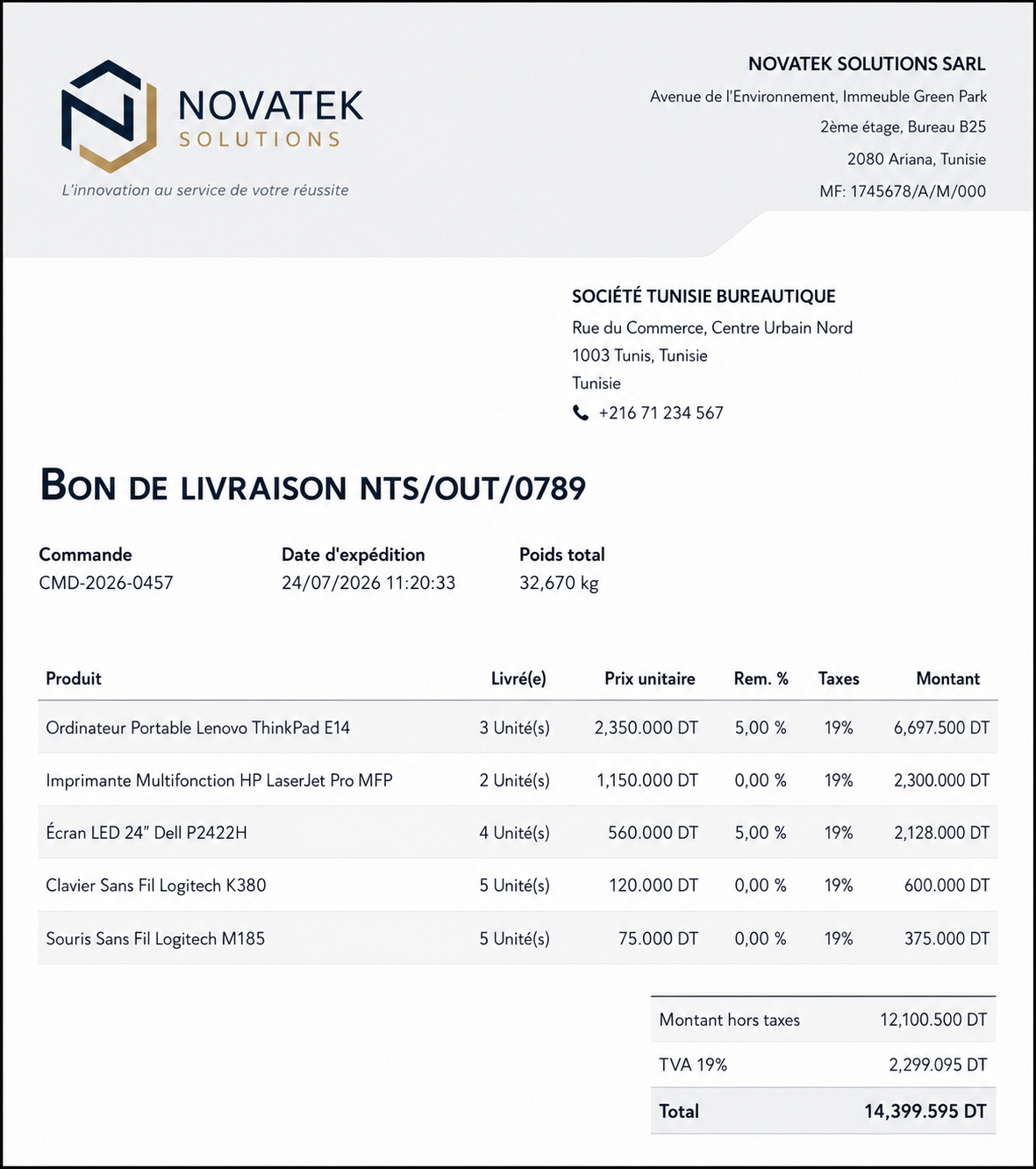
Delivery Slip after

Bug Tracker & Credits

Bug Tracker

Bugs are tracked on GitHub Issues. In case of trouble, please check there if your issue has already been reported. If you spotted it first, help us smashing it by providing detailed and welcome feedback.

Credits

Authors: BenAmor Rayeen (https://www.benamor.tech/)

Contributors: BenAmor Rayeen <benomorr326@gmail.com>

Maintainer: This module is maintained by BenAmor Rayeen.

Need Support?

For any questions, custom requirements, or professional Odoo support, feel free to contact us.

Website WhatsApp: +216 95 129 848
Availability
Odoo Online
Odoo.sh
On Premise
Odoo Apps Dependencies • Inventory (stock)
• Discuss (mail)
• Invoicing (account)
Lines of code 103
Technical Name valued_delivery_slip
LicenseLGPL-3
Websitehttps://www.benamor.tech/

Please log in to comment on this module

  • The author can leave a single reply to each comment.
  • This section is meant to ask simple questions or leave a rating. Every report of a problem experienced while using the module should be addressed to the author directly (refer to the following point).
  • If you want to start a discussion with the author, please use the developer contact information. They can usually be found in the description.
Community
  • Tutorials
  • Documentation
  • Forum
Open Source
  • Download
  • Github
  • Runbot
  • Translations
Services
  • Odoo.sh Hosting
  • Support
  • Upgrade
  • Custom Developments
  • Education
  • Find an Accountant
  • Find a Partner
  • Become a Partner
About us
  • Our company
  • Brand Assets
  • Contact us
  • Jobs
  • Events
  • Podcast
  • Blog
  • Customers
  • Legal • Privacy
  • Security

Odoo is a suite of open source business apps that cover all your company needs: CRM, eCommerce, accounting, inventory, point of sale, project management, etc.

Odoo's unique value proposition is to be at the same time very easy to use and fully integrated.

Website made with