

Odonity Login & Signup Theme Enhancer
Upgrade Your Odoo Authentication Screens with Style
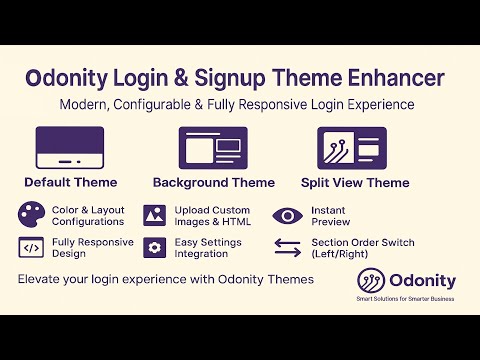
Give your Odoo login and signup pages a visual transformation with 3 beautiful, fully configurable themes that suit every brand style.
Key Features
- Three Unique Themes: Default, Background, and Split Layout
- Live Preview: Instantly see changes as you configure styles
- No Coding Required: Easy-to-use backend configuration panel
- Responsive Design: Works beautifully on mobile, tablet, and desktop
- Odoo 17 Compatible: Community & Enterprise supported
Default Theme Previews
Configuration

Login Page

Signup Page

Background Theme Previews
Configuration

Login Page

Signup Page

Split Layout Theme Previews
Configuration

Login Page

Signup Page

Configurable Options
3 Stunning Themes Included
1. Default Theme
- Keep Odoo's original login and signup layout.
- No configuration needed – clean and simple.
2. Background Theme
- Customize the full background of the login/signup page:
- Use a custom background image or choose a solid color.
- Set the position of the login card (Left, Center, Right, Top, Bottom).
- Customize the login card appearance:
- Background Color
- Background Opacity
- Text Color
- Button Color
3. Split Layout Theme (Modern UI)
- Split the screen into two sections: one for login/signup, one for custom HTML content.
- Choose layout direction:
- HTML Left – Login Right
- Login Left – HTML Right
- Customize each section independently:
- HTML Section Background Color
- Login Section Background Color
- Login Card Background Color & Opacity
- Text Color
- Button Color
- Add engaging HTML content: banners, branding, promotions, videos, or any message!
Live Color Pickers
- Instantly preview color selections in the backend.
- Fine-tune every shade to match your brand perfectly.
Fully Responsive
Whether your users log in from a desktop, tablet, or mobile device - your pages will look stunning and professional on all screen sizes.
Compatibility
- Odoo 17 Compatible (Community & Enterprise)
- Tested on all major browsers and screen sizes
Need Help or Customization?
We’re happy to tailor the module to your needs - extra layout tweaks, branding, animations, and more.
- Email: odonity.services@gmail.com
- Website: www.odonity.com
| Availability |
Odoo Online
Odoo.sh
On Premise
|
| Odoo Apps Dependencies |
•
Website (website)
• Discuss (mail) |
| Lines of code | 578 |
| Technical Name |
odonity_login_signup_theme |
| License | See License tab |
| Website | https://www.odonity.com |
Odonity Login & Signup Theme Enhancer
Odonity Login & Signup Theme Enhancer lets you beautifully redesign and personalize your Odoo login and signup pages with fully customizable layouts, styles, and colors. Choose from three modern themes with responsive design and configuration flexibility - no coding required.
Key Features
- Three Unique Login Themes: - Default Theme: Uses Odoo's original login design. - Background Theme: Add a custom background (color or image), set login position, and personalize card styling. - Split Layout Theme: A modern split-screen layout with flexible section ordering and HTML content support.
- Background Theme Options: - Background style: solid color or image upload - Login form position: center, left, right, top, bottom - Login card background color and opacity - Text and button colors
- Split Layout Theme Options: - HTML and Login section order (left/right) - Background color for both HTML and Login sections - Custom HTML content on one side - Login card background color and opacity - Text and button colors
- Responsive Design: Adapts perfectly to mobile, tablet, and desktop screens.
- Easy Configuration: All options available in the Website Settings menu.
- Visual Preview: Instantly preview each theme with images before applying.
Screenshots
Theme 1 (Default Theme) Selection

Theme 1 Login Screen

Theme 1 Signup Screen

Theme 2 (Background Theme) Selection

Theme 2 (Background Theme) Login Screen

Theme 2 (Background Theme) Signup Screen

Theme 3 (Split Layout Theme) Selection

Theme 3 (Split Layout Theme) Login Screen

Theme 3 (Split Layout Theme) Signup Screen

Installation
- Copy the module into your custom Odoo addons directory.
- Restart your Odoo server.
- Activate Developer Mode from the Odoo settings.
- Navigate to Apps > Update Apps List, search for "Odonity Login & Signup Theme Enhancer," and click Install.
Usage
- Go to Settings > General Settings.
- Under the Login & Signup Theme section, choose a theme.
- Configure styling and layout options for your selected theme.
- Save settings and refresh the login/signup page to view the changes.
Support & Customization
If you have any questions, need help, or want to customize further:
- Website: https://odonity.com
- Email: support@odonity.com
Changelog
1.0.0 (2025-04-21)
- Initial release of Odonity Login & Signup Theme Enhancer with 3 configurable themes for Odoo 17.
Odoo Proprietary License v1.1 - Strict Commercial Use

© 2024-Present Odonity. All Rights Reserved.
Module Name: Odonity Login & Signup Theme Enhancer (by Odonity)
License Owner: Odonity (https://www.odonity.com)
Support Email: odonity.services@gmail.com

This software is protected by copyright laws and international treaties. It is licensed, not sold. You are granted a **non-transferable, non-sublicensable, and non-exclusive license** to use this software ONLY under the terms below:

--------------------------------------------
STRICT TERMS OF USE
--------------------------------------------

PERMITTED:

- Use the module in one Odoo production instance only (with staging/test allowed only for that instance).
- Use for internal company operations.
- Request support, upgrades, or customization services from Odonity.

PROHIBITED WITHOUT WRITTEN PERMISSION FROM ODONITY:

- Modifying, altering, or extending the source code in any way.
- Reselling, sublicensing, or redistributing any part of the module.
- Sharing the code with third parties, including freelancers or other vendors.
- Uploading this module to public or private repositories, websites, or forums.
- Creating derivative works or using snippets in other modules.
- Using the module as a base to develop similar competing products.

WARNING:

This software contains **branding, code-level markers, and security tracking** for anti-piracy purposes. Tampering with these or violating this license may result in:

- Permanent termination of your usage rights
- Legal action under local and international intellectual property laws
- Immediate take-down notices for marketplaces and hosting providers

--------------------------------------------
LICENSE VERIFICATION & SUPPORT
--------------------------------------------

License Keys / Validation (optional): Odonity reserves the right to implement license key checks in future versions.
Support is only available to verified license holders.
Invoice or proof of purchase must be retained for all license claims.

For official support, licensing clarifications, or enterprise usage, please contact:
odonity.services@gmail.com | https://www.odonity.com

--------------------------------------------

BY INSTALLING THIS MODULE, YOU AGREE TO BE BOUND BY ALL TERMS ABOVE.

Unauthorized use, reproduction, or redistribution is strictly prohibited.
Please log in to comment on this module