Skip to Content
Odoo Menu
  • Sign in
  • Try it free
  • Apps
    Finance
    • Accounting
    • Invoicing
    • Expenses
    • Spreadsheet (BI)
    • Documents
    • Sign
    Sales
    • CRM
    • Sales
    • POS Shop
    • POS Restaurant
    • Subscriptions
    • Rental
    Websites
    • Website Builder
    • eCommerce
    • Blog
    • Forum
    • Live Chat
    • eLearning
    Supply Chain
    • Inventory
    • Manufacturing
    • PLM
    • Purchase
    • Maintenance
    • Quality
    Human Resources
    • Employees
    • Recruitment
    • Time Off
    • Appraisals
    • Referrals
    • Fleet
    Marketing
    • Social Marketing
    • Email Marketing
    • SMS Marketing
    • Events
    • Marketing Automation
    • Surveys
    Services
    • Project
    • Timesheets
    • Field Service
    • Helpdesk
    • Planning
    • Appointments
    Productivity
    • Discuss
    • Approvals
    • IoT
    • VoIP
    • Knowledge
    • WhatsApp
    Third party apps Odoo Studio Odoo Cloud Platform
  • Industries
    Retail
    • Book Store
    • Clothing Store
    • Furniture Store
    • Grocery Store
    • Hardware Store
    • Toy Store
    Food & Hospitality
    • Bar and Pub
    • Restaurant
    • Fast Food
    • Guest House
    • Beverage Distributor
    • Hotel
    Real Estate
    • Real Estate Agency
    • Architecture Firm
    • Construction
    • Property Management
    • Gardening
    • Property Owner Association
    Consulting
    • Accounting Firm
    • Odoo Partner
    • Marketing Agency
    • Law firm
    • Talent Acquisition
    • Audit & Certification
    Manufacturing
    • Textile
    • Metal
    • Furnitures
    • Food
    • Brewery
    • Corporate Gifts
    Health & Fitness
    • Sports Club
    • Eyewear Store
    • Fitness Center
    • Wellness Practitioners
    • Pharmacy
    • Hair Salon
    Trades
    • Handyman
    • IT Hardware & Support
    • Solar Energy Systems
    • Shoe Maker
    • Cleaning Services
    • HVAC Services
    Others
    • Nonprofit Organization
    • Environmental Agency
    • Billboard Rental
    • Photography
    • Bike Leasing
    • Software Reseller
    Browse all Industries
  • Community
    Learn
    • Tutorials
    • Documentation
    • Certifications
    • Training
    • Blog
    • Podcast
    Empower Education
    • Education Program
    • Scale Up! Business Game
    • Visit Odoo
    Get the Software
    • Download
    • Compare Editions
    • Releases
    Collaborate
    • Github
    • Forum
    • Events
    • Translations
    • Become a Partner
    • Services for Partners
    • Register your Accounting Firm
    Get Services
    • Find a Partner
    • Find an Accountant
      • Get a Tailored Demo
    • Implementation Services
    • Customer References
    • Support
    • Upgrades
    Github Youtube Twitter Linkedin Instagram Facebook Spotify
    +32 2 290 34 90
    • Get a Tailored Demo
  • Pricing
  • Help
  1. APPS
  2. Productivity
  3. Google Drive Storage Sync v 16.0
  4. Sales Conditions FAQ

Google Drive Storage Sync

by KSRO Labs https://ksrolabs.com
Odoo

$ 125.41

v 16.0 Third Party 1
Apps purchases are linked to your Odoo account, please sign in or sign up first.
Availability
Odoo Online
Odoo.sh
On Premise
Odoo Apps Dependencies Discuss (mail)
Lines of code 2607
Technical Name gdrive_storage_sync
LicenseLGPL-3
Websitehttps://ksrolabs.com
Versions 16.0 17.0 18.0 19.0
You bought this module and need support? Click here!
Availability
Odoo Online
Odoo.sh
On Premise
Odoo Apps Dependencies Discuss (mail)
Lines of code 2607
Technical Name gdrive_storage_sync
LicenseLGPL-3
Websitehttps://ksrolabs.com
Versions 16.0 17.0 18.0 19.0
🚀 Early Customer Launch Pricing: 30% Off

Google Drive Storage Sync for Odoo

The Focused Alternative to Heavy Cloud Storage Suites

Automatically sync your Odoo attachments with Google Drive without the bloat. Cut database size by up to 70%, access files anywhere, automatic daily backups—all with transparent pricing.

Regular Price: $179.00 Launch Price: $125.30 Save $53.70 (30% off)
⏰ Limited Time Offer Claim before window closes
✓ Clean Code 2,607 LOC
✓ Transparent 1 module, 1 price
✓ 5-Min Setup Guided wizard
✓ Smart Conflicts You choose
Odoo Two-Way Sync Team Drives Auto Backup
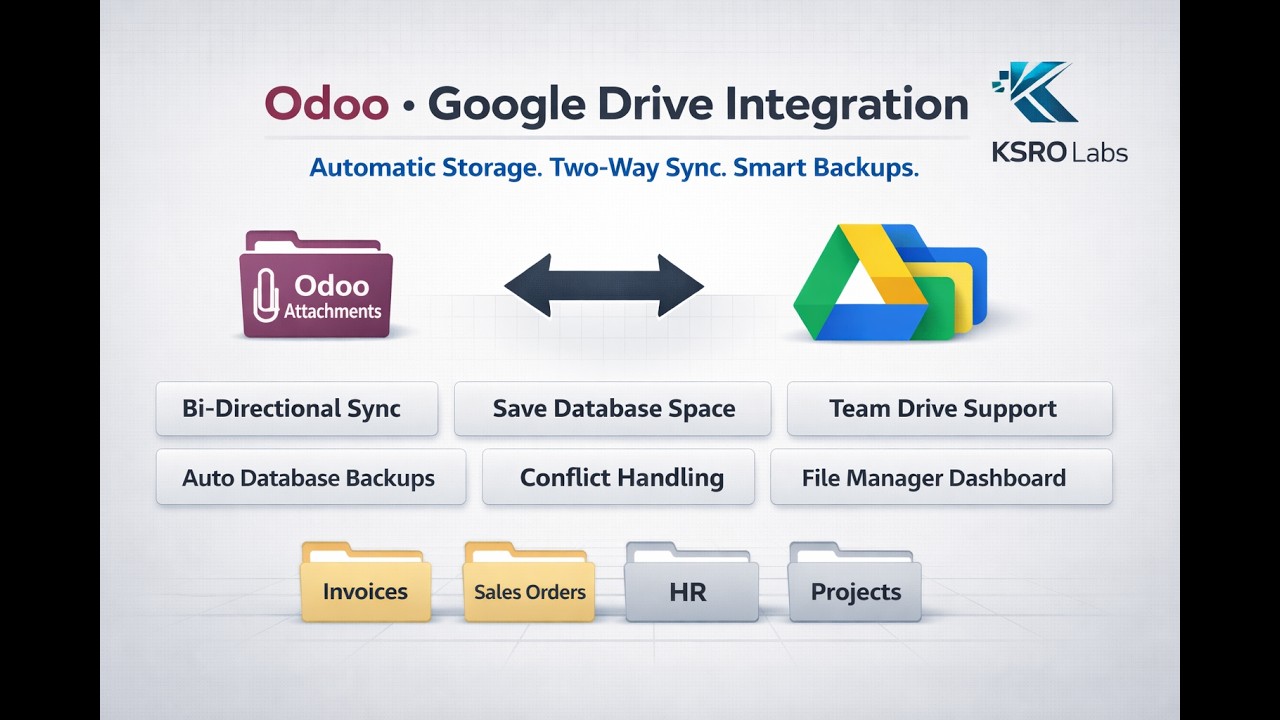
Google Drive Storage Sync overview and workflow preview

Live overview of the module in action: configuration, syncing, and monitoring.

Perfect For Your Team

📊 Accounting Teams

Invoices, vendor docs, compliance records auto-upload to Drive by folder. Reduces database bloat.

✓ Reduce DB size by up to 70%
🤝 Sales Teams

Quotes, contracts, signed PDFs sync in real-time. Teams collaborate in Drive, changes reflect in Odoo.

✓ Eliminate version conflicts
👔 HR Departments

Employee files (contracts, IDs, certifications) organize by person/department. Secure storage.

✓ Zero database bloat
📦 Project Teams

Task attachments auto-sync to Drive. Teams edit in Drive, changes sync back to Odoo automatically.

✓ Single source of truth
💾 Database Admins

Optimize Odoo performance by offloading large files. Keep links in Odoo, files in Drive.

✓ Faster queries & backups
🎁 Grab The Launch Offer

40% Off For Early Customers

Limited-time launch pricing is active. Get full Google Drive sync features, setup support, and future updates at a reduced price.

  • Bi-directional sync with smart conflict handling
  • Shared Drive support and queue reliability
  • Onboarding wizard, logs, and monitoring views
  • Direct support from the builder
  • 90-day money-back guarantee
$125.30
$179.00
SAVE 30% Limited-time launch price
Claim your discount before the introductory window closes.

Core Capabilities

🔄 Real-Time Two-Way Sync

Upload a file in Odoo and it appears in Drive within 1-2 minutes. Add a file to Drive and it becomes an Odoo attachment instantly. Edit in both places? Smart conflict detection alerts you to choose which version to keep.

📦 Offload (Save Space)

Best for: Large files, archives, compliance.

File uploads to Drive, removed from Odoo database. Database saves 50MB per invoice.

Example: 50MB invoice PDF reduces DB size instantly

🔄 Mirror (Keep Both)

Best for: Files edited in both places.

File uploads to Drive AND stays in Odoo. Both stay synchronized automatically.

Example: Contract PDFs edited in both places, always in sync

🔗 Link Only (Manual)

Best for: Selective sync, existing Drive folders.

No auto-upload, you manually link Drive files. Full control.

Example: Link to shared Team Drive folder selectively

🔗 Access Control & Sharing

Create public or portal-restricted share links directly from Odoo. Control who can access what. Files never leave your control.

💼 Team Drive Support

Works with Google Shared Drives for team collaboration. Files stay in sync across your entire team.

⏰ Auto Database Backups

Automatically backs up your entire Odoo database to Google Drive on a schedule. Never lose your data.

📊 File Manager Dashboard

One central view of all synced files. Filter by type, sort by date, open in Drive with one click. Never leave Odoo.

🛡️ Smart Conflict Detection

Edit a file in both Odoo AND Google Drive? The system detects this instantly. You choose what happens:

✅ Odoo Wins

Your Odoo version overwrites Drive. Simple, predictable.

Good for: Documents primarily edited in Odoo.

☁️ Drive Wins

Drive version wins, changes sync back to Odoo.

Good for: Documents edited in both places.

👤 Manual (Ask Me)

Get notified, you decide which version to keep.

Good for: Critical documents, audit trails.

✓ NO SURPRISE DATA LOSS • NO SILENT OVERWRITES • YOU'RE ALWAYS IN CONTROL

Real-World Workflows

📄 Accounting Department

Scenario: You receive 10 vendor invoices daily.

Workflow:

  1. Save PDFs to "Vendor Invoices" in Odoo
  2. Module uploads to Drive (organized by vendor)
  3. Accounting team reviews in Drive
  4. Month-end: Auto-backup runs
Result: No DB bloat • Organized files • Audit trail clean

🤝 Sales Team

Scenario: Sales manager creates a quote.

Workflow:

  1. Attach contract template (PDF)
  2. Module uploads to Drive automatically
  3. Team collaborates with Track Changes in Drive
  4. Final PDF uploaded back to Odoo
Result: Team collaboration • One source of truth • Zero duplicate files

👔 HR Department

Scenario: New employee hired in Odoo.

Workflow:

  1. Create employee record with department
  2. HR uploads: contract, ID, certifications
  3. Module auto-syncs to Drive by department
  4. Employee uploads their own docs
Result: Organized by person • No manual moving • Employee self-service

📦 Project Teams

Scenario: Project manager creates task with files.

Workflow:

  1. Team attaches designs, specs, reviews
  2. Module syncs to Drive by project
  3. Team edits in native tools (Figma, Docs)
  4. Changes sync back to Odoo automatically
Result: Native tool editing • One source of truth • Instant sync

⚡ Setup Takes 10 Minutes (5 Simple Steps)

  1. Enable Google Drive API (5 min)

    Google Cloud Console → Enable Drive API. Detailed steps in the Setup Wizard (copy-paste friendly).

  2. Install Module (1 min)

    Apps → Search "Google Drive Storage Sync" → Click Install.

  3. Run Setup Wizard (3 min)

    Menu: Google Drive › Setup Wizard. Paste credentials → Authorize → Pick root folder.

  4. Create Your First Sync Rule (1 min)

    Menu: Google Drive › Setup & Configuration › Sync Rules. Pick a model → Save.

  5. Done! Files Sync Automatically (0 min)

    Attach a file to a matching record. It appears in Drive in 1-2 minutes. Monitor in Dashboard.

vs faOtools: 15+ minutes (complex folder rules) • vs Webkul: Varies (GCS setup) • You: 10 minutes (straightforward)

Access & Permissions

👤 Regular Users

Can:

  • Attach files (auto-syncs)
  • View File Manager
  • View Dashboard
  • Resolve conflicts

⚙️ Administrators

Can:

  • Configure connections
  • Create sync rules
  • View logs & backups
  • Test connections

⚠️ Common Mistakes to Avoid

❌ Typo in redirect URL
The Setup Wizard shows the exact URL. Copy it exactly into Google Cloud Console.
❌ Forgetting Shared Drive ID
If using a Shared Drive, enter its ID during setup. Find it in the Drive URL.
❌ Too-strict file type filters
If you limit file types too much, normal files won't sync. Leave empty unless you have a specific need.
❌ Expecting instant sync
Sync happens every ~2 minutes (configurable). It's not real-time. Give it a minute or two.
❌ Deleting files in Drive expecting them to disappear in Odoo
By default, deleting a file in Odoo moves it to Drive trash. Deleting in Drive doesn't delete in Odoo unless configured to.

Where to Find Everything

Once installed, look for the Google Drive menu in your Odoo sidebar:

Google Drive menu and submenu navigation in Odoo

This menu preview shows all major sections and submenus for quick navigation.

📊 Dashboard — See sync status, pending jobs, errors

📁 File Manager — Browse all synced files, open/share them

⚡ Conflicts — Resolve files changed in both places

🔧 Setup Wizard — Initial configuration (Admins only)

🔐 Google Drive Connections — Manage Drive accounts (Admins)

📋 Sync Rules — Configure what/where to sync (Admins)

💾 Backups — View database backups (Admins)

📊 Job Queue — Monitor sync operations (Admins)

📋 Technical Details (For Admins)

How It Works

The module uses Google's Drive API to sync files. Google credentials are encrypted and stored securely. Sync happens in the background every 2-10 minutes via scheduled crons. All data is backed up to Drive automatically.

Security

✓ Google tokens encrypted and never logged
✓ Share links expire and can be revoked
✓ File access follows Odoo permissions
✓ Only managers see connection secrets

Limitations

  • OAuth only: Uses user Google accounts (not service accounts)
  • Polling: Sync happens on a schedule (~2-10 min), not real-time
  • Offloaded files: When removed from Odoo, they only exist in Drive. Restore via "Drive Wins" conflict policy
  • Google Docs: Google Docs/Sheets stay as native Drive docs (not converted)
  • Uninstall: Uninstalling doesn't delete Drive files (safe, but you must clean up manually)

Performance Notes

Large files use resumable uploads for reliability. Sync happens in batches to avoid database strain. Expect 2-5 minute latency between attaching a file and it appearing in Drive.

❓ FAQ

Setup & Configuration

How long does setup take?

10 minutes total: 5 min (Google API) + 1 min (install) + 3 min (wizard) + 1 min (first rule). Detailed steps in Setup Wizard.

Can I use this with a Google Shared Drive (Team Drive)?

Yes. Enable Team Drive support in setup and enter the Shared Drive ID. Perfect for multi-team collaboration.

How often does it check for changes?

Upload queue processes every 2 minutes, Drive change fetch every 10 minutes (both configurable). Fast enough for business workflows.

Security & Data

Is my Google data secure?

Google tokens encrypted, never logged. Share links expire and can be revoked. File access follows Odoo permissions. Only managers see secrets.

What if I edit the same file in Odoo and Drive?

Smart conflict detection alerts you. You pick which version to keep (Odoo wins, Drive wins, or ask me). No surprise overwrites.

Do I lose files if I uninstall the module?

No. Files in Google Drive stay in Drive. Attachments in Odoo stay in Odoo (unless manually removed). Safe to uninstall anytime.

Technical & Performance

Will syncing crash my Odoo if I have millions of files?

No. Processes files in small batches, uses database locks. Designed for large-scale operations (100K+ files tested).

What if my internet goes down during a sync?

Module retries automatically with exponential backoff. Jobs queue up and continue when connection is restored. Nothing is lost.

What about Google Docs/Sheets? Do they sync?

Google Docs/Sheets stay as native Drive docs (not converted). Regular files (PDFs, Word, Images, etc.) sync normally.

Pricing & Support

Why is this more expensive than the competition?

We're the specialist (Google Drive only). faOtools is generalist ($574.90 for 5+ clouds). Webkul focuses on GCS. We offer transparent pricing: one module, no hidden base modules. No bloat. Just pure Google Drive sync.

How much will Google API fees cost?

Nothing. The module uses only free-tier Google Drive APIs. Zero charges from Google, ever.

Can I try it before buying? Is there a guarantee?

Yes. 90-day money-back guarantee, no questions asked. Contact info@ksrolabs.com for a free trial on your Odoo database. We're confident you'll love it.

About KSRO Labs

KSRO Labs builds premium modules for the modern enterprise. We work at the intersection of Odoo, cloud ecosystems, and AI—crafting solutions that are production-grade, deeply integrated, and built to last.

"We do not build throwaway plugins. We build infrastructure."

Why We Built This

Most Odoo teams use Google Drive. But syncing with Odoo is either complex (multiple modules), expensive ($500+), or requires custom work. We built the focused alternative: Pure Google Drive sync. Transparent pricing. No hidden modules.

Our Commitment

  • Direct support from the builder (not a support queue)
  • Regular updates and feature additions
  • Public roadmap (you see what's coming)
  • 90-day money-back guarantee (no risk)

KSRO Labs — Connecting Odoo to the world.

Questions or want a demo?
We're happy to show you how this works on your Odoo database.

Email: info@ksrolabs.com
Website: https://ksrolabs.com
Odoo to BI consulting • Dashboard building • Implementation support
(c) 2025 KSROLABS | Built for performance, privacy, and precision.

Please log in to comment on this module

  • The author can leave a single reply to each comment.
  • This section is meant to ask simple questions or leave a rating. Every report of a problem experienced while using the module should be addressed to the author directly (refer to the following point).
  • If you want to start a discussion with the author or have a question related to your purchase, please use the support page.
Community
  • Tutorials
  • Documentation
  • Forum
Open Source
  • Download
  • Github
  • Runbot
  • Translations
Services
  • Odoo.sh Hosting
  • Support
  • Upgrade
  • Custom Developments
  • Education
  • Find an Accountant
  • Find a Partner
  • Become a Partner
About us
  • Our company
  • Brand Assets
  • Contact us
  • Jobs
  • Events
  • Podcast
  • Blog
  • Customers
  • Legal • Privacy
  • Security

Odoo is a suite of open source business apps that cover all your company needs: CRM, eCommerce, accounting, inventory, point of sale, project management, etc.

Odoo's unique value proposition is to be at the same time very easy to use and fully integrated.

Website made with