Skip to Content
Odoo Menu
  • Sign in
  • Try it free
  • Apps
    Finance
    • Accounting
    • Invoicing
    • Expenses
    • Spreadsheet (BI)
    • Documents
    • Sign
    Sales
    • CRM
    • Sales
    • POS Shop
    • POS Restaurant
    • Subscriptions
    • Rental
    Websites
    • Website Builder
    • eCommerce
    • Blog
    • Forum
    • Live Chat
    • eLearning
    Supply Chain
    • Inventory
    • Manufacturing
    • PLM
    • Purchase
    • Maintenance
    • Quality
    Human Resources
    • Employees
    • Recruitment
    • Time Off
    • Appraisals
    • Referrals
    • Fleet
    Marketing
    • Social Marketing
    • Email Marketing
    • SMS Marketing
    • Events
    • Marketing Automation
    • Surveys
    Services
    • Project
    • Timesheets
    • Field Service
    • Helpdesk
    • Planning
    • Appointments
    Productivity
    • Discuss
    • Approvals
    • IoT
    • VoIP
    • Knowledge
    • WhatsApp
    Third party apps Odoo Studio Odoo Cloud Platform
  • Industries
    Retail
    • Book Store
    • Clothing Store
    • Furniture Store
    • Grocery Store
    • Hardware Store
    • Toy Store
    Food & Hospitality
    • Bar and Pub
    • Restaurant
    • Fast Food
    • Guest House
    • Beverage Distributor
    • Hotel
    Real Estate
    • Real Estate Agency
    • Architecture Firm
    • Construction
    • Property Management
    • Gardening
    • Property Owner Association
    Consulting
    • Accounting Firm
    • Odoo Partner
    • Marketing Agency
    • Law firm
    • Talent Acquisition
    • Audit & Certification
    Manufacturing
    • Textile
    • Metal
    • Furnitures
    • Food
    • Brewery
    • Corporate Gifts
    Health & Fitness
    • Sports Club
    • Eyewear Store
    • Fitness Center
    • Wellness Practitioners
    • Pharmacy
    • Hair Salon
    Trades
    • Handyman
    • IT Hardware & Support
    • Solar Energy Systems
    • Shoe Maker
    • Cleaning Services
    • HVAC Services
    Others
    • Nonprofit Organization
    • Environmental Agency
    • Billboard Rental
    • Photography
    • Bike Leasing
    • Software Reseller
    Browse all Industries
  • Community
    Learn
    • Tutorials
    • Documentation
    • Certifications
    • Training
    • Blog
    • Podcast
    Empower Education
    • Education Program
    • Scale Up! Business Game
    • Visit Odoo
    Get the Software
    • Download
    • Compare Editions
    • Releases
    Collaborate
    • Github
    • Forum
    • Events
    • Translations
    • Become a Partner
    • Services for Partners
    • Register your Accounting Firm
    Get Services
    • Find a Partner
    • Find an Accountant
      • Get a Tailored Demo
    • Implementation Services
    • Customer References
    • Support
    • Upgrades
    Github Youtube Twitter Linkedin Instagram Facebook Spotify
    +32 2 290 34 90
    • Get a Tailored Demo
  • Pricing
  • Help
  1. APPS
  2. Point of Sale
  3. AI POS Copilot v 19.0
  4. Sales Conditions FAQ

AI POS Copilot

by XamlTech · Mahmoud Mohamed Amin https://xamltech.com
Odoo
In-App Purchases
v 19.0 Third Party 10
Download for v 19.0 Deploy on Odoo.sh Live Preview
Apps purchases are linked to your Odoo account, please sign in or sign up first.
Availability
Odoo Online
Odoo.sh
On Premise
Odoo Apps Dependencies • Inventory (stock)
• Point of Sale (point_of_sale)
• Discuss (mail)
• Invoicing (account)
Lines of code 2623
Technical Name ai_pos_copilot
LicenseOPL-1
Websitehttps://xamltech.com
You bought this module and need support? Click here!
Availability
Odoo Online
Odoo.sh
On Premise
Odoo Apps Dependencies • Inventory (stock)
• Point of Sale (point_of_sale)
• Discuss (mail)
• Invoicing (account)
Lines of code 2623
Technical Name ai_pos_copilot
LicenseOPL-1
Websitehttps://xamltech.com
  • Description
  • License
🎉 FREE — Limited Launch Week
✦

AI POS Copilot

Real-time AI upsell suggestions inside your Odoo 19 POS screen

Arabic & English · OpenAI · Gemini · Ollama · vLLM · Full Analytics

⬇ Install Free Now
▶ Watch Demo on YouTube

Questions? mahmudamen@gmail.com  ·  Setup service available

4
AI Providers
800ms
Debounce
Odoo 19
Enterprise
100%
Arabic RTL
OPL-1
License
The Problem

Cashiers miss upsell opportunities every minute

Your cashier is focused on speed — they can't browse the menu to suggest add-ons during a busy shift. Every uncaptured upsell is lost revenue. AI POS Copilot fixes this automatically.

🤖
AI watches the cart
Fires suggestions 800ms after every cart change — automatic, no cashier action needed
⚡
One tap adds to cart
Suggestion cards appear in the sidebar — cashier taps, product is added instantly
📊
Full analytics logged
Every suggestion and acceptance is recorded — track ROI, top products, response times
AI POS Copilot — suggestion panel in POS screen
▶ YouTube

See it in action

Full walkthrough video: setup, configuration, live suggestions, analytics dashboard, Arabic RTL mode.
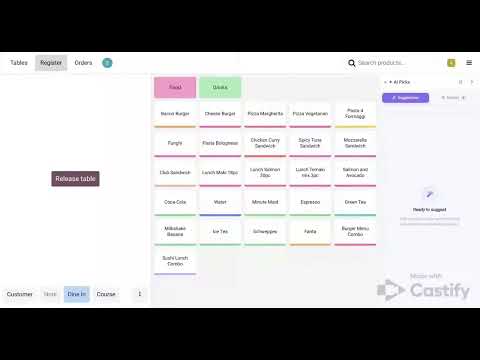
AI POS Copilot — Full Walkthrough Demo on YouTube
▶ Watch on YouTube — XamlTech

Subscribe for Odoo tutorials, module walkthroughs & Arabic dev content

Features

Everything you need, nothing you don't

✦
Real-Time AI Suggestions
Cart is watched live — debounced 800ms, suggestions fire automatically on every change
⚡
One-Tap Add to Cart
Cashier taps the suggestion card — product added to the current order in one click
🌐
4 AI Providers
OpenAI, Google Gemini, Ollama (local, private), vLLM — switch per POS terminal
🔒
100% Private Mode
Use Ollama or vLLM — your data never leaves your server, no cloud API key needed
🌍
Arabic-First RTL
Suggestions shown in Arabic and English — full RTL layout support, built for MENA market
📦
Slow-Stock Prioritisation
AI promotes products with no movement in N days — turns dead stock into revenue
📊
Full Suggestion Analytics
List, graph, and pivot views — acceptance rate, top suggested products, latency by provider
🛡️
Graceful Degradation
AI fails silently — POS never blocked. Offline guard, rate-limit cooldown, 5-min cache
Screenshots

See every screen

AI suggestion panel — POS screen

AI suggestion cards in the POS sidebar — horizontal design, confidence badge, one-tap add

Suggestion cards

Confidence badges — green/amber/slate by match quality

History tab

History tab — full session suggestion log with re-add button

Collapsed panel

Panel collapsed — narrow strip, expands on click

Loading skeleton

Shimmer skeleton while AI is thinking

POS configuration — AI Copilot tab

POS Configuration — AI Copilot settings tab with provider selector, model name, API key, prompts

Backend analytics

Backend — AI Suggestion Logs list view

Analytics graph

Acceptance rate graph by product

Prompt templates

Built-in prompt templates — restaurant, café, retail, pharmacy — fully editable per POS terminal

How It Works

From cart to suggestion in under 2 seconds

1
Cashier adds product
Cart update detected automatically in OWL
2
AI analyses cart
800ms debounce → LLM receives cart + catalogue + history
3
Cards appear instantly
Up to 3 suggestions with name, reason ✦ and confidence badge
4
Tap → added + logged
One tap adds product, acceptance logged with timing for analytics
AI Providers

Works with any LLM

Provider Recommended Models API Key Notes
OpenAI GPT-4o-mini · GPT-4.1-mini · GPT-4o Required Best quality. Auto-detected from sk-… key prefix.
Google Gemini Gemini 2.0 Flash · Gemini 2.5 Flash Required Fast & cost-effective. Auto-detected from AIza… key prefix.
Ollama (local) qwen2.5:3b · llama3.2 · phi3:mini Not needed 100% private. Runs on your server. Recommended: qwen2.5:3b.
vLLM (local) Any HuggingFace model Not needed High-throughput inference. OpenAI-compatible API at localhost:8000.
Industries

Built for MENA retail & food service

🍔
Restaurant & Fast Food
  • Suggest drinks with every meal
  • Upsell desserts after mains
  • Promote combo upgrades automatically
☕
Café & Coffee Shop
  • Suggest pastries with every coffee order
  • Upsell size upgrades and add-ons
  • Surface slow-moving bakery items
🛒
Retail & Grocery
  • Cross-sell complementary products
  • Promote near-expiry stock first
  • Suggest bundles and value packs
💊
Pharmacy
  • Suggest supplements with medication
  • Upsell vitamins and wellness products
  • Surface slow-moving health items
🛠 Setup Service

Need help getting started?

I offer a personal setup and configuration service — I'll install the module, connect your AI provider, configure the prompts for your industry, and make sure everything is running perfectly.

✅
Module installation
On your Odoo server or Odoo.sh
✅
AI provider setup
OpenAI / Gemini / Ollama / vLLM
✅
Prompt customisation
Tailored for your product catalogue
📧 Email me for setup — mahmudamen@gmail.com

Usually responds within 24 hours · Available in Arabic and English

FAQ

Frequently asked questions

Does it work without an internet connection?
Yes — if you use Ollama or vLLM on your local server, the module is 100% offline. If using OpenAI/Gemini and the connection drops, the module fails silently and the POS continues working normally.
Does it slow down the POS?
No. AI calls are fully asynchronous with an 800ms debounce. The POS never waits for a response — the sidebar simply stays empty or shows the last suggestions if the call is slow. A 5-minute in-memory cache also means repeated carts are instant.
Is my API key safe?
Yes. The API key is stored in ir.config_parameter (server-side only) and never sent to the browser or included in any RPC response. It is not stored in any model field visible to users.
Which Ollama model should I use?
qwen2.5:3b is the recommended local model — fast (~2s), reliably outputs JSON, and understands Arabic product names. Run: ollama pull qwen2.5:3b. Avoid tinyllama for production — it's too small for consistent JSON output.
Can I customise the prompts?
Yes. Every POS terminal can have its own system prompt and user prompt template. Built-in templates for restaurant, café, retail, and pharmacy are included. You can also edit the global defaults from POS Settings.
Does it work on Odoo.sh and Odoo Online?
Yes for Odoo.sh (On-Premise compatible). Odoo Online has strict outbound firewall rules — Ollama/vLLM local providers won't work on Online, but OpenAI and Gemini will.
Is customer data sent to the AI?
The prompt contains: cart items (name, qty, price), available products (name, price, category), and optionally the customer's purchase history (product names and quantities only). No personal data (name, email, phone, address) is ever sent.
Changelog

Release notes

v 1.1.0 Latest April 2026
  • Added vLLM as 4th AI provider (OpenAI-compatible local inference)
  • Premium UI redesign — horizontal suggestion cards, confidence badges, shimmer skeleton
  • Panel collapse/expand toggle — slim strip when hidden
  • Parser now handles raw array responses from small models (tinyllama)
  • Increased Ollama token limit 100→180 to reduce truncation
  • Fixed XML parse error in attachment.xml
v 1.0.0 April 2026
  • Initial release for Odoo 19 Enterprise
  • OpenAI, Google Gemini, Ollama support
  • OWL v3 sidebar panel with suggestion cards and history tab
  • In-process cache, rate-limit guard, offline detection
  • Backend analytics — list, graph, pivot views
  • Arabic RTL full support, MENA-first prompts
  • Slow-moving stock prioritisation
  • Prompt template library (restaurant, café, retail, pharmacy)
Support & Contact

We're here to help

Questions, bug reports, feature requests — reach out directly. We respond in Arabic and English.

📧
Email
mahmudamen@gmail.com
▶
YouTube
@XamlTech
⏱
Response time
Within 24 hours
More by XamlTech

More modules from XamlTech

All available on the Odoo App Store

🌾
Advanced Agricultural Management
Complete Farm, Crop, Harvest & Production Management with Full Odoo ERP Integration
Odoo 19 $871
🔒
POS Base — Security Framework
Complete POS security with PIN authentication and role-based permissions
Odoo 18 $256
⚙️
POS Customization — Extended Features
Additional POS customizations and enhancements for Odoo 18
Odoo 18 $512
✂️
POS Cutting Orders
Advanced Cutting Orders Management for POS
Odoo 18 $461
📦
POS Stock Management
Real-time Stock Display & Validation for POS
Odoo 18 $409
🏪
View All XamlTech Apps
apps.odoo.com → search xamltech
XamlTech
Mahmoud Mohamed Amin · mahmudamen@gmail.com
Odoo 19 Enterprise · v 1.1.0 · OPL-1
OpenAI · Google Gemini · Ollama · vLLM · Arabic RTL · MENA
Odoo Proprietary License v1.0

This software and associated files (the "Software") may only be used (executed,
modified, executed after modifications) if you have purchased a valid license
from the authors, typically via Odoo Apps, or if you have received a written
agreement from the authors of the Software (see the COPYRIGHT file).

You may develop Odoo modules that use the Software as a library (typically
by depending on it, importing it and using its resources), but without copying
any source code or material from the Software. You may distribute those
modules under the license of your choice, provided that this license is
compatible with the terms of the Odoo Proprietary License (For example:
LGPL, MIT, or proprietary licenses similar to this one).

It is forbidden to publish, distribute, sublicense, or sell copies of the Software
or modified copies of the Software.

The above copyright notice and this permission notice must be included in all
copies or substantial portions of the Software.

THE SOFTWARE IS PROVIDED "AS IS", WITHOUT WARRANTY OF ANY KIND, EXPRESS OR
IMPLIED, INCLUDING BUT NOT LIMITED TO THE WARRANTIES OF MERCHANTABILITY,
FITNESS FOR A PARTICULAR PURPOSE AND NONINFRINGEMENT.
IN NO EVENT SHALL THE AUTHORS OR COPYRIGHT HOLDERS BE LIABLE FOR ANY CLAIM,
DAMAGES OR OTHER LIABILITY, WHETHER IN AN ACTION OF CONTRACT, TORT OR OTHERWISE,
ARISING FROM, OUT OF OR IN CONNECTION WITH THE SOFTWARE OR THE USE OR OTHER
DEALINGS IN THE SOFTWARE.

Please log in to comment on this module

  • The author can leave a single reply to each comment.
  • This section is meant to ask simple questions or leave a rating. Every report of a problem experienced while using the module should be addressed to the author directly (refer to the following point).
  • If you want to start a discussion with the author, please use the developer contact information. They can usually be found in the description.
Please choose a rating from 1 to 5 for this module.
Community
  • Tutorials
  • Documentation
  • Forum
Open Source
  • Download
  • Github
  • Runbot
  • Translations
Services
  • Odoo.sh Hosting
  • Support
  • Upgrade
  • Custom Developments
  • Education
  • Find an Accountant
  • Find a Partner
  • Become a Partner
About us
  • Our company
  • Brand Assets
  • Contact us
  • Jobs
  • Events
  • Podcast
  • Blog
  • Customers
  • Legal • Privacy
  • Security

Odoo is a suite of open source business apps that cover all your company needs: CRM, eCommerce, accounting, inventory, point of sale, project management, etc.

Odoo's unique value proposition is to be at the same time very easy to use and fully integrated.

Website made with