

BOM Kit Revenue POS
by CLuedoo https://www.cluedoo.com/shop/lic-clu-set-pos-0021-bom-kit-revenue-pos-7124$ 399.09
In-App Purchases
ODOO'S FUNCTION]
In Odoo, there is no Revenue Sharing, so sales revenue cannot be automatically allocated to their individual components.
CLUEDOO'S FUNCTION
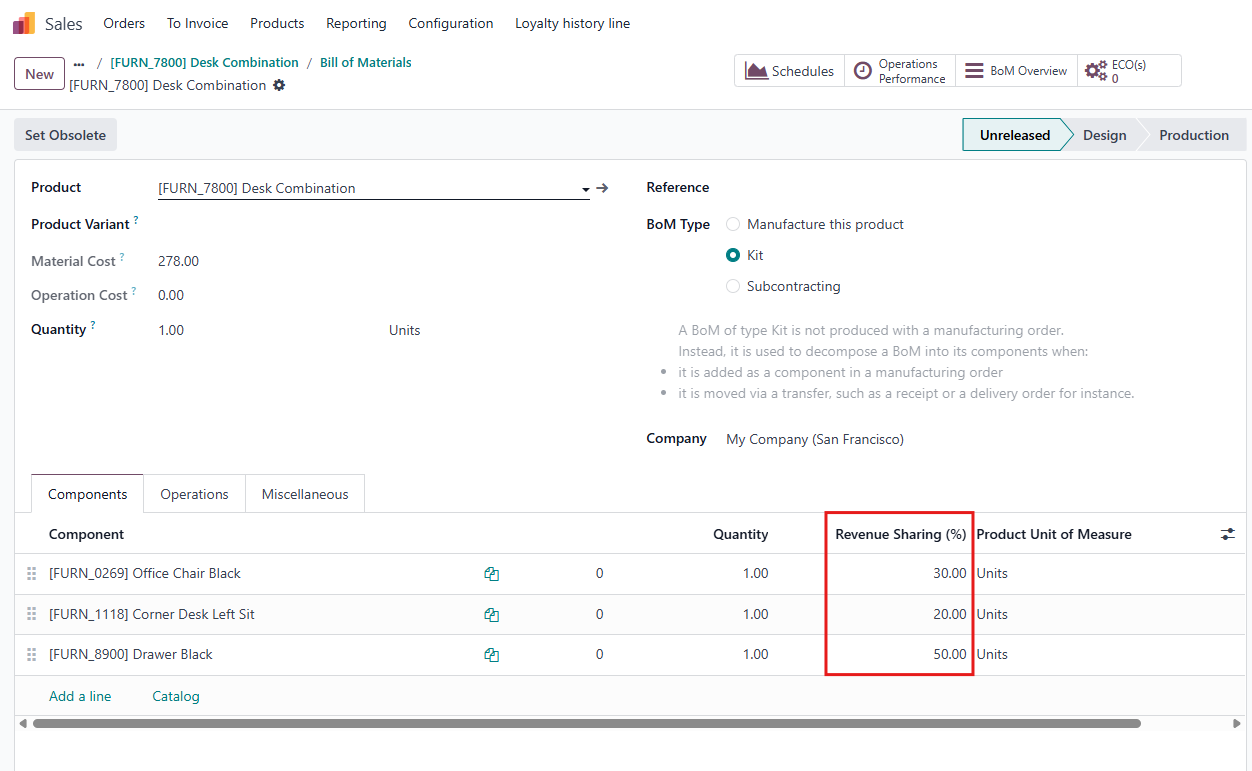
CLuedoo enhances the standard process by introducing Revenue Sharing (%) , allowing sales revenue from Kit products to be allocated among their component items and extending to Point of Sale . This improvement leads to enhanced accuracy and better traceability in revenue management.
CONFIGURATION |
|
|
1. Go to a product's Bills of Material and set the Revenue Sharing (%) for each component of the product.
Notes:
|
|
|
2. Go to Settings > Enable Closing Entry by Product checkbox
|

|
USAGE |
|
|
1. Go to a Point of Sale session and choose the product that you set up in step 1 > Payment |
|
|
2. Finish the order and Close Register > open the related POS Journal Entry. |
|
|
In the Journal Items tab, you can see how the revenue from the KIT sale is allocated to each component.
Formula:
|

|


| Availability |
Odoo Online
Odoo.sh
On Premise
|
| Odoo Apps Dependencies |
•
Point of Sale (point_of_sale)
• Manufacturing (mrp) • Inventory (stock) • Discuss (mail) • Invoicing (account) |
| Community Apps Dependencies | Show |
| Lines of code | 149 |
| Technical Name |
cds_bom_kit_revenue_pos |
| License | OPL-1 |
| Website | https://www.cluedoo.com/shop/lic-clu-set-pos-0021-bom-kit-revenue-pos-7124 |
Odoo Proprietary License v1.0

This software and associated files (the "Software") may only be used (executed,
modified, executed after modifications) if you have purchased a valid license
from the authors, typically via Odoo Apps, or if you have received a written
agreement from the authors of the Software (see the COPYRIGHT file).

You may develop Odoo modules that use the Software as a library (typically
by depending on it, importing it and using its resources), but without copying
any source code or material from the Software. You may distribute those
modules under the license of your choice, provided that this license is
compatible with the terms of the Odoo Proprietary License (For example:
LGPL, MIT, or proprietary licenses similar to this one).

It is forbidden to publish, distribute, sublicense, or sell copies of the Software
or modified copies of the Software.

The above copyright notice and this permission notice must be included in all
copies or substantial portions of the Software.

THE SOFTWARE IS PROVIDED "AS IS", WITHOUT WARRANTY OF ANY KIND, EXPRESS OR
IMPLIED, INCLUDING BUT NOT LIMITED TO THE WARRANTIES OF MERCHANTABILITY,
FITNESS FOR A PARTICULAR PURPOSE AND NONINFRINGEMENT.
IN NO EVENT SHALL THE AUTHORS OR COPYRIGHT HOLDERS BE LIABLE FOR ANY CLAIM,
DAMAGES OR OTHER LIABILITY, WHETHER IN AN ACTION OF CONTRACT, TORT OR OTHERWISE,
ARISING FROM, OUT OF OR IN CONNECTION WITH THE SOFTWARE OR THE USE OR OTHER
DEALINGS IN THE SOFTWARE.
Please log in to comment on this module