

Auto Lot - Package Fulfillment
by CLuedoo https://www.cluedoo.com/shop/licclusetsnl0041-auto-lot-package-fulfillment-7258$ 442.66
| Availability |
Odoo Online
Odoo.sh
On Premise
|
| Odoo Apps Dependencies |
•
Barcode (stock_barcode)
• Inventory (stock) • Discuss (mail) |
| Community Apps Dependencies | Show |
| Lines of code | 971 |
| Technical Name |
cds_lot_package_sync |
| License | OPL-1 |
| Website | https://www.cluedoo.com/shop/licclusetsnl0041-auto-lot-package-fulfillment-7258 |
| Availability |
Odoo Online
Odoo.sh
On Premise
|
| Odoo Apps Dependencies |
•
Barcode (stock_barcode)
• Inventory (stock) • Discuss (mail) |
| Community Apps Dependencies | Show |
| Lines of code | 971 |
| Technical Name |
cds_lot_package_sync |
| License | OPL-1 |
| Website | https://www.cluedoo.com/shop/licclusetsnl0041-auto-lot-package-fulfillment-7258 |
ODOO'S FUNCTION
By default, Odoo requires users to manually split and assign each stock move line when both lots and packages are involved in the same transfer. This means you have to carefully calculate and enter every line yourself to ensure the quantities match - a time-consuming process that is highly prone to human error.
CLUEDOO'S FUNCTION
CLuedoo brings the power of automatically split and assign lots and packages in sequential order until the maximum quantity is reached . Whether you enter lots first or packages first, the module intelligently distributes stock move lines to ensure both are filled correctly without conflict. Say goodbye to manual line splitting and data inconsistencies between your Backend and Barcode operations.
CONFIGURATION |
|
|
1. Open an existing product or create a new product
tracked by Lots
|

|
|
2. Under the Sales tab, define a Packaging Unit e.g., Pack of 5 |
|
USAGE |
|
|
1. Create a
Purchase Order
with the configured product and set the unit of measure to the defined package.
|

|
|
2. Navigate to the generated receipt and click the Barcode button to open it in the Barcode app. |


|
|
Option A: Assign Packages First, Lots Later 1. Click Put in Pack by PU - packages are generated automatically based on the packaging unit. Example: With 15 total units and a pack size of 5, the system generates 3 packages automatically.
|
|
|
2. Click the
pencil icon
then the
Generate Serials/Lots
button.
|
|
|
Example: With 6 units per lot, 3 lots are generated automatically. |
|
|
Results: Each package is filled to its maximum capacity before moving to the next, and each lot is consumed in order before moving to the next Example:
|
|
|
Option B: Assign Lots First, Packages Later 1. Click Generate Serials/Lots - lots are generated automatically for the product.
Example: 3 lots are generated automatically.
|
|
|
2. Click Put in Pack by PU - packages are assigned and mapped to the lots sequentially until each package reaches its maximum quantity. |
|
|
Both options produce the same result - lots and packages are always distributed correctly regardless of the order they are assigned.
|
|
|
Beside Generate Serials/Lots and Put in Pack by PU from the Barcode app, we can also do it directly in the Backend . |
|
|
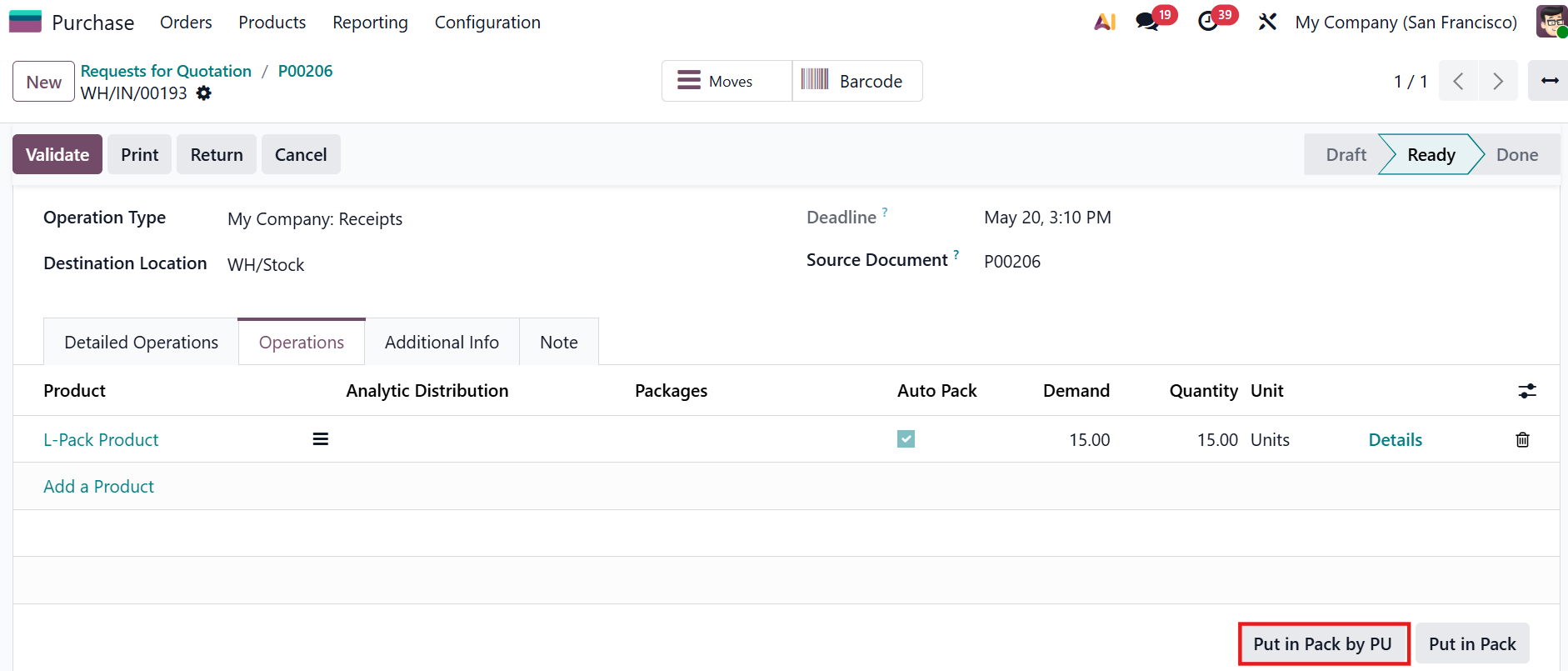
Option A: Assign Packages First, Lots Later On the generated receipt, click Put in Pack by PU at the end of the generated receipt > packages are generated automatically based on the packaging unit. |
|
|
Generate Serials/Lots then both lots and packages are assigned sequentially until each package reaches its maximum quantity |
|
|
Option B: Assign Lots First, Packages Later 1 . Click Details then Generate Serials/Lots |
|
|
2. Click Put in Pack by PU - packages are assigned and mapped to the lots sequentially until each package reaches its maximum quantity.
|
|
|
The result is the same when assigning packages first and lots later. |
|




Odoo Proprietary License v1.0

This software and associated files (the "Software") may only be used (executed,
modified, executed after modifications) if you have purchased a valid license
from the authors, typically via Odoo Apps, or if you have received a written
agreement from the authors of the Software (see the COPYRIGHT file).

You may develop Odoo modules that use the Software as a library (typically
by depending on it, importing it and using its resources), but without copying
any source code or material from the Software. You may distribute those
modules under the license of your choice, provided that this license is
compatible with the terms of the Odoo Proprietary License (For example:
LGPL, MIT, or proprietary licenses similar to this one).

It is forbidden to publish, distribute, sublicense, or sell copies of the Software
or modified copies of the Software.

The above copyright notice and this permission notice must be included in all
copies or substantial portions of the Software.

THE SOFTWARE IS PROVIDED "AS IS", WITHOUT WARRANTY OF ANY KIND, EXPRESS OR
IMPLIED, INCLUDING BUT NOT LIMITED TO THE WARRANTIES OF MERCHANTABILITY,
FITNESS FOR A PARTICULAR PURPOSE AND NONINFRINGEMENT.
IN NO EVENT SHALL THE AUTHORS OR COPYRIGHT HOLDERS BE LIABLE FOR ANY CLAIM,
DAMAGES OR OTHER LIABILITY, WHETHER IN AN ACTION OF CONTRACT, TORT OR OTHERWISE,
ARISING FROM, OUT OF OR IN CONNECTION WITH THE SOFTWARE OR THE USE OR OTHER
DEALINGS IN THE SOFTWARE.
Please log in to comment on this module