

Milestone management on PO for subcontracted service
by CLuedoo https://www.cluedoo.com/shop/licclusetpur0034-milestone-management-on-po-for-subcontracted-service-6733$ 1764.29
ODOO'S FUNCTION
In Odoo, there exists a limitation where users are unable to directly associate tasks and projects with the Purchase Order (PO). This lack of connectivity can create challenges in maintaining a seamless workflow, as the relationship between the PO and the corresponding tasks or projects remains disconnected, potentially leading to inefficiencies in project management and oversight.
CLUEDOO'S FUNCTION
By utilizing the smart "Milestones" button, CLuedoo enables an efficient and intelligent linkage, ensuring that the PO is directly tied to the relevant tasks and projects, thereby enhancing coordination, improving oversight, and fostering a more streamlined project management experience.
|
1. Go to Products > Create a new product Under the General Information tab, make sure to set:
Note:
Milestone Template is optional at this step.
|

|
|
Under the Purchase tab
|

|
|
Note:
To create Milestone Template, go to
Inventory > Product > Product Template Milestone
|

|
|
2. Create
Sales Order
for this product >
Confirm
After confirmation, you can see the smart buttons for
Projects
,
Milestones
and
Purchase
|

|
|
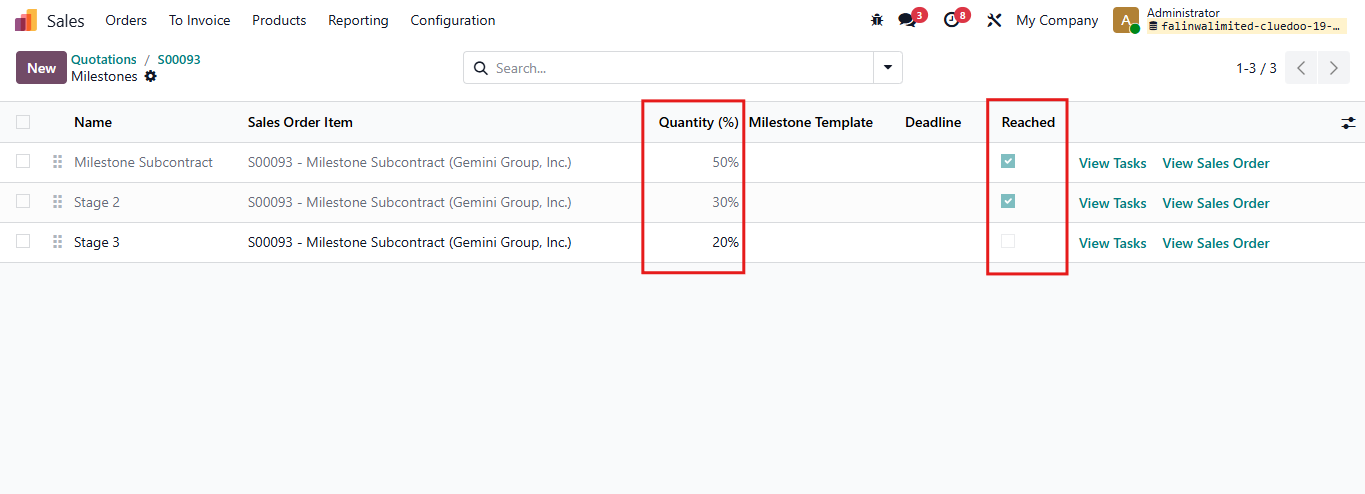
3.1. Click on smart button Milestones. You can see it automatically set the quantity to 100%, but this field is editable.
|

|
|
After finishing a milestone, tick the
Reached
checkbox.
|
|
|
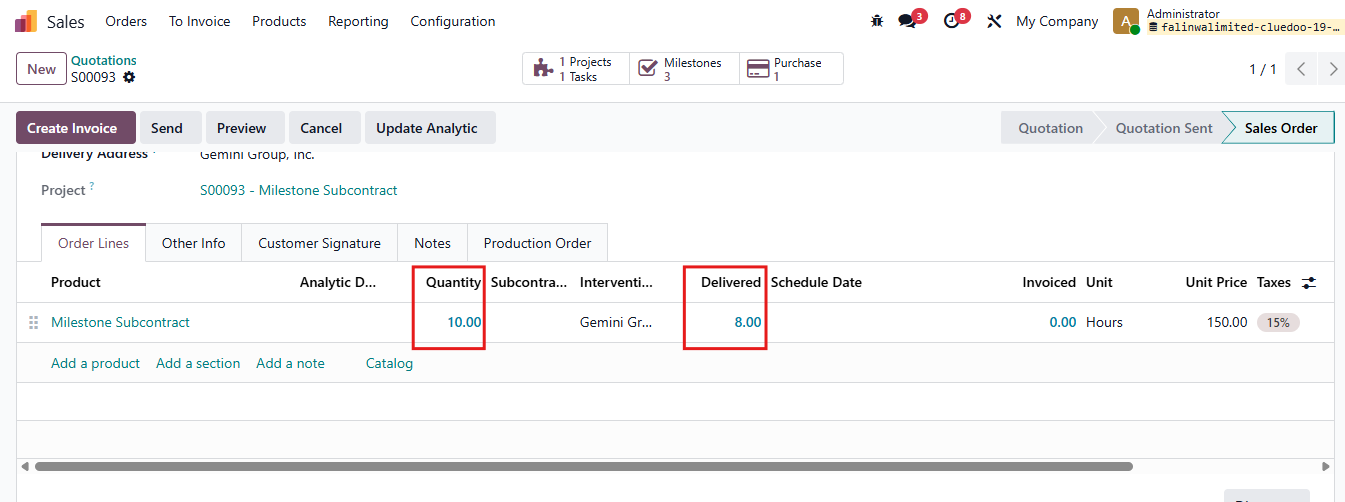
You can see the
Delivered
quantity
column in the SO is equal to the
Quantity
of all the milestone reached.
|
|
|
3.2. Click on the smart button
Purchase
to access the PO >
Confirm PO
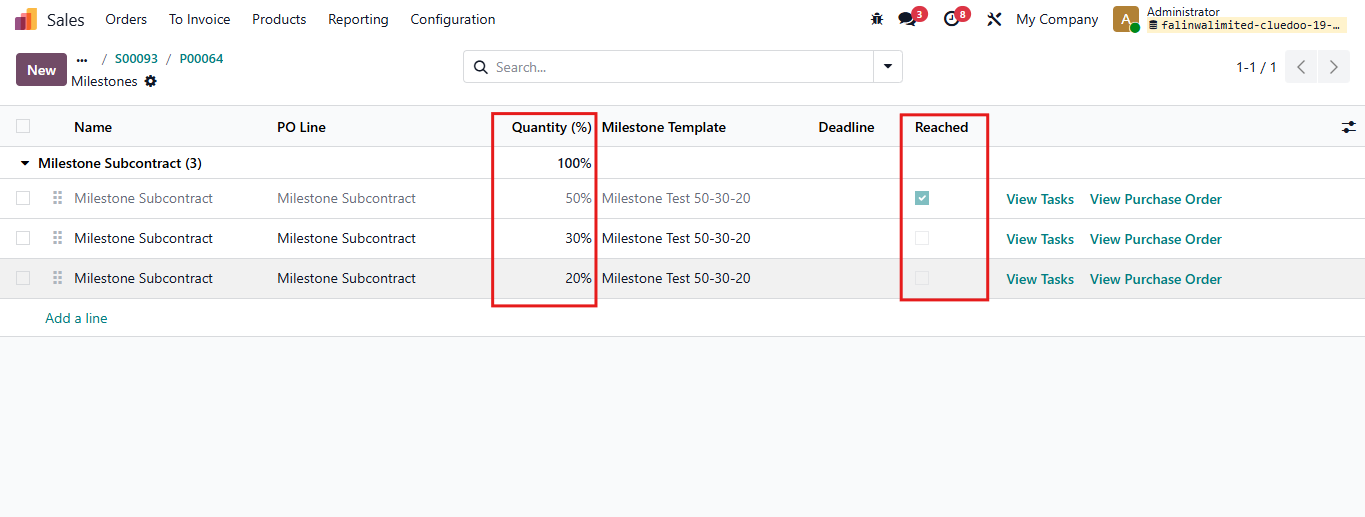
After that, you will see smart button
Milestones
appears and it will follow the template of the Milestone you set in Step 1.
|

|
|
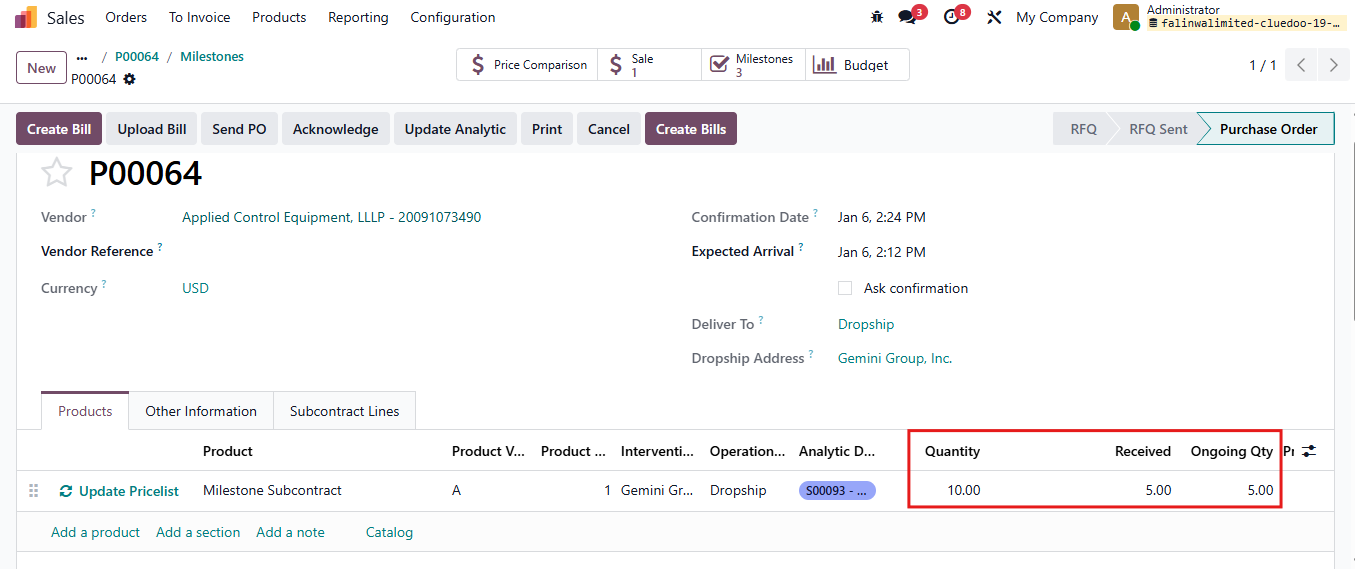
You can see the
Received
quantity in the PO is equal to the
Quantity
of all the milestone reached.
|
|
|
You can also see the smart button
PO Milestones
and the task viewed from the PO Milestones is linked to the task originally created from the SO.
|


|
|
4.1. You can also
create PO
from the task
in a project
Go to Projects > Choose a project > create a new task Fill two fields: Product and Subcontractor Then click on Create PO |

|
|
Note: The selected project must be set to Field Service . |

|
|
4.2. Then, a Purchase Order is created You can check field Purchase Order Line Click on the arrow and you will see the PO |


|
|
4.2.
Confirm
the Purchase Order
The smart button
Milestones
appears
You can also see the tasks and projects linked with this PO.
|

|
| Availability |
Odoo Online
Odoo.sh
On Premise
|
| Odoo Apps Dependencies |
•
Project (project)
• Purchase (purchase) • Sales (sale_management) • Invoicing (account) • Discuss (mail) • Employees (hr) • Inventory (stock) • Field Service (industry_fsm) • Timesheets (timesheet_grid) |
| Community Apps Dependencies | Show |
| Lines of code | 2818 |
| Technical Name |
fal_milestone_subcontracted_service |
| License | OPL-1 |
| Website | https://www.cluedoo.com/shop/licclusetpur0034-milestone-management-on-po-for-subcontracted-service-6733 |
Odoo Proprietary License v1.0

This software and associated files (the "Software") may only be used (executed,
modified, executed after modifications) if you have purchased a valid license
from the authors, typically via Odoo Apps, or if you have received a written
agreement from the authors of the Software (see the COPYRIGHT file).

You may develop Odoo modules that use the Software as a library (typically
by depending on it, importing it and using its resources), but without copying
any source code or material from the Software. You may distribute those
modules under the license of your choice, provided that this license is
compatible with the terms of the Odoo Proprietary License (For example:
LGPL, MIT, or proprietary licenses similar to this one).

It is forbidden to publish, distribute, sublicense, or sell copies of the Software
or modified copies of the Software.

The above copyright notice and this permission notice must be included in all
copies or substantial portions of the Software.

THE SOFTWARE IS PROVIDED "AS IS", WITHOUT WARRANTY OF ANY KIND, EXPRESS OR
IMPLIED, INCLUDING BUT NOT LIMITED TO THE WARRANTIES OF MERCHANTABILITY,
FITNESS FOR A PARTICULAR PURPOSE AND NONINFRINGEMENT.
IN NO EVENT SHALL THE AUTHORS OR COPYRIGHT HOLDERS BE LIABLE FOR ANY CLAIM,
DAMAGES OR OTHER LIABILITY, WHETHER IN AN ACTION OF CONTRACT, TORT OR OTHERWISE,
ARISING FROM, OUT OF OR IN CONNECTION WITH THE SOFTWARE OR THE USE OR OTHER
DEALINGS IN THE SOFTWARE.
Please log in to comment on this module