

Set default quantity 0 in Receipt
by CLuedoo https://www.cluedoo.com/shop/lic-clu-set-ppm-0029-set-default-quantity-0-in-receipt-6680$ 99.77
ODOO'S FUNCTION
In Odoo, when a Receipt is generated from the Purchase Order confirmation, the received product quantity (Quantity field) is automatically set to match the planned quantity to be moved (Demand field). However, in practice, the planned quantity may be split across multiple transfers and users must manually adjust the actual received quantity.
CLUEDOO'S FUNCTION
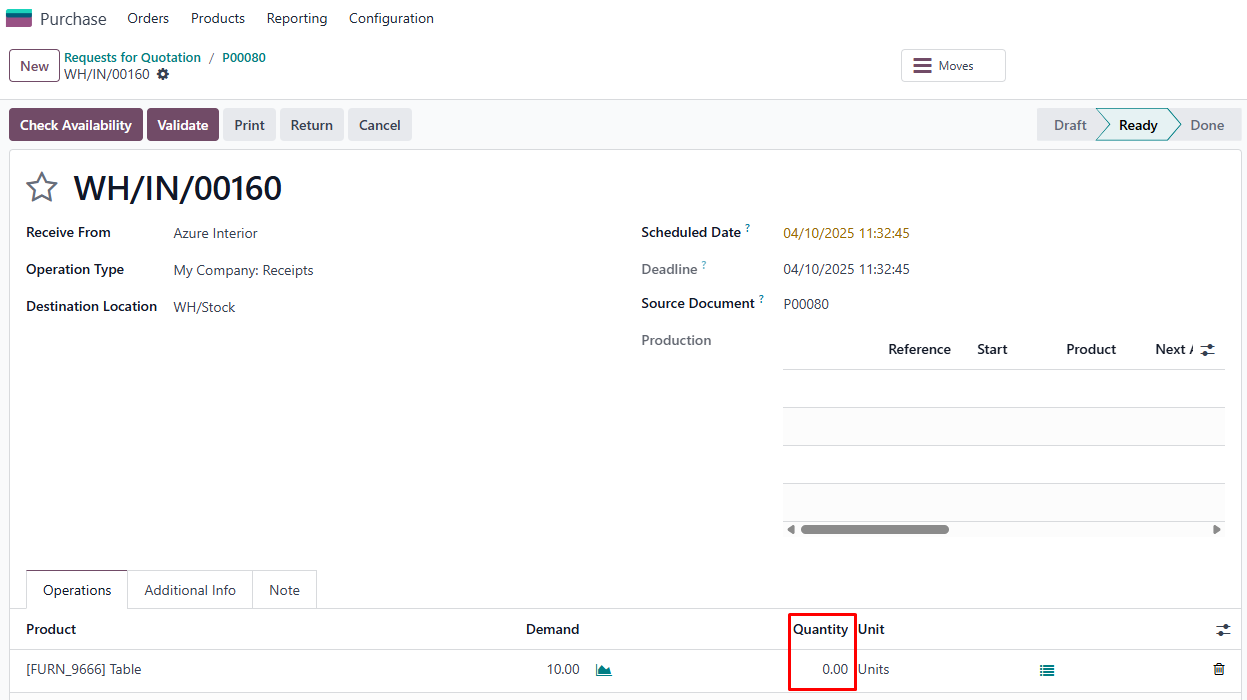
In CLuedoo, when a Receipt is generated from a Purchase Order confirmation, the Quantity field for the received product is initially set to 0. Users can then manually adjust this value based on the actual received quantity. In comparison with Odoo’s behavior, setting the default quantity to 0 helps minimize misunderstandings regarding the actual received quantity.
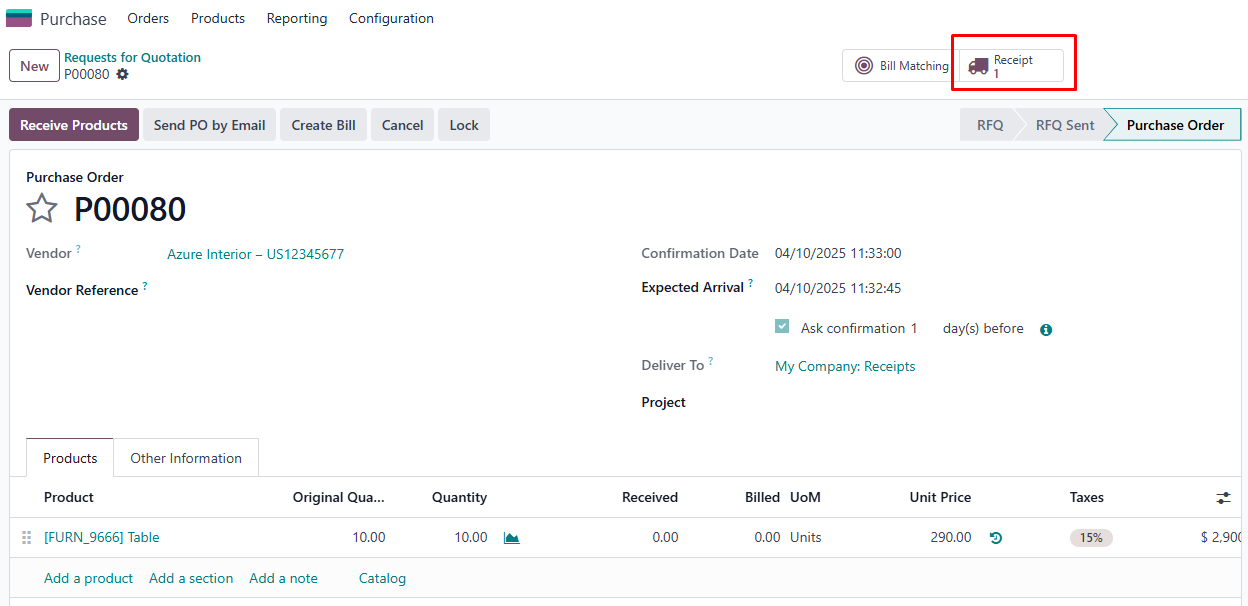
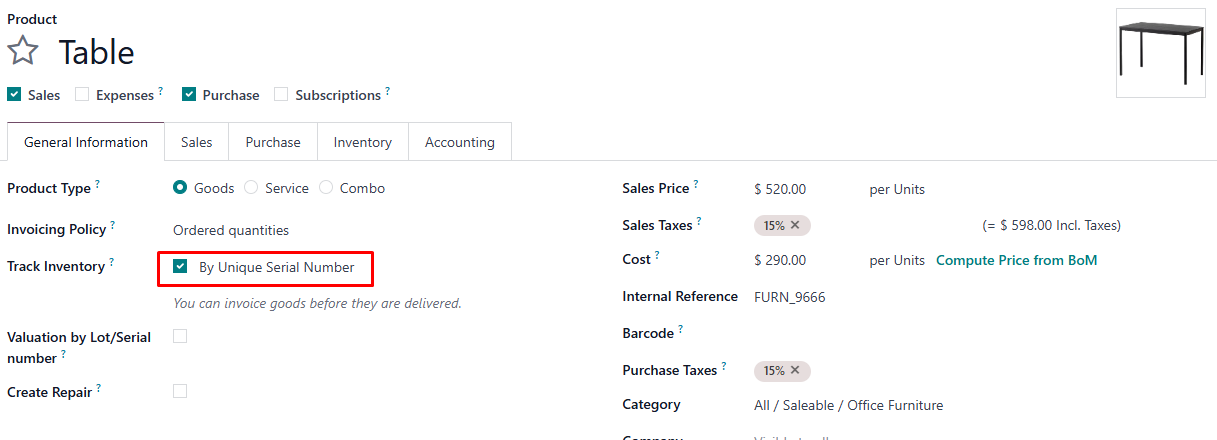
A. When a Receipt is generated from the Purchase Order confirmation1. Purchase → New RFQ → Fill Vendor → Fill Delivery To → Fill Product line (product and quantity) → Confirm Order → You will see a Receipt button is generated. Note: Ensure the product's 'Track Inventory' setting is set to 'By Unique Serial Number' or ' By Lots'. |
|
|
2. Receipt → You will see the quantity is set to 0 |
|
|
3.
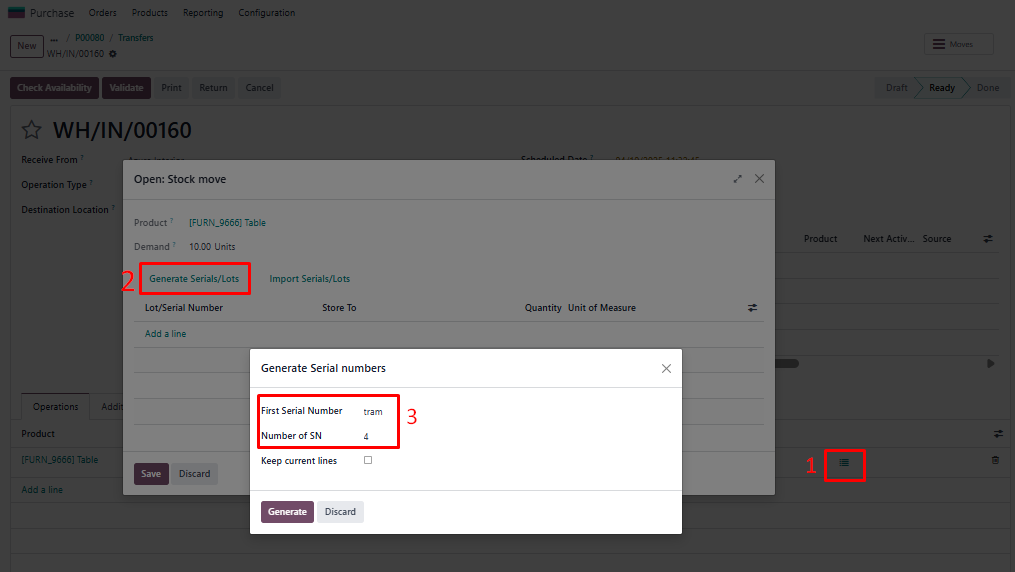
Receipt → Open: Stock move → Generate Serials/Lots →
Fill unique
First Serial Number
and
Number of SN → Generate → Save
Note: Fill in Number of SN that is lower than the ordered quantity to create a Backorder |
|
|
4.
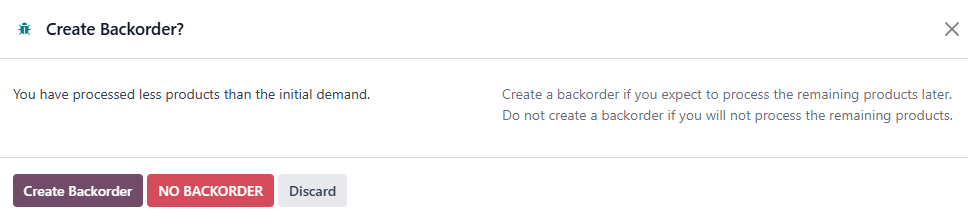
Validate → a wizard appears →
Create Backorder
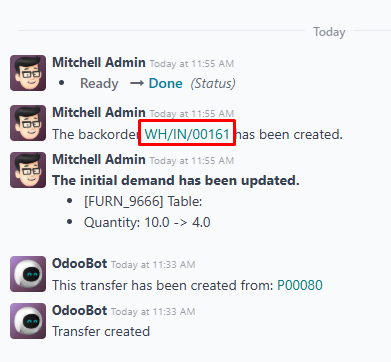
→
A log note is generated to inform that a backorder has been created -> Open this Backorder
|
|
|
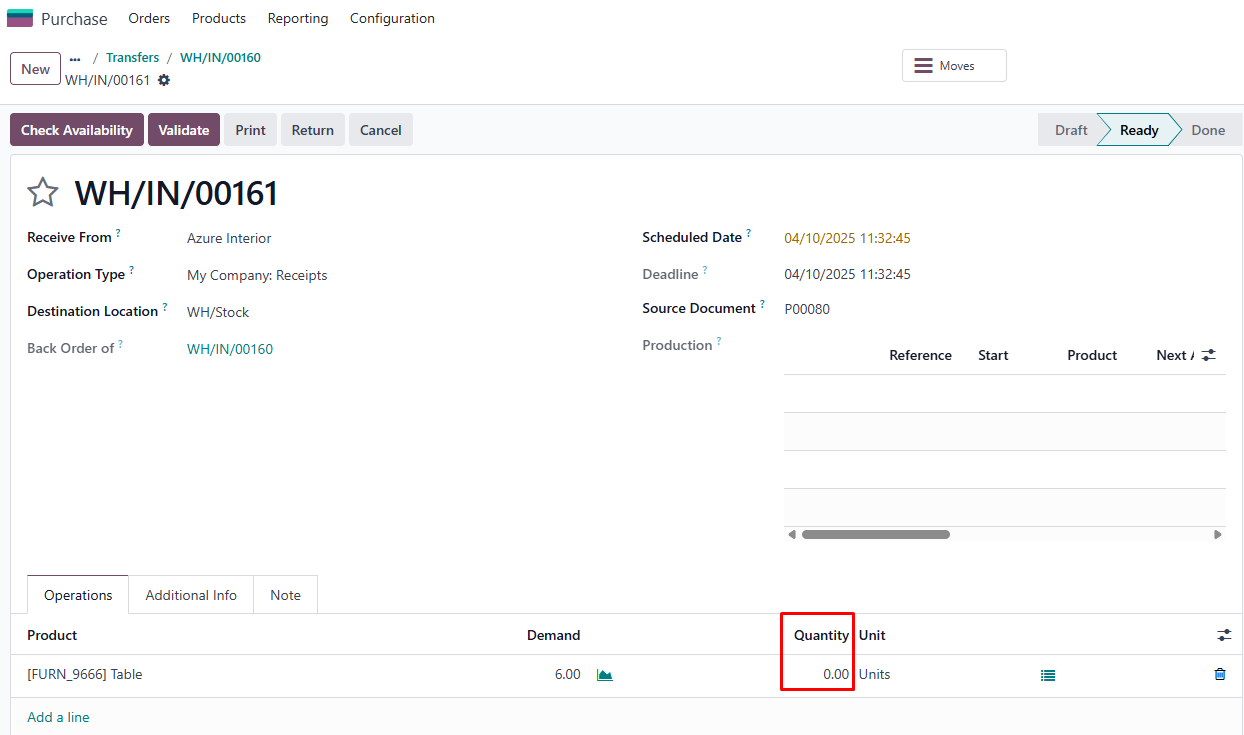
5. You will see the quantity in backorder is set to 0
|
|
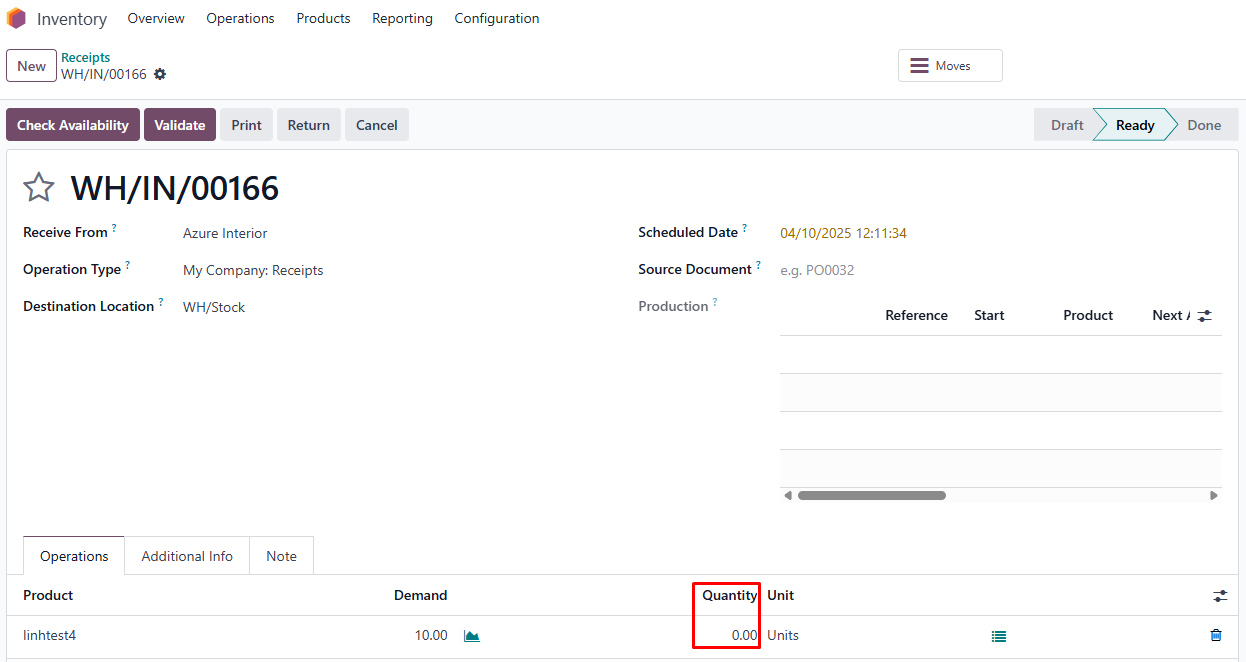
B. When a Receipt is created from Inventory → Transfer1. New Receipt → Fill Receive Form → Fill Product line (product and demand quantity) → Mark as Todo → You will see the quantity is set to 0 Note: Ensure the product's 'Track Inventory' setting is set to 'By Unique Serial Number'. |
|
|
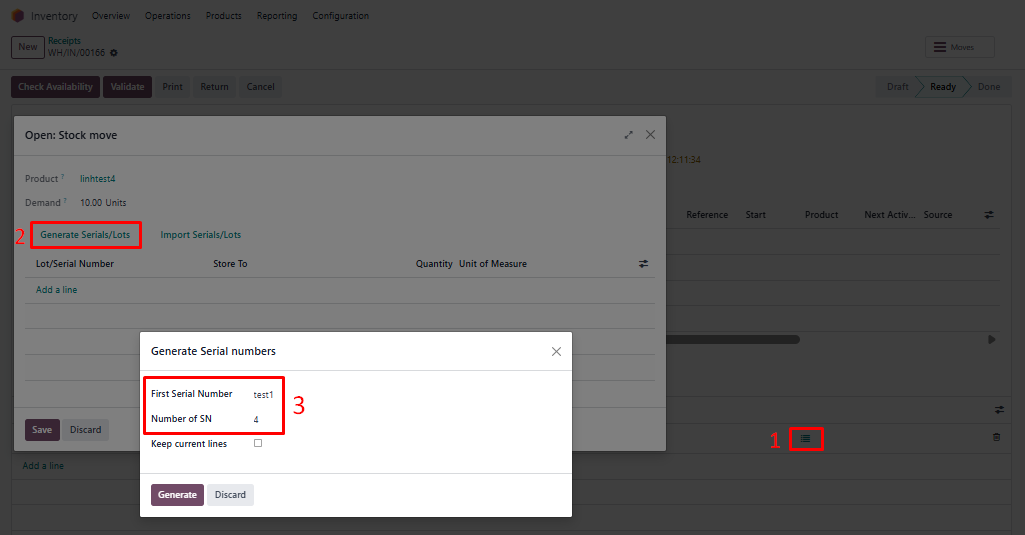
2. Open: Stock move → Generate Serials/Lots → Fill unique First Serial Number and Number of SN → Generate → Save Note: Fill in Number of SN that is lower than the ordered quantity to create a Backorder |
|
|
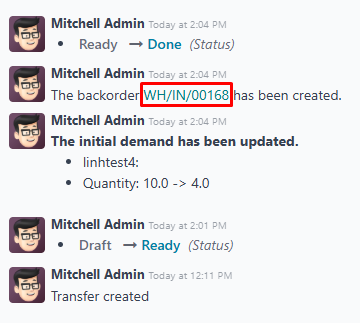
3.
Validate →
a wizard appears
→
Create Backorder →
A log note is generated to inform that a backorder has been created -> Open this Backorder
|
|
|
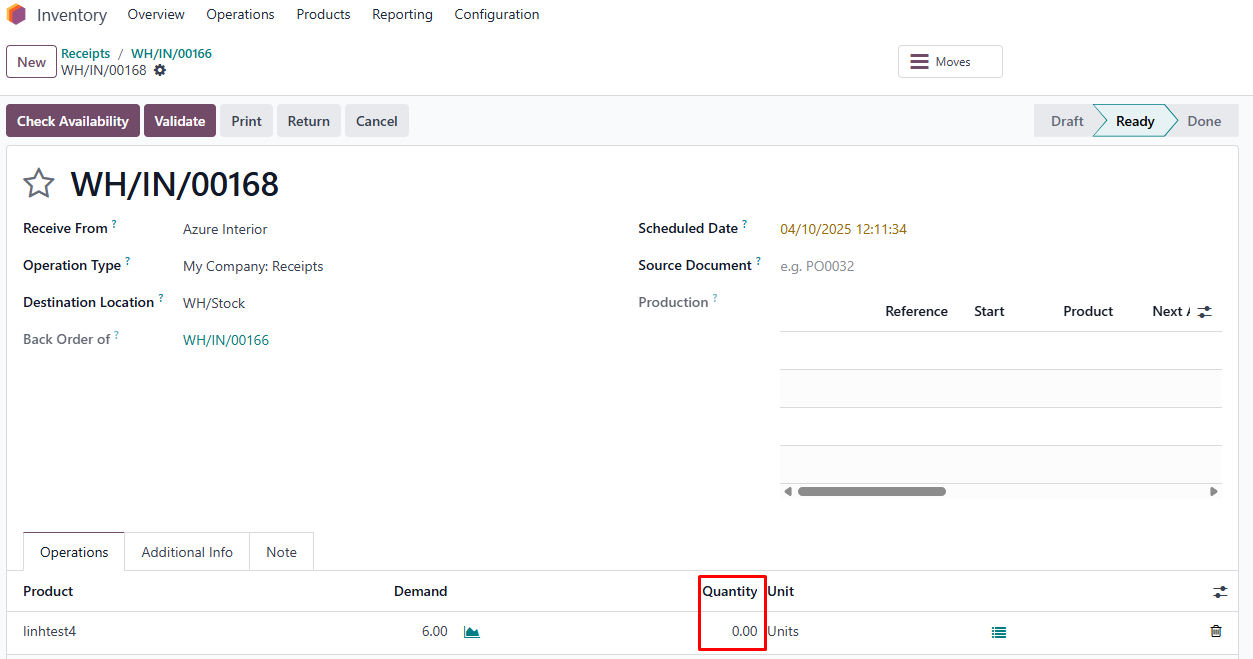
4. You will see the quantity in backorder is set to 0
|
|
| Availability |
Odoo Online
Odoo.sh
On Premise
|
| Odoo Apps Dependencies |
•
Inventory (stock)
• Purchase (purchase) • Discuss (mail) • Invoicing (account) |
| Lines of code | 52 |
| Technical Name |
fal_set_qty_receipt |
| License | OPL-1 |
| Website | https://www.cluedoo.com/shop/lic-clu-set-ppm-0029-set-default-quantity-0-in-receipt-6680 |
Odoo Proprietary License v1.0

This software and associated files (the "Software") may only be used (executed,
modified, executed after modifications) if you have purchased a valid license
from the authors, typically via Odoo Apps, or if you have received a written
agreement from the authors of the Software (see the COPYRIGHT file).

You may develop Odoo modules that use the Software as a library (typically
by depending on it, importing it and using its resources), but without copying
any source code or material from the Software. You may distribute those
modules under the license of your choice, provided that this license is
compatible with the terms of the Odoo Proprietary License (For example:
LGPL, MIT, or proprietary licenses similar to this one).

It is forbidden to publish, distribute, sublicense, or sell copies of the Software
or modified copies of the Software.

The above copyright notice and this permission notice must be included in all
copies or substantial portions of the Software.

THE SOFTWARE IS PROVIDED "AS IS", WITHOUT WARRANTY OF ANY KIND, EXPRESS OR
IMPLIED, INCLUDING BUT NOT LIMITED TO THE WARRANTIES OF MERCHANTABILITY,
FITNESS FOR A PARTICULAR PURPOSE AND NONINFRINGEMENT.
IN NO EVENT SHALL THE AUTHORS OR COPYRIGHT HOLDERS BE LIABLE FOR ANY CLAIM,
DAMAGES OR OTHER LIABILITY, WHETHER IN AN ACTION OF CONTRACT, TORT OR OTHERWISE,
ARISING FROM, OUT OF OR IN CONNECTION WITH THE SOFTWARE OR THE USE OR OTHER
DEALINGS IN THE SOFTWARE.
Please log in to comment on this module