

Advanced WhatsApp Web Integration | Send Quotation | Send Invoice | Without Business API
by Micra Digital https://www.micra.digital/$ 47.57
WhatsApp Odoo Connector
Communicate instantly with your customers using WhatsApp Web integration, allowing you to send unlimited Quotations & Invoices completely free — no WhatsApp Business API, no recurring fees, no hidden costs.
Free & Unlimited
A premium Odoo extension to send Quotations & Invoices via WhatsApp — no Business API, no cost.
Contact Our Team
Scan the QR code or contact Micra Digital instantly through WhatsApp, Email, or Phone.


Direct WhatsApp Integration
Traditional WhatsApp integrations for Odoo often require expensive Business APIs and charge you per message. This can quickly become costly for businesses sending numerous quotations, invoices, or simple updates.
This module bypasses those limitations by securely authenticating with your regular WhatsApp Web application. Send documents, personalized messages, and updates directly from Odoo without any hidden fees or API restrictions.
Send Quotations & Invoices Free
Directly send Quotations and Invoices from Odoo to your customers on WhatsApp — no Business API, no fees, completely free.
Setup Guide Steps
Install and start using the module in just a few simple steps.
Install Module
Add the module to your custom addons and install it from the Apps list.
Scan QR Code
Go to the configured WhatsApp sessions and scan the QR code using your WhatsApp Mobile App.
Create Templates
Set up customized message templates for common documents like Orders and Invoices.
Start Sending!
Open any quotation or invoice and click the "Send by WhatsApp" button.
Truly Unlimited Usage
Unlike official API providers that charge you for every conversation started, you can send as many messages as you want directly through your connected WhatsApp Web account.
Custom Message Templates
Create personalized templates that dynamically pull data from your Odoo Sales Orders, Invoices, and Contacts. Standardize your communication easily.
How It Works
1. Authenticate Once
Link your company or personal WhatsApp number easily by scanning a secure QR Code directly from within Odoo.
2. Send in One Click
Choose a personalized template and hit Send. The message and attached PDF are instantly delivered.
App Key Features
Everything you need to send quotations and invoices directly via WhatsApp — for free.
Multiple Numbers
Add multiple WhatsApp numbers separated by a comma — all recipients receive the Quotation or Invoice instantly in one send.
Send PDF Quotation
Open any Sales Order and send the Quotation PDF directly to your customer on WhatsApp with a single click — no email needed.
Sales OrdersSend Invoice
From the Accounting module, send Customer Invoices as PDF attachments on WhatsApp instantly.
AccountingUnlimited Users
Connect multiple WhatsApp numbers for different users — no per-user fees, no Business API subscriptions required.
No API CostModule Highlights
Secure QR Code Authentication leveraging the native WhatsApp Web protocol.
Unlimited Users & Numbers: Connect as many internal team members and WhatsApp numbers as you need.
One-Click Send from Sales Orders, Invoices, and Contacts with automated PDF attachments.
Dynamic Message Templates designed perfectly for Quotes or Invoices and pulling Odoo record IDs instantly.
Use Cases
Sales representatives sending customized, instant Quotations to clients.
Admin teams distributing invoices securely and quickly over WhatsApp.
Any company communicating frequently with clients and avoiding high API costs per message.
Companies with multiple sales reps using individual WhatsApp accounts connected within Odoo.
Explore More Odoo Apps
Explore more powerful modules developed by Micra Digital to enhance your Odoo experience.


Frequently Asked Questions
Common questions buyers usually ask before installation.
Are there any limitations on the number of messages I can send?
No! Because this relies on WhatsApp Web directly, you are not charged per message. You can send as many messages as a normal user. (Standard WhatsApp anti-spam policies still apply).
Do I need to sign up for Meta's WhatsApp Business API?
No. This integration relies on the standard WhatsApp Web protocol, completely bypassing complex metadata approvals and costs.
Can multiple users link their own numbers?
Yes, the module supports configuring multiple distinct WhatsApp sessions, allowing different users or teams to send messages from their respective numbers.
Can I add placeholders in my message templates?
Yes. You can define templates that dynamically extract data such as the customer's name, the order total, or a due date.
 MICRA DIGITAL
Ready to Use This App?
Our team at Micra Digital builds practical Odoo solutions that improve everyday business workflows. Contact us for installation support, customization, or product guidance.
Company
Micra Digital
Website
www.micra.digital
hello@micra.digital
App Screenshots Preview

WhatsApp Sessions List
View all configured WhatsApp sessions inside Odoo. Each session represents a linked WhatsApp number, allowing multiple users to manage their own accounts from a single dashboard.

Session Detail & Connection Status
Each WhatsApp session shows its current connection status. Easily manage and monitor your linked accounts from within Odoo.

QR Code Authentication
Authenticate your WhatsApp account by scanning the QR code displayed in Odoo using your WhatsApp Mobile App. No Business API or additional setup required.

Send Quotation from Sales Order
A dedicated WhatsApp button appears directly on the Sales Order header. Click it to instantly send the Quotation PDF to your customer on WhatsApp.

Custom Message & Template Preview
Before sending, choose a custom message template or type a personalized message. The PDF is automatically attached and sent along with your message.

Send Invoice from Accounting
From the Accounting module, send Customer Invoices directly via WhatsApp. The invoice PDF is attached automatically to the message.
For Portal User

WhatsApp Connected & Ready
Once authenticated, your session shows as Connected. Messages and documents are sent immediately with no further configuration needed.

My Account & Session Settings
Manage your WhatsApp session settings, view account details, and configure preferences from the dedicated account page.
MICRA DIGITAL
Ready to Use This App?
Our team at Micra Digital builds practical Odoo solutions that improve everyday business workflows. Contact us for installation support, customization, or product guidance.
Company
Micra Digital
Website
www.micra.digital
hello@micra.digital
Setup Installation Guide
Follow the steps below for your operating system to get started quickly.
Windows
Installation steps for Windows users
Prerequisites
Before installing the module, make sure Node.js LTS is installed on your system.
Ensure Port 3000 is Free
The WhatsApp service runs on port 3000. Make sure no other application is using this port before starting. You can check by running the following in Command Prompt:
netstat -ano | findstr :3000
CMD
Install the Module
Copy the module folder into your Odoo custom addons directory, then install it from the Apps menu in Odoo.
In Odoo
Apps → Search → Install
Linux
Installation steps for Linux users
Need Linux Setup Help?
For detailed Linux installation instructions, please get in touch with our team at Micra Digital. We'll guide you through the full setup tailored to your server environment.
MICRA DIGITAL
Ready to Use This App?
Our team at Micra Digital builds practical Odoo solutions that improve everyday business workflows. Contact us for installation support, customization, or product guidance.
Company
Micra Digital
Website
www.micra.digital
hello@micra.digital
Video Demo
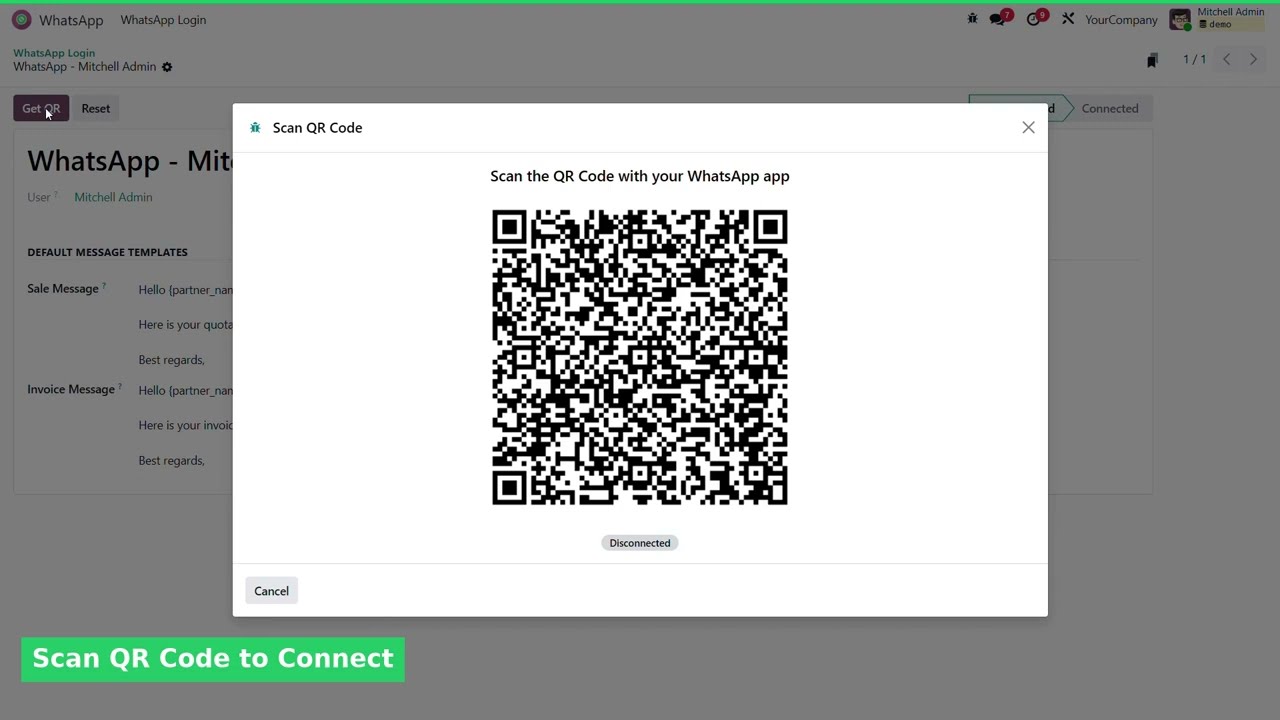 MICRA DIGITAL
Ready to Use This App?
Our team at Micra Digital builds practical Odoo solutions that improve everyday business workflows. Contact us for installation support, customization, or product guidance.
Company
Micra Digital
Website
www.micra.digital
hello@micra.digital
| Availability |
Odoo Online
Odoo.sh
On Premise
|
| Odoo Apps Dependencies |
•
Website (website)
• Discuss (mail) • Invoicing (account) |
| Lines of code | 1228 |
| Technical Name |
whatsapp_web |
| License | OPL-1 |
| Website | https://www.micra.digital/ |
Odoo Proprietary License v1.0

This software and associated files (the "Software") may only be used (executed,
modified, executed after modifications) if you have purchased a valid license
from the authors, typically via Odoo Apps, or if you have received a written
agreement from the authors of the Software (see the COPYRIGHT file).

You may develop Odoo modules that use the Software as a library (typically
by depending on it, importing it and using its resources), but without copying
any source code or material from the Software. You may distribute those
modules under the license of your choice, provided that this license is
compatible with the terms of the Odoo Proprietary License (For example:
LGPL, MIT, or proprietary licenses similar to this one).

It is forbidden to publish, distribute, sublicense, or sell copies of the Software
or modified copies of the Software.

The above copyright notice and this permission notice must be included in all
copies or substantial portions of the Software.

THE SOFTWARE IS PROVIDED "AS IS", WITHOUT WARRANTY OF ANY KIND, EXPRESS OR
IMPLIED, INCLUDING BUT NOT LIMITED TO THE WARRANTIES OF MERCHANTABILITY,
FITNESS FOR A PARTICULAR PURPOSE AND NONINFRINGEMENT.
IN NO EVENT SHALL THE AUTHORS OR COPYRIGHT HOLDERS BE LIABLE FOR ANY CLAIM,
DAMAGES OR OTHER LIABILITY, WHETHER IN AN ACTION OF CONTRACT, TORT OR OTHERWISE,
ARISING FROM, OUT OF OR IN CONNECTION WITH THE SOFTWARE OR THE USE OR OTHER
DEALINGS IN THE SOFTWARE.
Please log in to comment on this module