

Auto Backup to AWS S3
Protect your business data with the ultimate Odoo administrative utility. Automate database snapshots directly to Amazon S3, complete with smart retention policies and 1-click manual triggers.
IAM Credential Security
Securely connect with AWS using official Access Key and Secret Key protocols. Validated with a built-in connection test.
Automated Schedules
Uses Odoo's native Cron system for reliable backups by minutes, hours, days, weeks, or months completely hands-free.
Smart Retention
Automatically purges older backups by count or age to keep your S3 bucket lean and cost-efficient.
Complete Archives
Full database exported as .sql and .zip (including filestore) everything needed to restore your environment.
1-Click Manual
Trigger an instant backup anytime perfect before a major module update or deployment.
Central Settings
Configure your AWS credentials, region, bucket, and scope entirely within the standard Odoo Settings menu.
Why Choose Auto Backup to S3?
Numbers that speak for themselves
Watch it in action.
Follow our step-by-step walkthrough to securely connect your Odoo instance to AWS S3 without writing a single line of code.
|
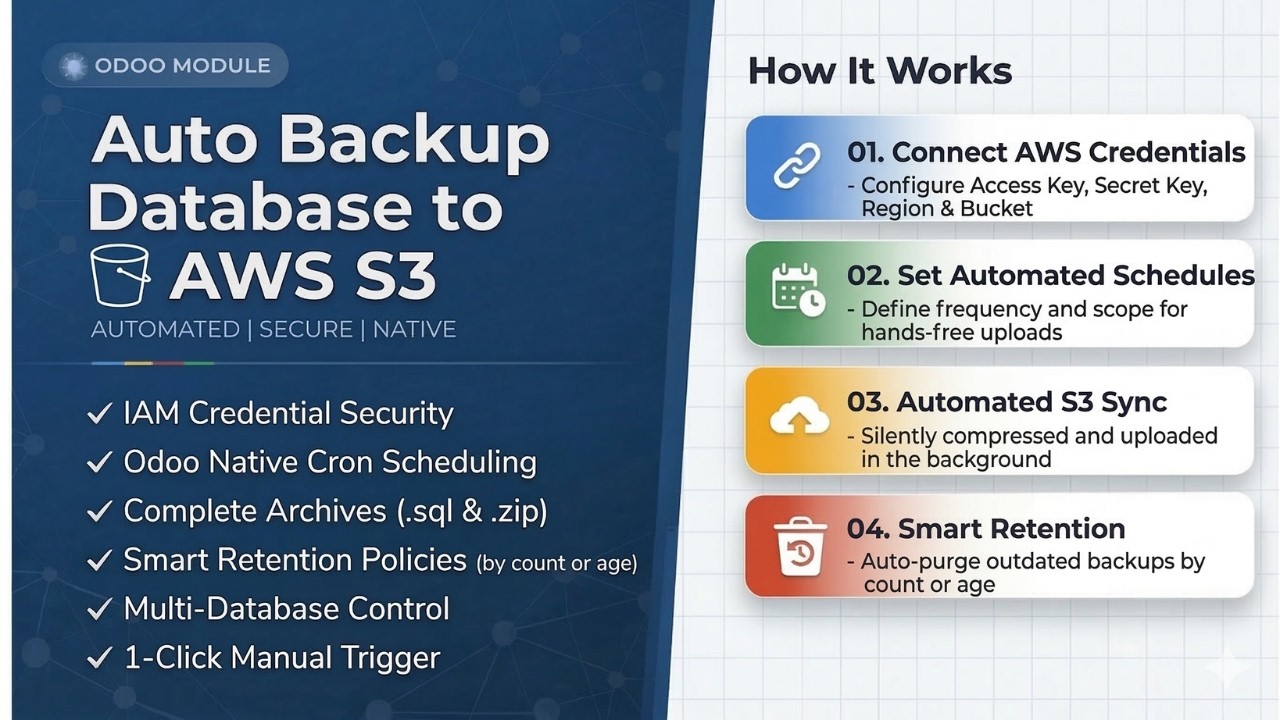
1
|
Configure AWS Credentials
Add your Access Key, Secret Key, Region, and Bucket securely inside native Odoo settings.
|
|
2
|
Set Automated Schedules
Define your backup frequency and database scope for hands-free S3 uploads.
|
|
3
|
Sit Back & Relax
Snapshots are automatically compressed and synced to your S3 bucket.
|
|
Python Dependency
External Dependency RequiredThis module requires boto3 the official AWS SDK for Python to communicate with Amazon S3. Install it on your Odoo server before activating the module. |
|
              # Install boto3 on your Odoo server

              $ pip3 install boto3
              # If using a virtualenv or Odoo.sh

              $ /path/to/odoo/venv/bin/pip install boto3
              # Declared in the module manifest

              'external_dependencies': {

                  'python': ['boto3'],

              },
Key Features
Each feature is engineered to eliminate risk and reduce manual effort, ensuring your database is always protected on Amazon S3.
Automated Backup System
Configure once backups run on your chosen schedule. Completely hands-free.
Cron PoweredThe core Auto Backup feature works seamlessly with Odoo's native Cron scheduler. Configure once to automatically generate and upload database snapshots to your S3 bucket completely hands-free.
|
01
|
"Set-it-and-forget-it" cron integration
Odoo's scheduler runs your backup on your chosen frequency automatically.
|
|
02
|
Silent background execution
Backups run quietly without affecting your team's workflow.
|
|
03
|
1-Click manual backup override
Trigger an instant snapshot anytime before a major update or deployment.
|
Your data never touches unauthorized servers. We use official AWS IAM credentials to securely authenticate and transfer your Odoo data directly to your chosen S3 bucket.
|
01
|
Access Key & Secret Key protocols
Authenticate using AWS's own secure IAM credential system.
|
|
02
|
Built-in connection test
Validate your credentials and boto3 setup before you start sending data.
|
|
03
|
Easy disconnect & reset
Securely clear and reset credentials to switch accounts or revoke access at any time.
|
Enterprise-Grade Security
Zero unauthorized access. Official AWS IAM protocols keep credentials locked down.
AWS IAMSmart Storage Retention
Automated cleanup keeps your S3 bucket lean. You set the rules it handles the rest.
Auto CleanupCloud storage costs money. Our built-in retention algorithm automatically scans your S3 bucket and purges outdated backups based on the exact policy you specify.
|
01
|
Keep Last X Backups
Retain only the most recent X objects older ones are automatically removed.
|
|
02
|
Keep for X Days
Deletes any backup objects older than your configured day threshold.
|
|
03
|
Keep All (None)
Optionally disable the retention policy to store all backups indefinitely.
|
We don't just backup text. The module exports your entire database in two formats, with an optional toggle to include your Odoo filestore (images, documents, attachments).
|
01
|
Full database SQL dumps
Every table, record, and relation in your Odoo DB fully exported as a lightweight .sql file.
|
|
02
|
Optional Filestore inclusion
Toggle on to include images, PDFs, and attachments alongside your database export.
|
|
03
|
Dual format uploads to S3
Both .sql and .zip archives uploaded per backup run maximum flexibility for restoration.
|
Comprehensive Archives
Dual .sql & .zip exports of your database and filestore nothing left behind.
Dual FormatMulti-Database Control
Backup all databases or just the ones that matter independently for auto and manual.
Flexible ScopeNot every database needs to be backed up the same way. Choose independent scope settings for automated and manual backups giving you full control over what gets uploaded to S3 and when.
|
01
|
All Databases
Automatically sync every database in your Odoo environment on each run.
|
|
02
|
Selected Databases
Pick specific databases to avoid backing up demo or test environments unnecessarily.
|
|
03
|
Independent auto & manual scopes
Your auto-backup can run on All DBs while manual can target just one fully separated configs.
|
INTERFACE GALLERY
A clean, centralized interface for managing all your AWS S3 backups natively inside Odoo.
|
|
Step 01
Centralized AWS SettingsConfigure your Access Key, Secret Key, Region, and Target Bucket directly in 
|
|
|
Step 02
Test & Verify ConnectionUse the built-in "Test Connection" button to validate your credentials and boto3 prerequisites before any data is sent. 
|
|
|
Step 03
Automated Cron SchedulingSet your backup frequency (Minutes, Hours, Days, Weeks, or Months) and database scope inside Odoo's native scheduled actions dashboard. 
|
|
|
Step 04
Manual Backup SettingsTrigger an instant backup anytime with a single click with its own independent database scope, ideal before major module updates or deployments. 
|
|
|
Step 05
Built-in Retention PolicyChoose to keep the last X backups, keep for X days, or keep all. The module handles automated S3 cleanup for you. 
|
|
|
Step 06
Direct AWS S3 BucketYour backups are neatly organized inside your S3 bucket in a structured folder hierarchy.


Auto Backup
Manual Backup

.sql Raw DB dump
.zip Full Odoo backup
|
Ready to Secure Your Database?
Don't leave your data to chance. Install Auto Backup to AWS S3 today and ensure your business continuity engineered for modern Odoo environments.
— Related Modules —
You Might Also Like
Explore our suite of productivity-focused Odoo modules built for real business workflows.


Odoo Proprietary License v1.0

This software and associated files (the "Software") may only be used (executed,
modified, executed after modifications) if you have purchased a valid license
from the authors, typically via Odoo Apps, or if you have received a written
agreement from the authors of the Software (see the COPYRIGHT file).

You may develop Odoo modules that use the Software as a library (typically
by depending on it, importing it and using its resources), but without copying
any source code or material from the Software. You may distribute those
modules under the license of your choice, provided that this license is
compatible with the terms of the Odoo Proprietary License (For example:
LGPL, MIT, or proprietary licenses similar to this one).

It is forbidden to publish, distribute, sublicense, or sell copies of the Software
or modified copies of the Software.

The above copyright notice and this permission notice must be included in all
copies or substantial portions of the Software.

THE SOFTWARE IS PROVIDED "AS IS", WITHOUT WARRANTY OF ANY KIND, EXPRESS OR
IMPLIED, INCLUDING BUT NOT LIMITED TO THE WARRANTIES OF MERCHANTABILITY,
FITNESS FOR A PARTICULAR PURPOSE AND NONINFRINGEMENT.
IN NO EVENT SHALL THE AUTHORS OR COPYRIGHT HOLDERS BE LIABLE FOR ANY CLAIM,
DAMAGES OR OTHER LIABILITY, WHETHER IN AN ACTION OF CONTRACT, TORT OR OTHERWISE,
ARISING FROM, OUT OF OR IN CONNECTION WITH THE SOFTWARE OR THE USE OR OTHER
DEALINGS IN THE SOFTWARE.
Please log in to comment on this module