Skip to Content
Odoo Menu
  • Sign in
  • Try it free
  • Apps
    Finance
    • Accounting
    • Invoicing
    • Expenses
    • Spreadsheet (BI)
    • Documents
    • Sign
    Sales
    • CRM
    • Sales
    • POS Shop
    • POS Restaurant
    • Subscriptions
    • Rental
    Websites
    • Website Builder
    • eCommerce
    • Blog
    • Forum
    • Live Chat
    • eLearning
    Supply Chain
    • Inventory
    • Manufacturing
    • PLM
    • Purchase
    • Maintenance
    • Quality
    Human Resources
    • Employees
    • Recruitment
    • Time Off
    • Appraisals
    • Referrals
    • Fleet
    Marketing
    • Social Marketing
    • Email Marketing
    • SMS Marketing
    • Events
    • Marketing Automation
    • Surveys
    Services
    • Project
    • Timesheets
    • Field Service
    • Helpdesk
    • Planning
    • Appointments
    Productivity
    • Discuss
    • Approvals
    • IoT
    • VoIP
    • Knowledge
    • WhatsApp
    Third party apps Odoo Studio Odoo Cloud Platform
  • Industries
    Retail
    • Book Store
    • Clothing Store
    • Furniture Store
    • Grocery Store
    • Hardware Store
    • Toy Store
    Food & Hospitality
    • Bar and Pub
    • Restaurant
    • Fast Food
    • Guest House
    • Beverage Distributor
    • Hotel
    Real Estate
    • Real Estate Agency
    • Architecture Firm
    • Construction
    • Property Management
    • Gardening
    • Property Owner Association
    Consulting
    • Accounting Firm
    • Odoo Partner
    • Marketing Agency
    • Law firm
    • Talent Acquisition
    • Audit & Certification
    Manufacturing
    • Textile
    • Metal
    • Furnitures
    • Food
    • Brewery
    • Corporate Gifts
    Health & Fitness
    • Sports Club
    • Eyewear Store
    • Fitness Center
    • Wellness Practitioners
    • Pharmacy
    • Hair Salon
    Trades
    • Handyman
    • IT Hardware & Support
    • Solar Energy Systems
    • Shoe Maker
    • Cleaning Services
    • HVAC Services
    Others
    • Nonprofit Organization
    • Environmental Agency
    • Billboard Rental
    • Photography
    • Bike Leasing
    • Software Reseller
    Browse all Industries
  • Community
    Learn
    • Tutorials
    • Documentation
    • Certifications
    • Training
    • Blog
    • Podcast
    Empower Education
    • Education Program
    • Scale Up! Business Game
    • Visit Odoo
    Get the Software
    • Download
    • Compare Editions
    • Releases
    Collaborate
    • Github
    • Forum
    • Events
    • Translations
    • Become a Partner
    • Services for Partners
    • Register your Accounting Firm
    Get Services
    • Find a Partner
    • Find an Accountant
      • Get a Tailored Demo
    • Implementation Services
    • Customer References
    • Support
    • Upgrades
    Github Youtube Twitter Linkedin Instagram Facebook Spotify
    +32 2 290 34 90
    • Get a Tailored Demo
  • Pricing
  • Help
  1. APPS
  2. Extra Tools
  3. Auto Backup Database to Cloud v 19.0
  4. Sales Conditions FAQ

Auto Backup Database to Cloud

by CloudAddons Technologies
Odoo

$ 20.14

v 19.0 Third Party
Apps purchases are linked to your Odoo account, please sign in or sign up first.
Availability
Odoo Online
Odoo.sh
On Premise
Lines of code 2771
Technical Name auto_backup_db_cloud
LicenseOPL-1
Versions 17.0 18.0 19.0
You bought this module and need support? Click here!
Availability
Odoo Online
Odoo.sh
On Premise
Lines of code 2771
Technical Name auto_backup_db_cloud
LicenseOPL-1
Versions 17.0 18.0 19.0
  • Description
  • License
MULTI-CLOUD ODOO NATIVE ZERO MIDDLEWARE

Backup Odoo to 5 Cloud Providers
Automatically.

The most comprehensive database backup module for Odoo. Automate encrypted snapshots to AWS S3, Google Drive, Dropbox, OneDrive and Nextcloud with smart retention, dual formats, selective DB scope, and per-provider independent scheduling. No code. No middleware. No risk.

AWS S3 Google Drive Dropbox OneDrive Nextcloud

Why Multi-Cloud Backup?

Numbers that speak for themselves

5
Cloud Providers
2x
Backup Formats
3
Retention Modes
3+
Odoo Versions
01

5 Cloud Providers

AWS S3, Google Drive, Dropbox, OneDrive, and Nextcloud from a single module with unified settings.

boto3 SDK Drive v3
02

Multi-Auth Security

OAuth 2.0 for Google, Dropbox and OneDrive with dedicated callback controllers and refresh tokens.

OAuth 2.0 Access Key
03

Per-Provider Scheduling

Each provider has its own independent toggle, interval tracker, and specialized cron auto-adjustment.

ir.cron Native Auto-Adjust
04

Retention Policy

3-Mode Retention: Keep All, Keep Last N, or Keep for X Days. Configured independently per cloud provider.

Keep Last N Auto-Cleanup
05

Dual Format Archives

Backups create both a raw .sql dump and a complete .zip archive (DB + filestore) simultaneously.

.sql dump .zip archive
06

Selective DB Scope

Choose "All Databases" or specify targets. Auto-discovers new databases via cloud.backup.db.

Selective Auto-Discovery

Watch it in action.

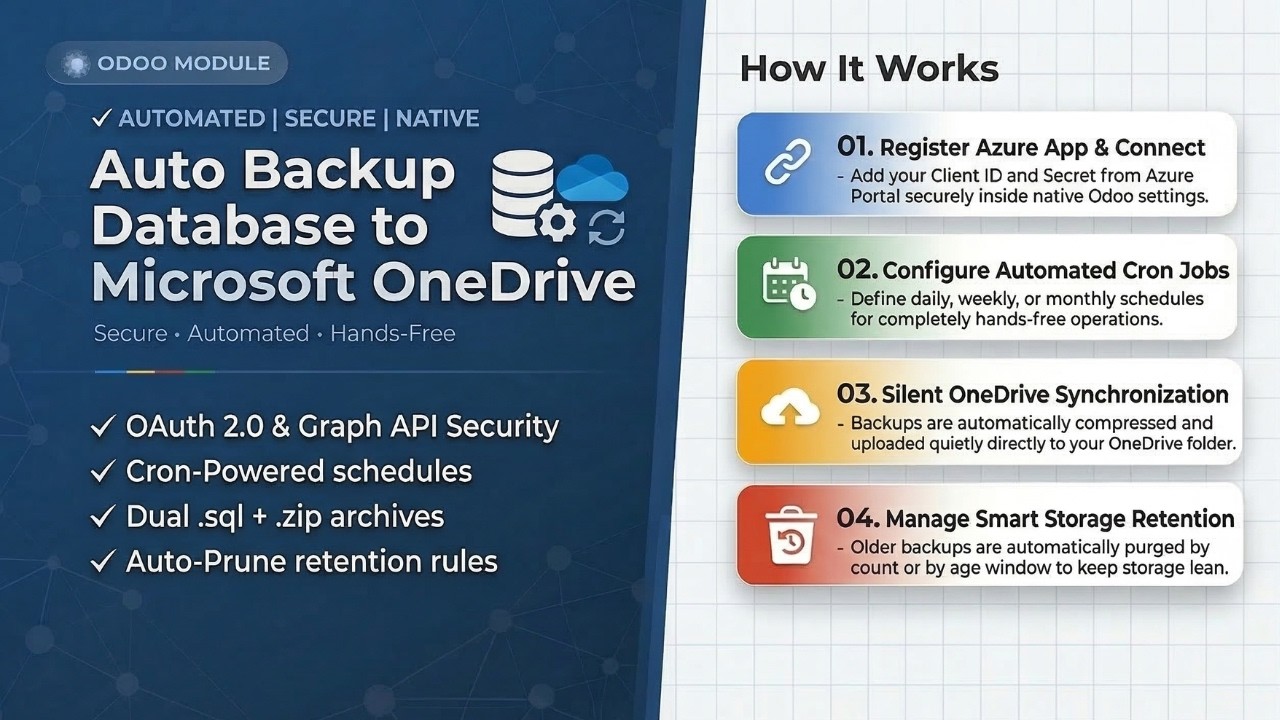
Follow our step-by-step walkthrough to securely connect your Odoo instance to Microsoft OneDrive without writing a single line of code.

1

Register Azure App and Connect

Add your Client ID and Secret from Azure Portal securely inside native Odoo settings.

2

Set Automated Schedules

Define daily, weekly, or monthly cron jobs for hands-free backups.

3

Disaster Recovery and Restore

Snapshots are automatically compressed and synced to your OneDrive folder.

youtube.com/odoo-backup-guide
Setup Video

Auto Backup Setup Guide

Step-by-step video tutorial

Watch Video
Feature 01 / Automation

Per-Provider Automated Scheduling

Each cloud provider runs on its own independent schedule. Configure AWS S3 daily, Google Drive weekly, and Nextcloud monthly all from a single settings panel.

01 / Automation

Set-it-and-forget-it Backups

Each cloud provider runs on its own independent schedule via Odoo's native ir.cron completely hands-free.

Cron Powered

A unified cron job loops through all 5 providers. Each provider's active flag and interval are managed independently to ensure precision.

01
Independent toggles and intervals
Enable AWS daily while running Google Drive weekly using provider_backup_active flags.
02
Auto-adjusting frequency
The master cron always syncs to your smallest active provider interval automatically.
03
Last-run tracking
Precision field tracking per provider ensures schedules never conflict or overlap.
04
1-Click manual override
Trigger instant snapshots anytime ideal before updates, migrations, or deployments.
Feature 02 / Security

Enterprise-Grade Authentication

All credentials stored securely in ir.config_parameter never in transient records or external servers. Dedicated OAuth callback controllers per provider.

Multiple authentication methods: OAuth 2.0 for Google, Dropbox and OneDrive; Access Keys for AWS; and App Passwords for Nextcloud.

01
Dedicated OAuth callbacks
Secure separate endpoints for Google, Dropbox, and OneDrive authentication controllers.
02
Automatic token refresh
Tokens are persisted and refreshed automatically. Sessions never expire unexpectedly.
03
1-Click credential reset
Instantly wipe all keys from system parameters with zero data leftover on disconnect.
02 / Security

Zero External Exposure

All credentials stay in your Odoo instance. We never use intermediary servers or third-party relay dashboards.

Multi-Auth
Feature 03 / Storage

3-Mode Smart Retention

Cloud storage costs money. Built-in retention logic automatically scans each provider and purges outdated backups based on your exact rules.

03 / Storage

Smart Storage Retention

3 retention modes independently configured per provider. Prevents quota errors and unexpected storage costs.

Auto Cleanup

Each provider has its own independent retention configuration. The engine runs automatically after every backup.

Keep All
No deletion. History retained.
Last N
Keep newest N folders.
X Days
Purge after X days.
Provider Implementations
S3 Paginator Drive API v3 WebDAV DELETE

See It In Action. Across All 5 Clouds.

A clean, centralized interface for managing all your backups natively inside Odoo screenshots from every provider.

Step 01

Centralized Odoo Settings

Configure your Client ID, Secret, Access Keys, and Redirect URIs directly inside the native res.config.settings panel for each cloud provider.

AWS S3 Access Key + Secret Key
Odoo Settings Cloud Backup AWS S3
AWS S3 Centralized Settings
Google Drive OAuth 2.0
Odoo Settings Cloud Backup Google Drive
Google Drive Settings
Dropbox OAuth 2.0
Odoo Settings Cloud Backup Dropbox
Dropbox Settings
OneDrive OAuth 2.0
Odoo Settings Cloud Backup OneDrive
OneDrive Settings
Nextcloud App Password WebDAV
Odoo Settings Cloud Backup Nextcloud
Nextcloud Settings
Step 02

Secure OAuth Login

Standard Google, Dropbox, and Microsoft consent screens ensure your credentials are transferred securely. Each provider's OAuth flow is handled by a dedicated callback controller with automatic refresh token storage.

AWS S3 Access Key Auth
AWS S3 Access Key + Secret Key Authentication
AWS S3 Auth
Google Drive Google Consent Screen
Google Drive OAuth 2.0 Authorization
Google Drive OAuth
Dropbox Dropbox Consent Screen
Dropbox OAuth 2.0 Authorization
Dropbox OAuth
OneDrive Microsoft Consent Screen
OneDrive Microsoft OAuth 2.0 Authorization
OneDrive OAuth
Nextcloud WebDAV + App Password
Nextcloud WebDAV PROPFIND Connection Test
Nextcloud Auth
Step 03

Automated Cron Scheduling

Set independent backup frequencies per provider inside Odoo's native Scheduled Actions dashboard. Minutes, Hours, Days, Weeks, or Months each provider runs on its own schedule without conflicts.

AWS S3 Every 1 Day
Odoo Scheduled Actions AWS S3 Auto Backup
AWS S3 Cron
Step 04

Manual Backup Settings

Trigger an instant backup anytime with a single click ideal before major module updates, migrations, or deployments. Separate database scope from scheduled auto backups, per provider.

AWS S3
Odoo Settings Manual Backup AWS S3
AWS S3 Manual Backup
Step 05

Built-in Retention Rule

Define how many days or how many backup folders to keep. The module handles automated cleanup independently per provider preventing quota errors and unnecessary cloud storage costs.

AWS S3 S3 Paginator
Retention Policy AWS S3
AWS S3 Retention
Step 06

Cloud Drive Folder

Your backups are neatly stored in your designated root folder on each cloud platform structured, organized, and instantly accessible from any device at any time.

AWS S3S3 Bucket View
AWS S3 my-odoo-backups/
AWS S3 Root Bucket
Google DriveRoot Folder
Google Drive Odoo Backups/
Google Drive Root Folder
DropboxRoot Folder
Dropbox /Odoo Backups/
Dropbox Root Folder
OneDriveRoot Folder
OneDrive Odoo Backups/
OneDrive Root Folder
NextcloudWebDAV Root
Nextcloud /remote.php/dav/files/.../
Nextcloud Root Folder
Step 07

Auto and Manual Subfolders

Inside each timestamped root folder, backups are organized by database name subfolders. Auto and Manual backups are clearly separated so you can instantly locate and restore any specific snapshot.

Auto_DD-MM-YYYY_HH-MM-SS/ Manual_DD-MM-YYYY_HH-MM-SS/
AWS S3
AWS S3 Auto_15-03-2025/ db_name/
AWS S3 Subfolders
Google Drive
Google Drive Auto_15-03-2025/ db_name/
Google Drive Subfolders
Dropbox
Dropbox /Auto_15-03-2025/ db_name/
Dropbox Subfolders
OneDrive
OneDrive Auto_15-03-2025/ db_name/
OneDrive Subfolders
Nextcloud
Nextcloud Auto_15-03-2025/ db_name/
Nextcloud Subfolders
Step 08

Backup Files (.sql and .zip)

Your actual database and filestore two files created per database on every run. The .sql is a raw SQL dump; the .zip includes the full Odoo DB plus all filestore files.

.sql dump_db(format='sql') Pure database .zip dump_db(format='zip') DB + filestore
AWS S3
AWS S3 .../db_name/ db.sql db.zip
AWS S3 Backup Files
Google Drive
Google Drive .../db_name/ db.sql db.zip
Google Drive Backup Files
Dropbox
Dropbox .../db_name/ db.sql db.zip
Dropbox Backup Files
OneDrive
OneDrive .../db_name/ db.sql db.zip
OneDrive Backup Files
Nextcloud
Nextcloud .../db_name/ db.sql db.zip
Nextcloud Backup Files
Ready to get started?

Protect Every Database.
Across Every Cloud.

Don't risk your business data on a single provider. Install Multi-Cloud Backup and get automated, secure, organized snapshots to all 5 cloud platforms without writing a single line of code.

Odoo 19 Odoo 18 Odoo 17
AWS S3 Google Drive Dropbox OneDrive
Odoo Proprietary License v1.0

This software and associated files (the "Software") may only be used (executed,
modified, executed after modifications) if you have purchased a valid license
from the authors, typically via Odoo Apps, or if you have received a written
agreement from the authors of the Software (see the COPYRIGHT file).

You may develop Odoo modules that use the Software as a library (typically
by depending on it, importing it and using its resources), but without copying
any source code or material from the Software. You may distribute those
modules under the license of your choice, provided that this license is
compatible with the terms of the Odoo Proprietary License (For example:
LGPL, MIT, or proprietary licenses similar to this one).

It is forbidden to publish, distribute, sublicense, or sell copies of the Software
or modified copies of the Software.

The above copyright notice and this permission notice must be included in all
copies or substantial portions of the Software.

THE SOFTWARE IS PROVIDED "AS IS", WITHOUT WARRANTY OF ANY KIND, EXPRESS OR
IMPLIED, INCLUDING BUT NOT LIMITED TO THE WARRANTIES OF MERCHANTABILITY,
FITNESS FOR A PARTICULAR PURPOSE AND NONINFRINGEMENT.
IN NO EVENT SHALL THE AUTHORS OR COPYRIGHT HOLDERS BE LIABLE FOR ANY CLAIM,
DAMAGES OR OTHER LIABILITY, WHETHER IN AN ACTION OF CONTRACT, TORT OR OTHERWISE,
ARISING FROM, OUT OF OR IN CONNECTION WITH THE SOFTWARE OR THE USE OR OTHER
DEALINGS IN THE SOFTWARE.

Please log in to comment on this module

  • The author can leave a single reply to each comment.
  • This section is meant to ask simple questions or leave a rating. Every report of a problem experienced while using the module should be addressed to the author directly (refer to the following point).
  • If you want to start a discussion with the author or have a question related to your purchase, please use the support page.
Community
  • Tutorials
  • Documentation
  • Forum
Open Source
  • Download
  • Github
  • Runbot
  • Translations
Services
  • Odoo.sh Hosting
  • Support
  • Upgrade
  • Custom Developments
  • Education
  • Find an Accountant
  • Find a Partner
  • Become a Partner
About us
  • Our company
  • Brand Assets
  • Contact us
  • Jobs
  • Events
  • Podcast
  • Blog
  • Customers
  • Legal • Privacy
  • Security

Odoo is a suite of open source business apps that cover all your company needs: CRM, eCommerce, accounting, inventory, point of sale, project management, etc.

Odoo's unique value proposition is to be at the same time very easy to use and fully integrated.

Website made with