

Auto Backup to Dropbox
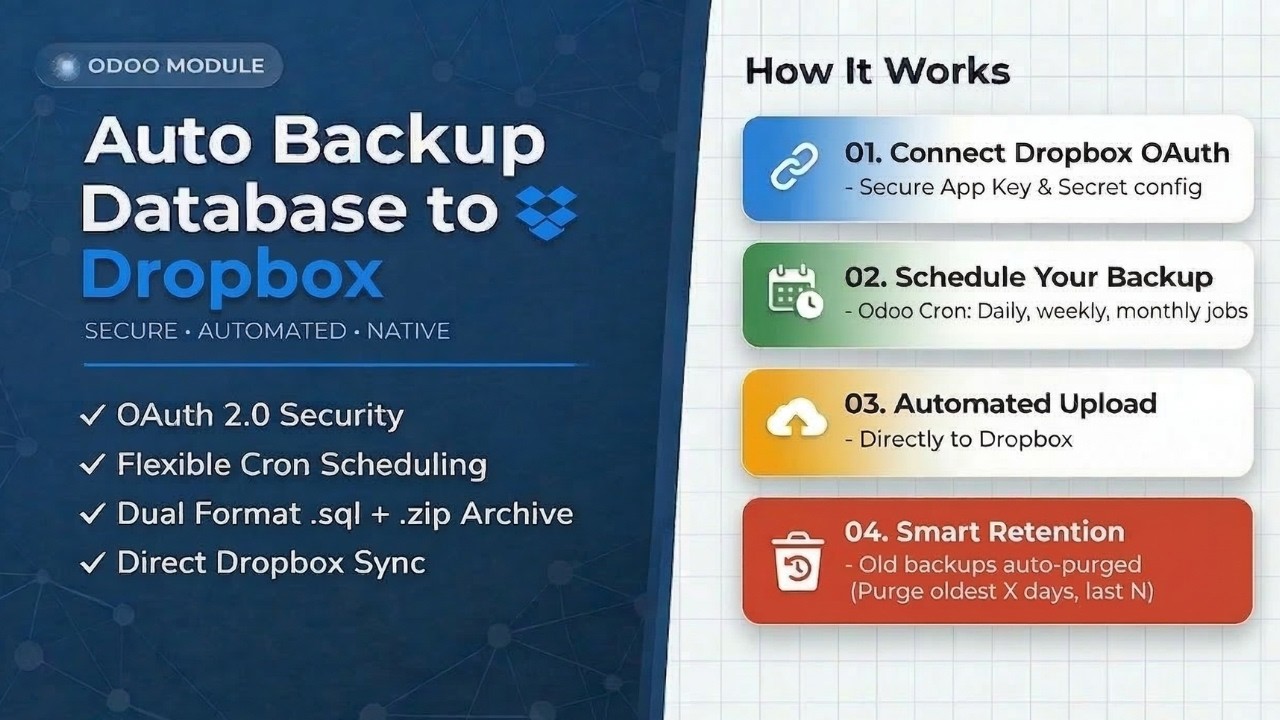
Protect your business data with the ultimate Odoo administrative utility. Automate database snapshots directly to Dropbox, complete with smart storage retention and 1-click manual triggers.
OAuth 2.0 Security
Securely connect using Dropbox App Key and Secret with refresh token support. No passwords stored ever.
Automated Schedules
Minutes, hours, days, weeks, or months Odoo's native Cron keeps backups running hands-free.
Smart Retention
Keep All, Keep Last N, or Keep for X Days auto-purge old backups to control Dropbox storage costs.
Dual Backup Formats
Uploads both .sql and .zip per database raw dump for speed, full archive for completeness.
1-Click Manual
Trigger an instant backup anytime perfect before a major update. Real-time alerts included.
Central Settings
Configure folder paths, tokens, and retention rules entirely within the standard Odoo Settings menu.
Why Choose Auto Backup?
Numbers that speak for themselves
Watch it in action.
Follow our step-by-step walkthrough to securely connect your Odoo instance to Dropbox without writing a single line of code.
|
1
|
Connect Dropbox OAuth
Add your App Key and Secret securely inside native Odoo settings.
|
|
2
|
Set Automated Schedules
Define flexible cron intervals minutes to monthly for hands-free backups.
|
|
3
|
Sit Back & Relax
Snapshots are automatically compressed and synced to your Dropbox folder.
|
Key Features
Each feature is engineered to eliminate risk and reduce manual effort, ensuring your database is always protected.
Automated Backup System
Configure once backups run on any schedule. Completely hands-free.
Cron PoweredThe core Auto Backup feature works seamlessly with Odoo's native Cron scheduler. Configure once to automatically generate and upload database snapshots completely hands-free.
|
01
|
"Set-it-and-forget-it" cron integration
Runs every X minutes, hours, days, weeks, or months fully automated.
|
|
02
|
Silent background execution
Backups run quietly without affecting your team's workflow or Odoo performance.
|
|
03
|
1-Click manual backup override
Trigger an instant snapshot anytime before a major update or deployment.
|
Your data never touches unauthorized servers. We use official Dropbox OAuth 2.0 protocols with offline refresh tokens to securely authenticate and push your data directly to Dropbox.
|
01
|
Official App Key & Secret protocols
Authenticate using Dropbox's own secure system no passwords stored anywhere.
|
|
02
|
Refresh tokens for long-term access
Offline access tokens maintain the connection without frequent re-authentication.
|
|
03
|
Credentials stored in Odoo config params
Everything lives inside your own Odoo instance never on external dashboards.
|
Enterprise-Grade Security
Zero unauthorized access. Official Dropbox protocols keep credentials locked down.
OAuth 2.0Smart Storage Retention
Automated cleanup keeps Dropbox lean. Three modes you set the rules.
Auto CleanupCloud storage isn't free. Our built-in retention algorithm automatically scans your Dropbox and purges outdated backups across three configurable modes to keep your storage under control.
|
01
|
Keep All / Keep Last N / Keep for X Days
Three flexible modes to match any business policy or compliance requirement.
|
|
02
|
Prevents Dropbox quota limits
No surprise "storage full" errors blocking your scheduled backup operations.
|
|
03
|
Cost-efficient cloud management
Only keep what you need reducing unnecessary cloud storage spend over time.
|
We don't just backup text. The module exports your entire database in dual format both a .sql dump and a full .zip, with an optional toggle to include your Odoo filestore.
|
01
|
Dual format: .sql + .zip uploads
SQL for quick restoration, .zip for complete Odoo recovery including the full filestore.
|
|
02
|
Multi-database with auto-detection
Backs up all or selected databases automatically detects everything on your server.
|
|
03
|
Optional filestore inclusion
Toggle on to include images, PDFs, and attachments alongside your database export.
|
Comprehensive Archives
Dual-format exports of your database and filestore nothing left behind.
.sql + .zip ExportINTERFACE GALLERY
A clean, centralized interface for managing all your Dropbox backups natively inside Odoo.
|
|
Step 01
Centralized Odoo SettingsConfigure your App Key, Secret, and Dropbox folder path in 
|
|
|
Step 02
Secure OAuth LoginStandard Dropbox consent screens ensure your credentials stay safe and data is transferred securely. 
|
|
|
Step 03
Automated Cron SchedulingSet your backup frequencies inside Odoo's native scheduled actions dashboard. 
|
|
|
Step 04
Manual Backup SettingsTrigger an instant backup anytime with a single click. Real-time success/failure notifications included. 
|
|
|
Step 05
Built-in Retention RuleChoose your retention mode and the module handles automated Dropbox cleanup for you. 
|
|
|
Step 06
Direct Dropbox FolderYour backups are neatly organized inside Dropbox in a timestamped folder hierarchy.


Auto Backup
Manual Backup

.sqlRaw DB dump
.zipFull Odoo backup
|

Ready to Secure Your Database?
Don't leave your data to chance. Install Auto Backup to Dropbox today and ensure your business continuity engineered for modern Odoo environments.
— Related Modules —
You Might Also Like
Explore our suite of productivity-focused Odoo modules built for real business workflows.


Please log in to comment on this module